


How to Migrate Legacy Eclipse Applications to the Web and Visual Studio Code
 Andreas Mülder
10 min read
Andreas Mülder
10 min read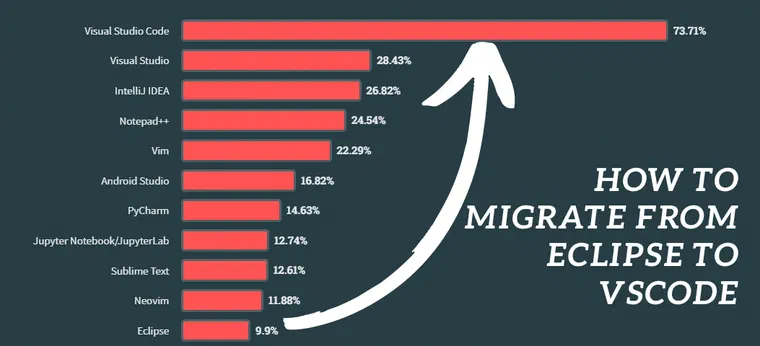
Over the last two years, we migrated itemis CREATE, a medium to large-sized project (280K Lines of Code), from a standalone Eclipse-based application to the web and Visual Studio Code. Here are the lessons learned from this transition.
The Decline of Eclipse
Eclipse, once a dominant integrated development environment (IDE) for Java and other programming languages, has seen a decline in popularity over the past 15 years. According to the 2023 Stack Overflow survey, only 9.9% of professional software developers still use Eclipse. Visual Studio Code, on the other hand, has become the most popular IDE with a 74% usage rate.
There are several reasons for the decreasing popularity of Eclipse. Competing IDEs like IntelliJ IDEA and Visual Studio Code have gained traction due to their better performance, and superior user experience. Eclipse has faced criticism for being clumsy, slow, and resource-intensive, with a less intuitive interface and cumbersome plugin management. Additionally, shifts in modern programming languages and frameworks have further contributed to Eclipse’s downfall.
That is why we decided to shift our Eclipse-based product itemis CREATE towards a modern web application and Visual Studio Code. The main challenge we faced was to reuse as much of the existing code base as possible.
The existing Eclipse Application
Since the last 1.5 years, we successfully migrated our product itemis CREATE to the cloud and to Visual Studio Code. itemis CREATE offers various components, including a graphical editor with additional views for modeling software behavior, a simulation engine, a validation and test engine, and multiple code generators; C, CPP, C#, Java, Python and much more.
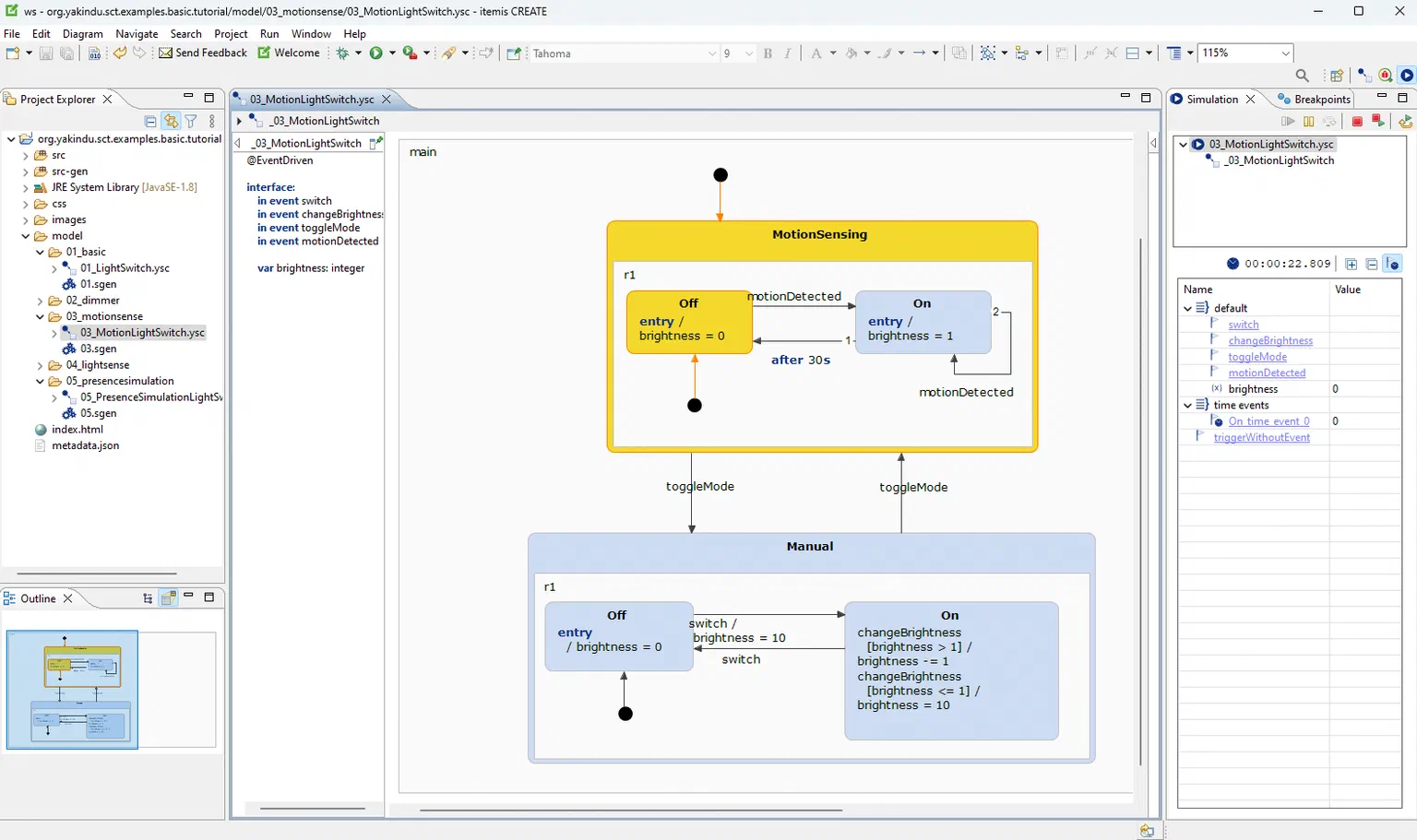
The codebase consists of 119 plugin projects, totaling approximately 280.000 lines of code, excluding the generated artifacts. It is primarily written in Java (two-thirds) and Xtend (one-third). We extensively utilize various Eclipse frameworks and technologies, mainly Xtext, Eclipse Modeling Framework (EMF), Graphical Modeling Framework (GMF), and SWT/JFace for user interfaces.
Transition to a Client-Server Architecture
This is a high-level overview of our client-server architecture used for our new web application and the Visual Studio Code plugin. Our primary goal was to reuse as much code as possible from our existing Eclipse application. For itemis CREATE, we reuse the code generators, simulation engine, and validation and test engine, which are now encapsulated in a web backend that provides a REST API and WebSocket communication to access the existing code base from the client.
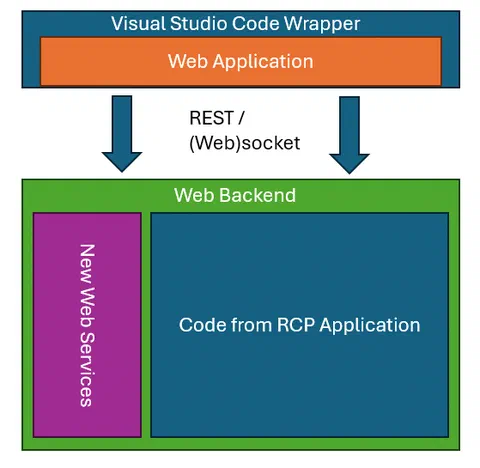
Several additional web services are required to handle the specifics of a web application, such as services for authentication and authorization, and loading and saving models. The web application itself is entirely new and built with VueJS. To integrate the web application within Visual Studio Code, we developed a Visual Studio Code Extension that incorporates parts of the web application via the Webview API. Let’s have a detailed look at the different components.
Status Quo: The existing Code Base
The key is maintaining a clear separation between UI and non-UI code. Plugins that depend on SWT/JFace or the Graphical Modeling Framework cannot be reused in web applications, necessitating a complete UI rebuild.
In contrast, the reuse potential of non-ui-related plugins is quite high. Frameworks like Eclipse Modeling Framework and even Xtext via the Language Server Protocol can be reused easily with some refactoring.
Rebuilding the Web Application
While this task is a significant effort, it is crucial for updating the outdated Eclipse UI to a more modern and user-friendly design. Modern single-page application (SPA) frameworks like Angular, React, and Vue simplify the development of aesthetically pleasing user interfaces compared to Eclipse’s SWT and JFace. Numerous UI widget libraries, such as Vuetify, React Material UI, or PrimeNG, enable the creation of rich user interfaces. In contrast, SWT/JFace offers only a limited range of components and looks outdated.
The same principle applies to plugins created with the Graphical Editing Framework (GEF) or the Graphical Modeling Framework (GMF). Fortunately, excellent frameworks for building graphical editors on the web, like JointJS, or yFiles, are available. These frameworks vary in their features, so it’s important to choose one that meets your specific requirements. They also typically integrate well with existing SPA frameworks.
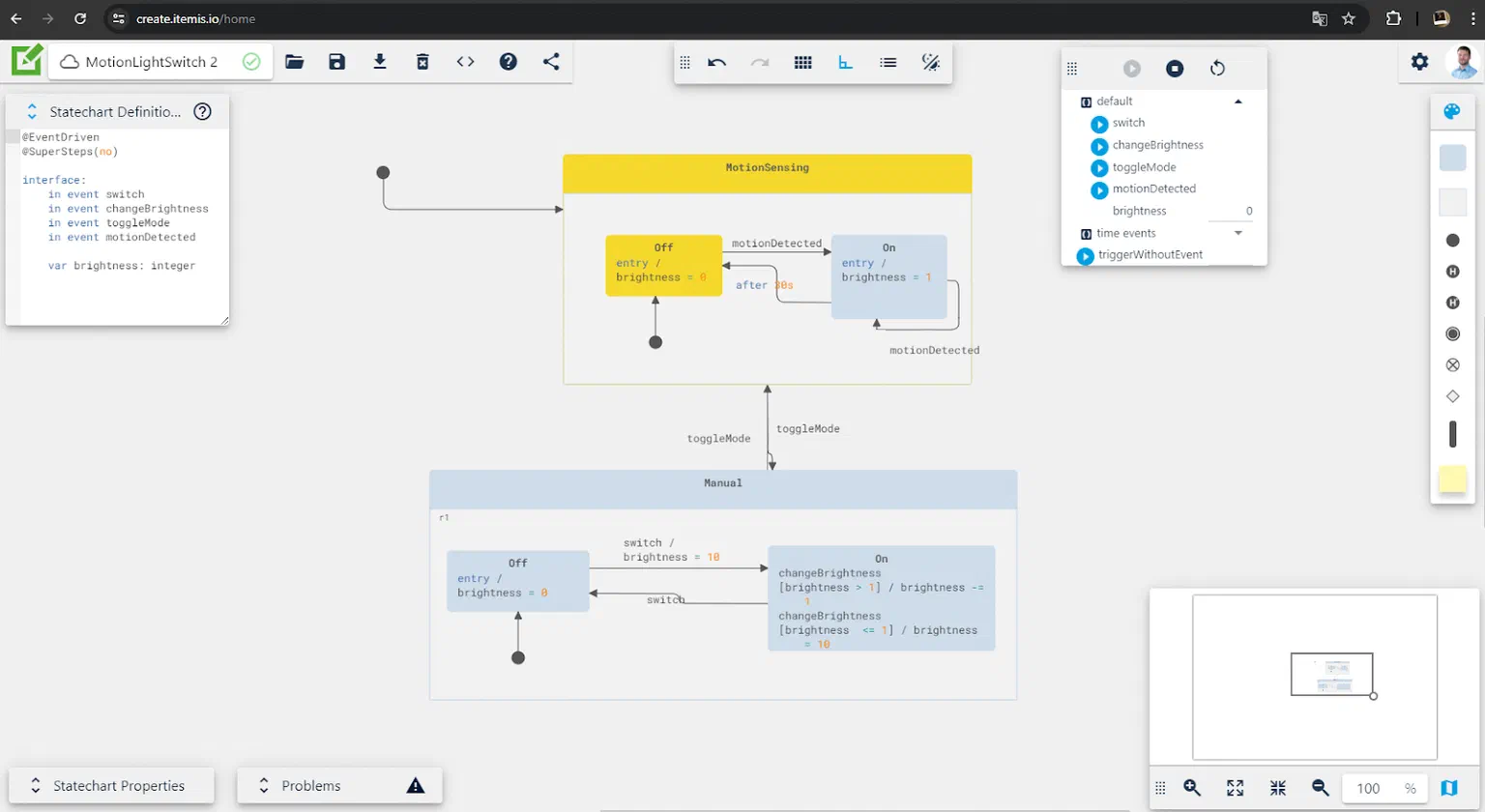
In our project, we chose VueJS with Vuetify, along with JointJS. However, I am confident that other framework combinations would also be effective. The new web application comprises approximately 22,000 lines of code, primarily written in TypeScript and Vue. Notably, the UI code from the Eclipse RCP application amounts to around 80,000 lines, nearly four times as much.
Refactoring of the non-ui related code base
To reuse the non-UI-related code, some preliminary work is required. First, the plugins will run in a non-OSGi environment, meaning all registrations via the plugin.xml will be ignored and must be done programmatically. For EMF, this involves manually registering packages and factories, as well as all custom extension points and extensions in the existing code base.
Additionally, when running the code in the web backend, there is no Eclipse workspace available. Therefore, plugins that rely on org.eclipse.core.filesystem must be adapted to operate without a traditional workspace. For instance, our code generators, which traditionally create generated artifacts directly in the Eclipse workspace, now need to return the result (i.e., the generated files) to the client. The client can then decide whether to store them in a workspace (within the context of Visual Studio Code), return them as a zip file, store them in a database, or handle them in another way. But this flexibility can be achieved easily with a combination of indirections and dependency injection.
If you intend to continue supporting the Eclipse-based tool, ensure you refactor the code so it can run in both environments. Do not branch from your existing code base, or you will go straight into maintenance hell.
The existing code as a web backend
The web backend acts as a communication layer between the clients and both the existing and new services. In our implementation, it is a thin layer built with Spring Boot that provides REST controllers and transforms the payload sent by the client into a format that the existing Eclipse code base can understand. While the client typically sends payloads in JSON format, the existing backend uses XMI/EMF format to load and serialize models. Therefore, we perform model-to-model transformations to translate between these two formats. Additionally, there is an interesting project called emfjson-jackson that might be useful if you are flexible with the client-side format and only need a JSON representation of your existing EMF models.
For our custom domain specific languages, we used the Xtext Language Server implementation. This enables Xtext to understand the Language Server Protocol and integrates seamlessly with Visual Studio Code and the Monaco Web Editor. Some customization for syntax coloring and quickfixes has to be done, but most of the features like validation and code completion work out of the box.
Do not underestimate the effort that is required for building, packaging and deployment. You will have to deal with technologies that are uncommon in classic Eclipse development. In our case, we decided to deploy our backend services on AWS and there are quite a lot of new tools and technologies to learn to get you off the ground.
Besides that, you will require some additional services that weren’t required before, since your Eclipse Application is a single-user application that runs on your local desktop. Implement robust authentication and authorization mechanisms to secure your backend services. This may involve integrating with OAuth providers or other identity management systems. Ensure secure communication between the extension and the backend using HTTPS and token-based authentication.
As said before, you might need a replacement for the classic Eclipse workspace to store models as files. In our case, we use a document database to store user models, settings, and meta data as json.
At itemis CREATE, we ended up with a reuse of ~210K/280K Lines Of Code and added ~22K Lines of Code for the additional services and the backend.
The Visual Studio Code Extension
The Visual Studio Code extension integrates our new web-based application into Visual Studio Code. Utilizing the Webview API makes it straightforward to integrate existing JavaScript/HTML code, allowing us to reuse most of the web frontend application. To achieve this, you simply need to register a new editor, associate it with a specific file extension, and load your main application within the editor tab.
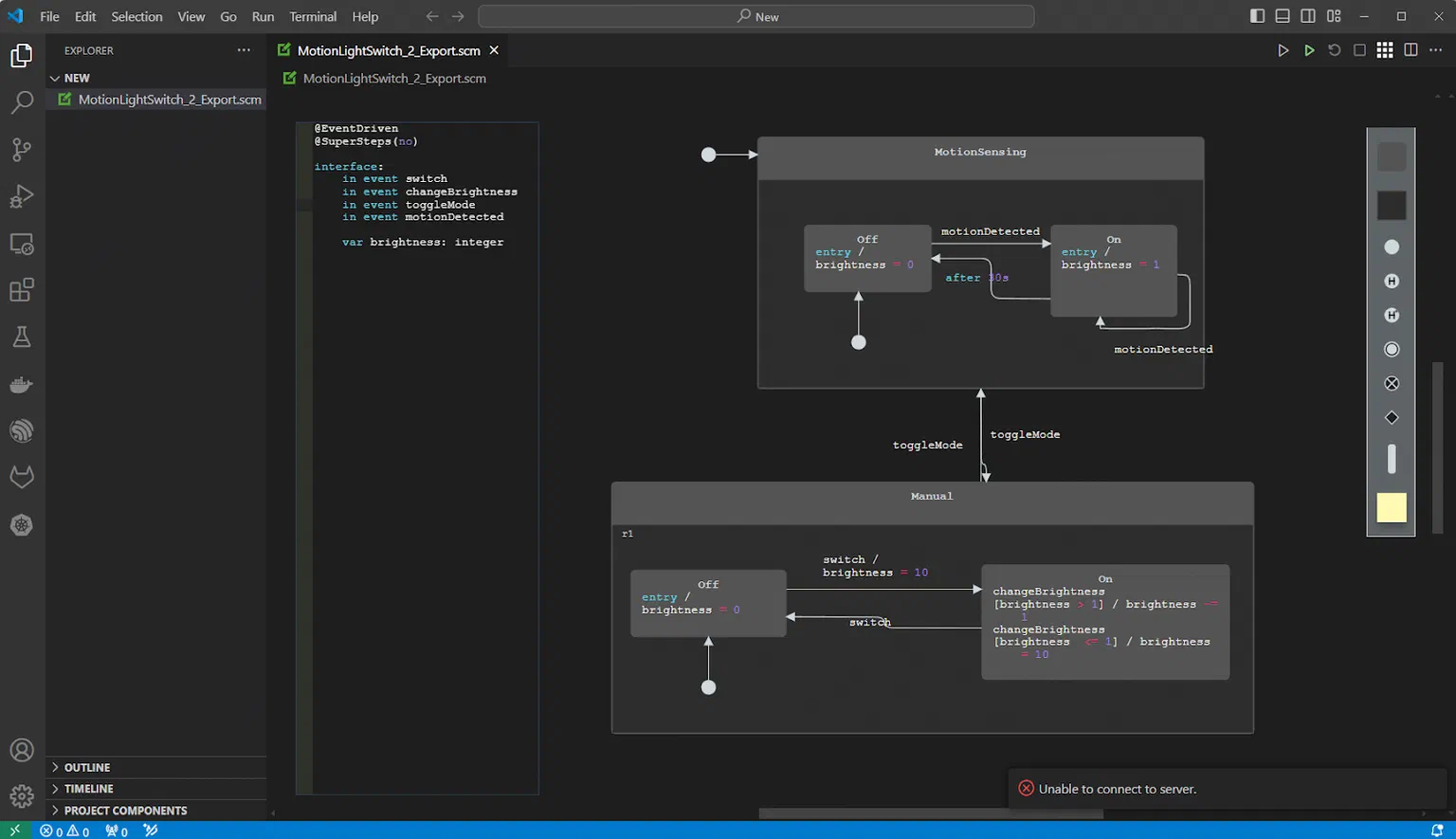
When integrating a separate application within the VSCode environment, it’s essential to ensure deep integration with VSCode’s extension points to maintain a consistent look and feel. This means not just displaying your web application within the editor but also integrating with VSCode native parts like the Preferences, the Problems View, and the notifications infrastructure.
Achieving this requires bidirectional communication between the outer VSCode application and the inner web application (e.g., itemis CREATE). The Webview API facilitates this communication, albeit somewhat clumsily, using webview.postMessage() and window.addEventListener(). This is similar to communicating with an iframe in web development.
For instance, if you register an extension for preferences, you need a listener to notify your inner application of preference changes and handle these changes appropriately. Conversely, if the inner application encounters an error, it can send a message to the outer application (VSCode) to trigger a notification through the VSCode notification system.
To support this, build your web application’s components and services so they can be swapped out for different implementations. For example, you might have one Notification Service for the web application that shows a toast on error and another that delegates to the VSCode environment. Again, dependency injection is helpful here, allowing you to compose two applications - one for VSCode and one for the web - using the same codebase.
Overall, the VSCode Integration required only 2000 Lines of Code thanks to a well-structured and reusable web application!
Summary
The migration of plugins from an Eclipse-based environment to a web-based architecture involves several critical considerations and substantial effort, particularly concerning the user interface (UI) components. The following points summarize our lessons learned about the challenges of this migration process:
- Clear Separation of Concerns: Plugins must have a distinct separation between UI and non-UI components to facilitate smoother migration.
- UI Plugin Reimplementation: UI-related plugins need to be reimplemented as they cannot be directly reused in a web environment.
- UI Migration Effort: The majority of the migration effort is concentrated on UI elements, as SWT/JFace Dialogs and Graphical Model/Editing Frameworks cannot be transitioned to the web.
- Efficiency in Web Technologies: Reimplementing UI editors and dialogs using web technologies is significantly less effort-intensive compared to maintaining them in the Eclipse ecosystem.
- Differences in UX/UI: Web UX/UI design principles differ from those in Eclipse, necessitating a new approach to user interface development.
- Backend Code Reusability: Non-UI-related code can be seamlessly reused in the backend. Technologies like EMF are effective in the backend, while Xtext/LSP also integrate well.
- New Technology Stack: Embracing a new technology stack introduces a learning curve, including aspects like deployment with Docker, AWS and Spring Boot.
- Backend Refactoring: Backend code requires some refactoring to adapt to a non-OSGI environment, eliminating the need for plugin.xml and the Eclipse workspace.
- New Considerations: The migration introduces new considerations such as user management, security, authentication, and authorization.
- Integration with VSCode: Reusing a web application within VSCode is straightforward with the web panel API, facilitating easier integration.
If you are facing the same challenges or want some exchange about this topic, feel free to contact me.
Legacy Modernization at itemis — We help teams modernize their software systems step by step: Legacy Modernization →

Principal Software Engineer