


Custom Tooling on EA Models: From Model to Generated Code
 Dr. Patrick Könemann
10 min read
Dr. Patrick Könemann
10 min read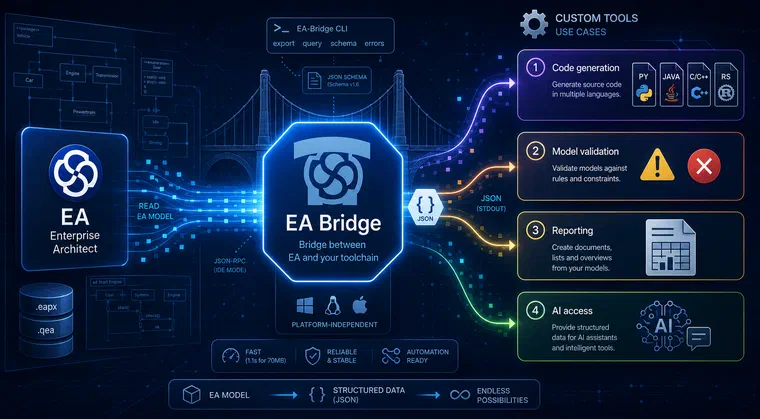
For many of our customers, an Enterprise Architect model is the authoritative description of their system or software architecture: classes, interfaces, state machines, including profiled models with stereotypes. But the value of that model only materialises when you can process it further: generating code from it, validating it against your own rules, or deriving documentation. That is exactly where Enterprise Architect struggles with its built-in capabilities. We therefore built the itemis EA Bridge: a tooling foundation that exposes the model as stable, machine-readable data on which custom tooling can be built.
Custom tooling does not necessarily mean a new domain-specific language from scratch. Extending an existing tool like Enterprise Architect and making its models usable is equally custom tooling: tailored to the process that the customer actually follows. This article describes how the EA Bridge creates that foundation and what can concretely be built on top of it.
One data point upfront, because it illustrates the load-bearing capacity of the foundation: a real customer model with over 70 MB, 77,164 model elements, and 140 extensive state machines is loaded by the EA Bridge in just over one second (around 1.1 seconds) in our measurements, and is made available as JSON. Enterprise Architect itself takes about five minutes to export the same model as XMI. This speed is the prerequisite for running code generation on every commit rather than treating it as an occasional special run.
Where the domain knowledge comes from
We are not starting from zero here. We have been developing the original, Java-based EA-Bridge since 2013 and have directly accompanied the rollout at seven customers; beyond that, numerous licences are in use. From over a decade of working with the EA data model we have built up a detailed understanding of its database structures, its various file formats, and the requirements customers place on code generation from models. That knowledge has been incorporated into the new tooling foundation, which we rebuilt with AI support in just four weeks: a Rust core as a CLI tool, complemented by a VS Code extension as the user interface. Two articles from the early days offer a look at the work that built that foundation: Eclipse-based UML Validation of Enterprise Architect Models and Eclipse-based Code Generation for Enterprise Architect Models.
Technically, the Rust core reads the model in two passes: the first collects raw data from the database, the second resolves cross-references and builds the finished model graph in memory.
The foundation: a stable, versioned JSON format
The real lever for custom tooling lies not in any single feature but in the data format. The EA Bridge exports the model into a documented JSON format that fully represents the model graph: packages, elements, connectors, and diagrams. These objects are stored as GUID-indexed maps, so an element can be looked up directly by its GUID rather than iterating a list or querying the database again.
An element carries considerably more than just a name and type in the export: its visibility, attributes and operations with all their details, the assigned stereotypes and tagged values, and the incoming and outgoing connectors. Attributes carry type name, classifier, default value, multiplicity, and visibility; multiplicities are represented as strings in the export (for example 1, 0..*, or *). Anyone building a custom tool needs to understand the quirks of Enterprise Architect; that is exactly why we document the mapping of every UML concept to its JSON path.
The format is stable and independently versioned (currently version 1.6). The core fields are deliberately kept stable so that downstream tools can build on a reliable structure; new, optional fields are added additively without breaking existing generators. The JSON schema can be emitted directly by the tool for programmatic validation.
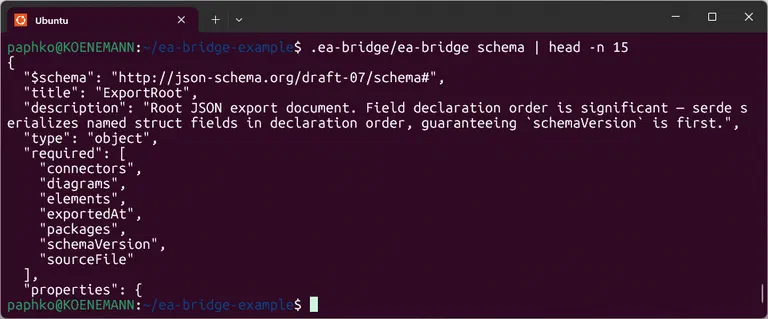 The JSON schema of the EA Bridge in a terminal on Ubuntu.
This stable format decouples the model source from downstream processing. A customer-specific generator, validator, or documentation tool works against a clearly documented data structure rather than against the internals of a tool, making it a maintainable building block in your own toolchain. It is also the difference that survives a migration: if the backend changes, for example from a local file to a server database, the JSON stays the same.
Code generation: adaptable rather than rigid
On this foundation, we ship three template sets for Java, Python, and C++ as an open, adaptable starting point. Each set consists of an entry script, a generator that transforms the JSON into a model prepared for the templates, and a set of Jinja2 templates. Shared formatting logic, rendering doc comments, assembling modifiers, constructing method signatures, lives in central macros so it is not repeated in every template.
The generators map the common UML concepts to code:
- Classes, interfaces, enumerations, data types become the corresponding constructs of the target language: a Java class, an interface with abstract methods, an enum, or a record.
- Attributes become fields with type, visibility, and multiplicity; operations become methods with parameters, return type, and modifiers such as
abstractorstatic. - Generalisation becomes the
extendsrelationship; realisation becomes theimplementsrelationship. - Associations and aggregations become fields whose collection type is derived from the multiplicity.
The real value is adaptability: the assignment of UML types to target-language types sits as a visible table in the generator, naming conventions are extracted as functions, and each type-specific template can be edited independently.
A concrete example: suppose every generated Java class should have a @since entry in its doc comment, derived from the version field of the model element. The version field is already available in the JSON export; all that is needed is a small addition to the class template and the doc-comment macro. What was previously manual transcription or a rigid generator changeable only by the vendor becomes a configurable step in your own build chain: a different target language, a different coding standard, a different framework, different metadata in the generated code.
To verify the generator produces real output, we add compilation tests on every push so that the generated Java, Python, and C++ files from a reference model actually compile. Compilation failures are caught immediately.
 Code generation on a Raspberry Pi: the exported model is transformed into target-language source files via the included templates.
If a target language needs to be supported for which no template set yet exists, the pragmatic approach is to take one of the three existing sets as a template and adapt it. The separation between the generator (which prepares the JSON) and the templates (which produce the concrete syntax) keeps this manageable: the model preparation stays largely the same, while the type-specific templates and type mapping are adapted. That way, the showcase grows step by step into a productive generator for exactly the language and conventions of a given customer.
Because the JSON is emitted deterministically, the generated code is reproducible and can be cleanly integrated into version control: a model change produces a traceable diff that can be reviewed like any other code. Code generation becomes a verifiable step in the development process.
More than code generation: validation and documentation
Because the model is available as structured data, model validation and documentation generators can equally be built on top of it. The CLI tool includes a query command that evaluates a jq program against the JSON and returns only the result. This allows you to determine the number of interfaces, for instance:
ea-bridge query model.qea '[.elements[] | select(.elementType=="Interface")] | length'
Consistency rules, naming conventions, or completeness checks can be formulated as queries and run reproducibly against any model. Examples that can be implemented directly include: “does every class marked as persistent have an identifier attribute?”, “do all interfaces in the API package carry the prescribed stereotype?”, or “are there elements without a description?”. In a CI pipeline, this becomes a quality gate that flags faulty models early rather than letting them flow through into generated code.
The EA Bridge deliberately does not ship a ready-made validator or documentation generator. What it ships: the reliable data foundation and the query capability on which customer-specific tooling is built.
Extensible with AI
Both paths (code generation and validation) currently assume that someone can write Jinja2 templates or jq queries. The AI skill that the EA Bridge ships with lowers exactly that barrier. It knows the semantics of the model (which UML concept sits at which location in the JSON) and the structure of the included code generation templates.
A desired change can be described in natural language, for example “add a header comment with author and version to every class”, and the skill knows which template and macro to adapt. For validation the same applies: because the skill knows the query language and the JSON paths, customer-specific rules can be generated as ready-to-use queries from a plain-words description. The result in both cases remains verifiable code: an experienced developer reviews the generated template or query before it enters the toolchain.
What the foundation does (not yet) provide
The EA Bridge is still very young and does not yet load all model information; in particular, behavioural diagrams such as Interactions are still incomplete, and we are developing the rest demand-driven. The included code generation templates are a showcase: they demonstrate the approach and cover common constructs, but deliberately do not produce a production-ready framework with getters, setters, or automatically generated helper methods.
These limits reflect a deliberate product strategy: first the load-bearing foundation, then the rest grows along with actual demand. Feature requests are welcome via the issue tracker.
EA Bridge: one building block in the toolchain
The same CLI foundation also serves toolchain integration (feeding EA models into CI/CD pipelines) and as a data basis for AI-assisted development; both are covered in separate articles. The focus here stays on the custom tool.
The EA Bridge is itself evidence of AI-assisted custom tooling: we built it in four weeks with AI agents using a specification-driven method, including a domain-specific AI skill that understands the underlying model. That very point, that AI dramatically lowers the cost of custom tools and shifts the make-or-buy decision, is elaborated on the page why AI is changing the economics of tool development.
AI serves as a tool here; architecture and domain modelling remain in human hands. For the EA Bridge, this concerned the mapping of EA database tables to UML concepts. The agents aimed for the most canonical possible transfer of the raw table data, but the mapping to UML concepts eluded them; domain knowledge was required that the agents did not bring. We see the same pattern regularly in customer projects: an assistant in a generic tool gives generic suggestions; a tool that structurally knows the domain delivers precise results. How existing standard tools can be extended purposefully without replacing them is described in the section domain-specific languages and tool extensions on the Custom Tools page.
Conclusion
A fast, scriptable CLI with a stable, versioned JSON format is the integration foundation on which custom tooling is built: code generation adaptable to target language, coding standards, and frameworks, as well as model validation and documentation. The included templates for Java, Python, and C++ are the open starting point, and an included AI skill lowers the barrier to adapting them even without deep programming knowledge.
If you want to get more out of your Enterprise Architect models than the built-in capabilities allow, that is exactly our field. How itemis develops custom tools, from domain analysis to long-term maintenance, is described on the Custom Tool Development page. The tool itself is available in the VS Code Marketplace.
Custom Tools at itemis — Custom tooling for your model-based development: Custom Tool Development →

Principal Engineer & Consultant