SCXML is a file format to describe state machines. Although it’s widely used, there’s a lack of good tool support. If you not only want a graphical editor for your statechart but also SCXML compliant verification, simulation and means to write unit tests, then you should read this blog post on how to take SCXML modeling to the next level.
What is State Chart XML, and what is it good for ?
SCXML, short for State Chart XML, is a statechart interchange format. It is based on XML and has been standardized by the W3C. The SCXML standardization is an important advantage because it makes statecharts highly portable and independent of a particular implementation. The prerequisite is of course that the respective execution environment corresponds to the SCXML specification.
The current version of the specification was released by the W3C in September 2015. A “hello world” in SCXML looks like this:
<scxml xmlns="http://www.w3.org/2005/07/scxml" version="1.0" initial="hello">
  <final id="hello">
    <onentry>
      <log expr="'hello world'" />
    </onentry>
  </final>
</scxml>
SCXML is an exchange format for Harel statecharts. The XML defines all the states, transitions, events and variables used in the state machine. Besides the state machine’s structural elements, the SCXML standard also defines the execution semantics of that state machine. And this is one of the biggest advantages of SCXML – the same statechart model can run on different SCXML engines on different platforms and it always behaves in exactly the same way – as long as the engines conform to the specified execution semantics.
SCXML is supported on nearly all platforms. For Java, Apache Commons SCXML is the most popular SCXML Engine. There are even SCXML engines written in JavaScript to be used in web applications, like SCION. Another very popular platform that uses SCXML for Human Machine Interfaces is the SCXML Interpreter for Qt.
What is the benefit of using itemis CREATE?
SCXML is an interchange format for machines and not a first-level programming language to be used by humans. Like many other XML formats, it is quite hard to read and even harder to write by hand. That said, good tool support is essential when working with SCXML. The Qt Creator provides a simple graphical editor for SCXML documents. This is a big advantage in contrast to writing State Chart XML by hand.
Besides a graphical editor, itemis CREATE’ so-called SCXML domain provides a rich feature set that allows higher-level modeling, interactive simulation and unit testing of SCXML statecharts. When using the SCXML domain, everything will by fully compliant with the SCXML standard. We adopted the built-in simulation engine to reflect the SCXML execution semantics, and of course the SCTUnit framework also supports the SCXML standard. Thus, you can be sure that your SCTUnit test results exactly reflect the behavior of the SCXML engine of your choice.
Let’s have a look at the feature set now.
Higher-level modeling concepts
Harel statecharts in general support certain higher-level features like choices, synchronization, time trigger and named entry and exit points. These concepts are extremely useful but SCXML does not support them out of the box. The itemis CREATE code generator circumvents this restriction by transforming such higher-level concepts into basic SCXML.
For example, the itemis CREATE language has first-level support for time triggers. Take the following statechart that increments an integer value every second:
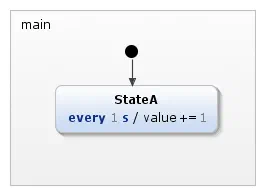
In SCXML, we can specify an equivalent statechart as follows:
<?xml version="1.0" encoding="UTF-8"?>
<scxml xmlns="http://www.w3.org/2005/07/scxml" version="1.0" datamodel="ecmascript" name="StateTimeTriggerAfter" initial="StateA">
    <datamodel>
        <data expr="0" id="value" />
    </datamodel>
    <state id="main_region">
        <state id="StateA">
            <onentry>
                <send event="StateA_timeEvent_0" delay="1s"/>
            </onentry>
            <transition event="StateA_timeEvent_0" cond="">
                <assign location="value" expr="value + 1"/>
                <send event="StateA_timeEvent_0" delay="1s"/>
            </transition>
            <onexit>
                <cancel sendid="StateA_timeEvent_0" />
            </onexit>
        </state>
    </state>
</scxml>
As you can see, the simple time trigger is reflected in multiple parts of the SCXML. We have to send a delayed event when entering the state, we have to send the same event in the state’s self-transition and we have to cancel the event when exiting the state. Changing the timing from 1 s to something else means to change two parts of the SCXML. This is error-prone when done manually. And this is just a very simple example. The same applies to choices, synchronization, time trigger and named entry and exit points.
Interactive simulation of SCXML models
With itemis CREATE, models can be executed directly in the simulator. The following example was taken from the Qt examples and modeled with itemis CREATE. With the itemis CREATE simulation engine, which uses Apache Commons SCXML under the hood, you can directly execute your model to check if it behaves as expected. You can interactively raise events and inspect variable values in the simulation view.
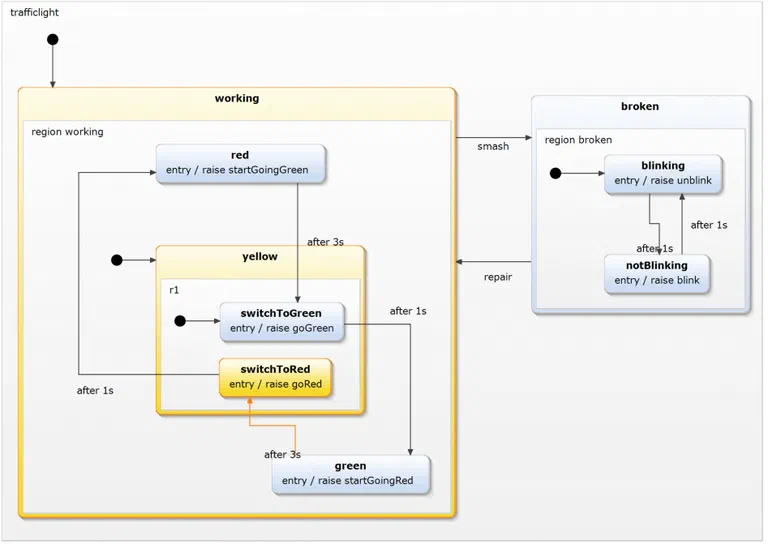
Unit testing SCXML statecharts
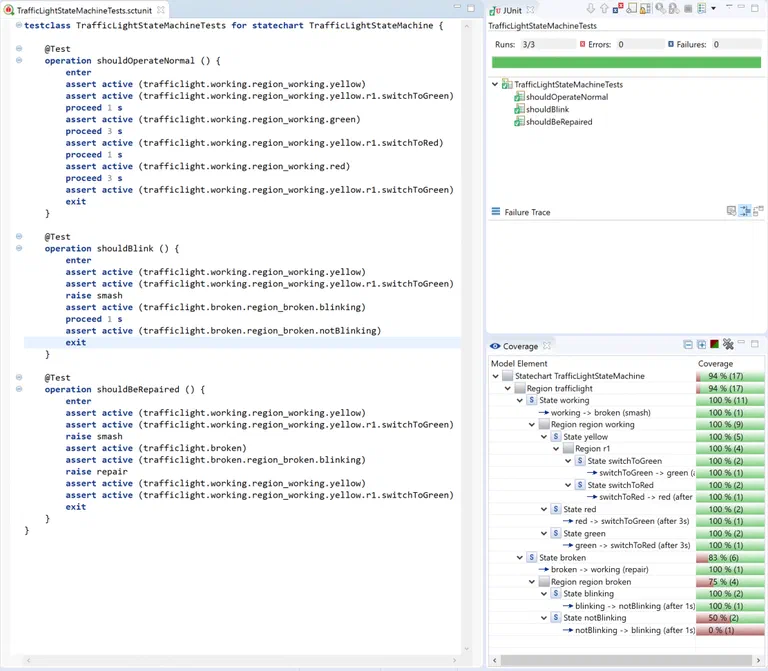
We also adopted our testing framework SCTUnit to work with SCXML models. For Qt, there is even an SCTUnit code generator that generates a C++ test suite from the test specification.
Get everything up and running
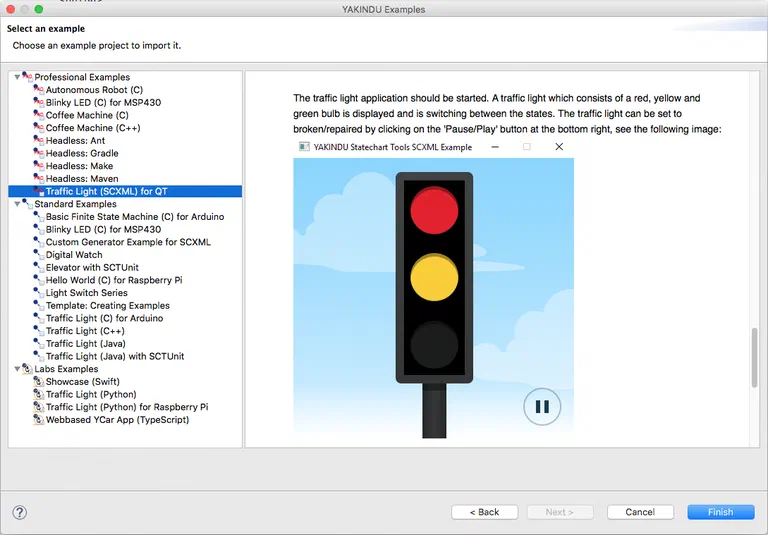
If you are new to itemis CREATE, you can download a 30-day trial version here or with one click on the banner below. To see everything in action, we have added an example to our example wizard. It contains the traffic light statechart, which is transformed into an SCXML file on the fly. Additionally, the example comes with some Qt code, so you can run it in your Qt environment and see the traffic light in action. You can edit, simulate and test the statechart in the same way as you would do with a “normal” statechart. To add this example to your workspace, select
File -> New -> Example -> itemis CREATE Examples. Select the “Traffic Light (SCXML) for QT” example and press Finish.
Don’t forget to provide us some feedback in the comment section of our blog or via our user group!
Model-Driven Software Development at itemis — Model statecharts, simulate behavior and generate production-ready code with itemis CREATE: Model-Driven Software Development →




 Andreas Mülder
9 min read
Andreas Mülder
9 min read