


As simple as Visio, just correct: SysML v2 with the KISS principle
 Andreas Mülder
12 min read
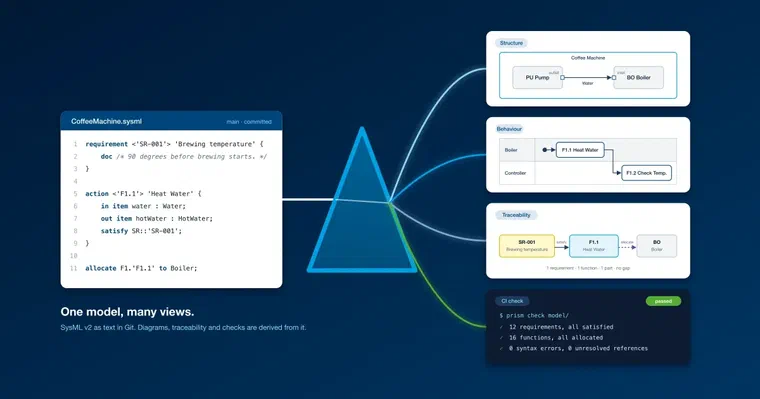
Every project has one: the architecture drawing in Visio that nobody maintains after six months. Formal models fix that, and with SysML v2 there’s an open standard with a textual notation to build on. The catch: the language is big, and many teams get stuck on the syntax before the benefits kick in. The way out is a principle long established in software development: KISS, “keep it simple, stupid”, meaning keep things as simple as possible. Applied to SysML v2, that means a subset the project defines itself and everyone on the team can read, plus a tool that writes the syntax. As simple as Visio, just correct.
The diagram nobody maintains
Every project has it: the architecture picture from Visio, slide 3 of the kick-off deck. Six months later the system has three new components, the sensor has a different name and the supplier interface runs over a different bus. The slide still shows the kick-off state.
Visio isn’t to blame. It’s fast, anyone can use it, the pictures look good. The picture just doesn’t know anything. A box labeled “Controller” is, to Visio, a rectangle with text. Whether the controller still exists, whether it satisfies requirement SR-012, whether the line to the sensor carries data or power, only the person who drew it knows.
Checking such a picture against the real system is manual work, and that stops after the third diagram. What’s left is decoration with an expiry date. My colleague Alexander Nyssen has explained why that isn’t MBSE in his post It’s not MBSE when you use draw.io or Visio.
What a formal model does differently
A formal model describes the same system, but in a language with fixed rules. The “Controller” box is no longer a rectangle but a part with a name and a type. A port has a direction, a requirement is satisfied by named elements. A tool can evaluate the model. That opens system architecture up to the same practices that have long proven themselves in software development:
- Architecture as code. The model lives in text form in a repository, Git for example. That means it can be handled like any other source code: branches, diffs, merge requests, blame. Who changed the interface, when and why, is in the log, not in an email.
- Pipelines. On every push, CI checks the model: syntax errors, broken references, requirements without a realization, functions without a part. Red or green before a human looks at it.
- Validators. Rules the team defines itself. “Every system function is allocated.” “Every port is typed.” Written once, checked on every change.
- Requirements traceability. Every requirement carries, in the model, where it was derived from, which function satisfies it and which part that function runs on. The traceability matrix for the audit becomes a query over the model and takes seconds. A requirement without a realization shows up on push, long before the review.
- Diagrams as output. Structure diagram, action flow with swimlanes, requirements landscape are all derived from the model. Nobody redraws them, nobody forgets to update them.
- Reading without a tool license. Whatever is generated from the model can be handed out as a website or as a single HTML file. Project management, domain experts and auditors read it in the browser, the supplier gets the file by email, and nobody needs a modeling tool for it.
- AI tools without detours. Because the model is text, AI assistants work with it directly: they read the model, propose requirements or parts, explain relationships and write valid syntax. SysML v2 is an established standard, and current language models know the notation. No interface to a tool format is needed, just the file.
- Integration tests against the model. The interface table the supplier tests against is the same one the architecture is drawn from. Signal names and types come from one source.
All it takes is a model a machine can read unambiguously, and a few scripts that do something with it. A big MBSE tool is optional. That’s the actual win: the model turns from a document into a data source.
Why SysML v2 and not tool X’s format
Formal models existed before SysML v2. They just lived in a tool’s data format: a binary format or an XML that only this tool writes and reads. The model was tied to the vendor. Switching tools meant a migration in which everything the target format could not represent was lost.
SysML v2 is an open OMG standard with a textual notation. Three properties make the difference:
- It’s text. A
.sysmlfile is UTF-8. Git can diff it, grep can search it, a script can generate or evaluate it. A merge request shows exactly the three lines that changed. - It’s open. Grammar and reference implementation are published: the OMG provides its pilot implementation, parser included, as open source on GitHub (systems-modeling/sysml-v2-release). Reading the language needs no license. And anyone who wants to build their own architecture-as-code toolchain starts from a working parser: a script that reads the model and builds the traceability table or checks a project rule is a small job.
- One model, many tools. Because the language is standardized, one tool can write the model, another can check it, a third can generate diagrams from it. Switching isn’t a migration project, because the file stays the same.
Here’s what it looks like. A requirement, a function that satisfies it, and the part it runs on:
requirement <'SR-001'> 'Brewing temperature' {
    doc /* The water shall reach 90 degrees before brewing starts. */
}

action <'F1.1'> 'Heat Water' {
    in item water : Water;
    out item hotWater : HotWater;
    satisfy SR::'SR-001';
}

allocate F1.'F1.1' to Boiler;
It reads like code, and that’s exactly the point. A human can read it in a review. A script can build the traceability table from it: SR-001 is satisfied by F1.1, F1.1 runs on the boiler. If one of the three lines is missing, CI reports a requirement without a realization. Whether switching from SysML v1 pays off is something Benjamin Alders has worked through soberly.
The catch: SysML v2 is a big language
And this is where we lose most systems engineers. SysML v2 is meant to express everything a system model needs: structure, behavior, requirements, state machines, calculations, constraints, use cases, verification cases, variants, expressions with units, plus KerML as the kernel language underneath and a standard library of quantities and SI units. The grammar generated from the specification runs to about 2,200 lines.
For the language, that’s the right call. For a team that needs a structure diagram with eight blocks and a function chain, the learning effort is out of proportion to the benefit. What happens in practice:
- Syntax errors. A missing semicolon,
:>>instead of:>, one quote too few around a name with spaces. The parser reports line 212, the engineer goes looking. - References.
CoffeeRequirements::SR::'SR-T1'::'SR-001'has to be spelled exactly like that. Renaming means finding every occurrence, in every file. - Choices. Should the function be an
action defor anaction?partoritem?connect,interfaceorflow? The language allows all of it. The project has to decide, and everyone on the team has to know and follow the decision. - Your own terms. SysML v2 has no idea what a “system function” or a “unit” is. The project defines
@SystemFunctionitself, and everyone has to write it the same way, or the script misses half of them.
Everyone who has tried it knows the result: the model becomes the job of the two people on the team who know the language. Everyone else waits for them or goes back to drawing in Visio. A model only two people can read doesn’t get read. The benefit of the formal model is gone before it started.
KISS, applied to SysML v2
The yardstick for “simple” is the engineer on the team who isn’t a language expert: what they can’t read, they won’t maintain. The way out is the same as with every big language: a subset. A team needs the ten constructs its project works with, and an agreement on how to use them. The rest of the language can stay on the shelf.
The same system, modeled twice
This is what the brewing temperature requirement looks like if you use everything SysML v2 offers. Units from the standard library, an evaluable constraint, an interface definition with two ends, a state machine for the boiler:
private import ISQ::*;
private import SI::*;

requirement def <'SR-001'> 'Brewing temperature' {
    subject boiler : Boiler;
    attribute minTemp : TemperatureValue = 90 ['°C_abs'];
    require constraint { boiler.waterTemp >= minTemp }
}

interface def WaterPipe {
    end supplierPort : ~WaterPort;
    end consumerPort : WaterPort;
    flow of Water from supplierPort.water to consumerPort.water;
}

part def Boiler {
    attribute waterTemp : TemperatureValue;
    port inlet : WaterPort;
    exhibit state boilerStates : BoilerStates;
}

part boiler : Boiler[1];
part pump : Pump[1];
interface pipe : WaterPipe connect pump.outlet to boiler.inlet;
And this is what it looks like when the project models only what it actually evaluates day to day:
requirement <'SR-001'> 'Brewing temperature' {
    doc /* The water shall reach 90 degrees before brewing starts. */
    attribute :>> priority = "high";
}

part boiler : Boiler {
    port inlet : WaterPort;
}
part pump : Pump {
    port outlet : ~WaterPort;
}
flow of Water from pump.outlet to boiler.inlet;

action <'F1.1'> 'Heat Water' {
    satisfy SR::'SR-001';
}
Both variants are valid SysML v2. The second is half as long and gets by without the standard library, without expressions and without a state machine. What it leaves out is left out on purpose:
- The constraint
waterTemp >= minTempisn’t evaluated by any tool in the project. The 90 degrees are checked on the test bench, not in the model. In the model, the sentence indocthat the reviewer reads is enough. - The unit
['°C_abs']is correct, but without evaluation it’s pure ceremony. It brings an import, a library and a source of errors with it. - The interface definition with two ends says the same thing for the diagram as one
flowline: water flows from the pump to the boiler. The interface table is derived from the port types. - The state machine has no place in the project’s methodology. Behavior is described as a function chain with allocations, and that’s what the swimlanes are generated from.
- The multiplicity
[1]is the default. It’s there because you can write it.
The project makes these decisions. And that’s exactly the assumption behind a subset: there’s a core that everyone on the team uses and that the tools draw and check, and there’s an add-on that stays allowed in the text but isn’t needed. In our case the split looks like this:
| Tier | Constructs | What happens with it |
|---|---|---|
| Core | package, part, port, item, attribute, action, requirement, connect, interface, flow, allocate, satisfy, derivation, view with expose and render, metadata | Drawn, checked, created by click and evaluated in CI |
| Add-on, allowed as text | state, transition, constraint, calc, use case, verification case, enumeration, multiplicity, accept, send, if, while | Parsed and carried along unchanged, shown in the model tree, has no diagram |
| Deliberately out | Standard library (ISQ, SI, Quantities), evaluation of constraints and calculations, simulation, sequence diagrams | Not loaded and not evaluated; whoever needs it uses a full tool |
Another project draws the line elsewhere. If you verify state machines, state is in your core. If you compute mass budgets, you need units and constraints. The subset is a decision per project, and it belongs in a file everyone can read.
Three principles
- The subset is configurable, and so is the methodology. The project defines in a configuration file what its metadata means:
@SystemFunctionis a function,@Unitis a unit,@Tapis a measurement tap. The methodology comes from the project; the tool only reads it. - The tool writes the syntax. Drag a port onto another port in the diagram, and
flow of Water from pump.outlet to boiler.inlet;gets written into the model. Move a function into a swimlane, and you get theallocateline. The engineer clicks, the syntax appears, including short-name numbering and the metadata of its siblings. Anyone who prefers typing the text can still do that. - Everything is checked before it’s written. Whether a change comes from the diagram, from the editor or from an AI assistant: if it doesn’t produce valid SysML v2, it’s rejected. The model is readable by every other SysML v2 tool in every state. The same rule applies to the AI assistant, plus one more: whatever it creates carries a Proposed marker in the model and appears dashed in every diagram until a human approves it. That, too, is just standard metadata in the text, not tool state.
The result feels like Visio: boxes, lines, labels, drag and drop. Under the hood is standard text in Git that a parser has checked and that CI checks again on every push.
What this looks like with PRISM
PRISM reads a folder of .sysml files from Git and generates all views from it with one command: action flows with swimlanes derived from the allocations, structure diagrams with ports and typed connections, allocations, requirements landscapes and the traceability of every requirement down to the part. The layout is automatic. The views open in the browser, as a static website or as a single HTML file for the supplier, with no modeling tool license.
You change things wherever it suits: in the diagram (drag port to port, move a function into a swimlane), in the details panel, in the text editor with checking as you type, or in the chat in plain language. Every change is checked before it’s written, has an undo and is committed only by click. Whatever the AI assistant creates stays marked as Proposed until a human approves it. What the project means by “function” or “unit” lives in a profile, and prism check runs the same rules in CI. PRISM runs locally on your machine; without the chat, nothing leaves the device.
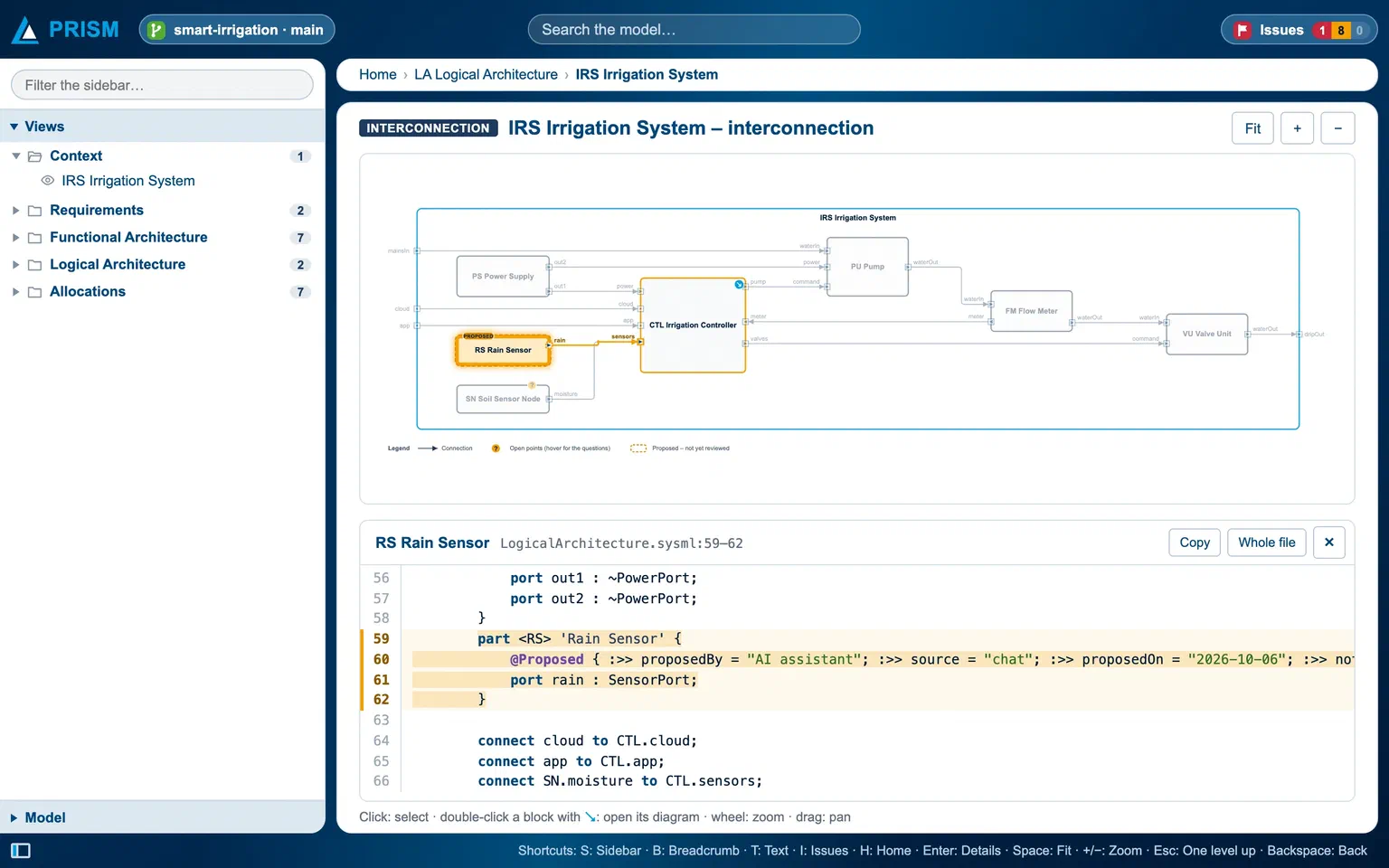
Structure diagram and the SysML text behind it in PRISM. The rain sensor proposed by the AI stays dashed and carries the Proposed marker in the text until a human approves it.
Try PRISM with a demo video, an example model and a demo appointment: prism.itemis.com →

Principal Software Engineer