Every once in a while our clients ask us whether it is possible to generate code for UML models designed with the Enterprise Architect (EA). Eclipse is no longer a young technology in 2026, but it remains widely used in the automotive and embedded industries. For teams already building on the Eclipse ecosystem, the approach described here is still the cleanest path. In general, we encourage our clients to follow the model-driven engineering (MDE) paradigm to automatically derive source code from software models.
When EA models make sense as a code source
Depending on the client’s use case, it might help them more to use a dedicated domain-specific language (e.g. with Xtext) with a client-specific code generator that perfectly suits the client’s needs. However, in some cases UML is also well-suited, e.g. when working with AUTOSAR models. In such scenarios, it seems reasonable to start with the general code generation facilities provided by EA and tailor them to specific needs. We show an example of such an attempt and explain why a third-party code generator can be the better choice.
The built-in template editor: capabilities and limits
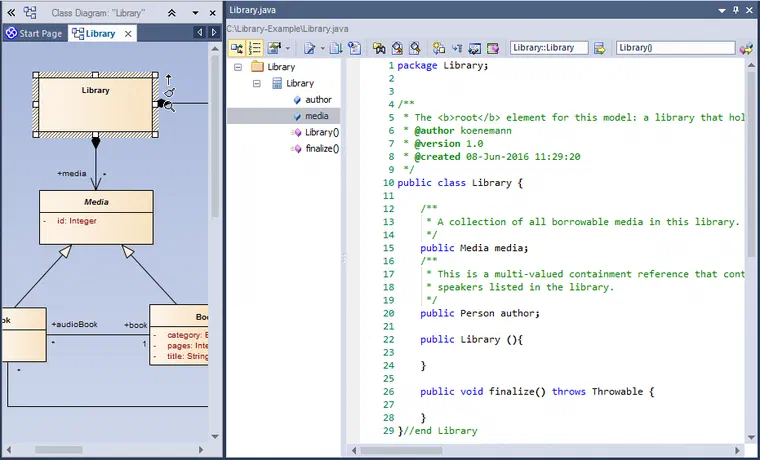
Starting with a simple UML model describing a library with media, the default code generation templates produce some rudimentary Java code. Unfortunately, the templates do not consider multiplicities: a library should hold an arbitrary number of media, not only one! So we checked the templates and were quite surprised by their unusual syntax and generation mechanism. It is nice that the templates are modularised and individual templates can be reused (e.g. for generating an attribute), even predefined macros can be used, e.g. to generate language-dependent visibilities. But we thought it would be easy to modify the templates to generate a List<Media> for our library…
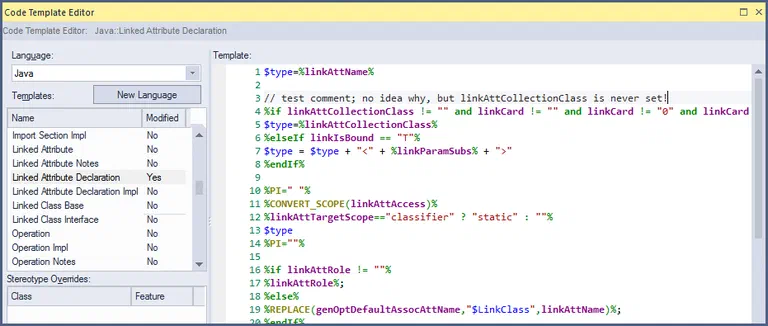
(Code template editor in EA: no syntax validation, bad documentation. The proposed way to generate a multi-valued field for the ‘media’ aggregation does not work.)
Where the built-in approach falls short
But this is not as easy as it sounds, even for experienced Java developers. We tried modifying the template ‘Attribute Declaration’ (which is referenced by ‘Class Body’), until we realised that ‘Linked Attribute Declaration’ is used instead. Having found the right place, we could not determine how a type like List is supposed to be generated because the predefined variable linkAttCollectionClass is never set. The tooltip says ‘The collection appropriate for the linked attribute in scope.’, the user guide is a bit more concrete, but we could not figure out how to set it. We ended up ignoring that variable and only keeping the ugly check of the aggregation’s cardinality (which fails e.g. for cardinality ‘1..1’). Our conclusion:
- The proprietary template language in EA has an incomplete and bad documentation.
- The relation between sub-templates (e.g. inclusion of ‘Link Attribute’ in a class) is opaque.
- Code completion is impractical because it does not scope properly depending on the current context.
- There is no syntax validation.
- The actually generated code is hard to spot in the templates; invalid instructions are directly generated.
- Macros cannot be modified or added.
Eclipse and the EA-Bridge: a proven approach
Because of the above listed disadvantages of the EA integrated code generation facilities, we recommend our clients who need code generation for UML models to use Eclipse and its tools for code generation. This also provides enough flexibility to format the generated code according to specific coding styles and guidelines, which would be a hard task with EA code templates.
We use the EA-Bridge to access EA models inside Eclipse. It loads them as Eclipse UML models and, as a by-product, performs a syntactical model validation. This makes all Eclipse-based modelling tools available for processing EA models, e.g. for model validation, code generation (e.g. Xtend or plain Java), or automated test execution in continuous integration builds.
Our choice for code generation is typically Xtend with its template expressions, because it integrates seamlessly with Java and provides code completion, syntax validation, and debugging support out of the box. The snippet below shows a simple example of how to generate code for the Library class as desired.
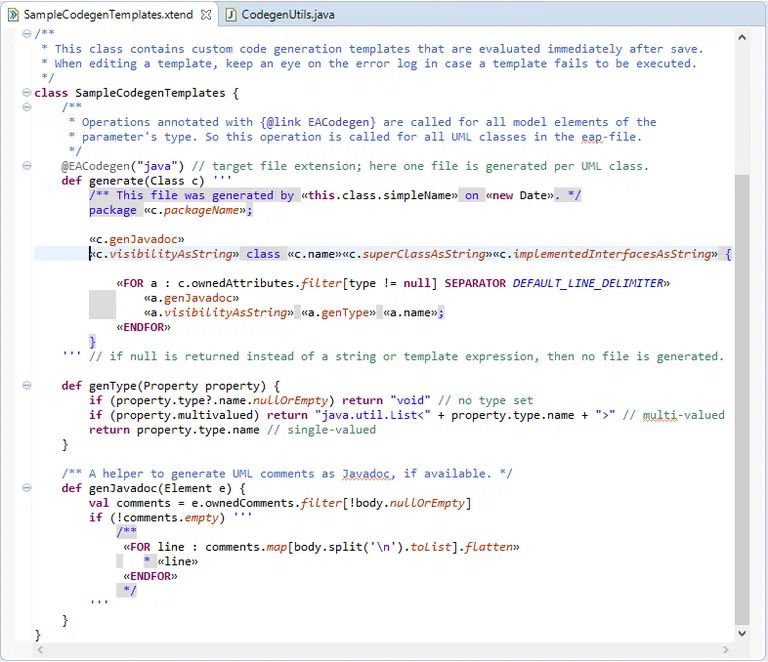
(A first code generation template in Xtend to generate Java classes for all UML classes of an EA model; this template can easily be extended as needed.)
Xtend as a template language: practical advantages
In contrast to the EA code generation facilities, Xtend code templates are validated, the IDE provides properly scoped code completion, and changes are immediately reflected in the generated code (if the Xtend code generator is configured as an Eclipse builder), which makes code template development a comfortable task. You can even work on the EA model and as soon as it changes, the code generator will update the generated code automatically. If you want to add custom code to your generated sources, we strongly suggest applying the generation gap pattern to clearly separate generated and manual code. Mixing generated and manual code is also possible (we have done that for some of our clients), but that requires a much more complicated code generator.
The Eclipse-based EA-Bridge is available in the Eclipse Marketplace and includes the example code generation templates discussed in this article.
Please keep in mind that the “EA-Bridge Live Codegen Example” project is just an example with only rudimentary error handling. It is useful to quickly get started with a code-generating prototype without starting a runtime instance. If you want to seriously build a code generator, you should do that inside a separate Eclipse plugin, register a builder or a context menu action, and launch it inside an Eclipse runtime instance.
Real-world example: generating the AUTOSAR specification from an EA model
That this approach scales to productive, fully headless pipelines without any graphical IDE is demonstrated by the AUTOSAR Consortium. The Consortium uses the EA-Bridge to read a large EA model, from which a Java-based code generator produces the AUTOSAR specification. In 2020 they replaced their own glue code to the EA API with the EA-Bridge — the result was a roughly tenfold performance improvement when loading the model. The entire process runs in CI pipelines, without ever starting an Eclipse IDE.
This example illustrates what “custom tooling on EA models” means in practice: a tool tailored to the exact output format (in this case a specification), running reliably and reproducibly.
Since 2024 there is a new generation of the EA-Bridge: a Rust-based core as a CLI tool, complemented by a VS Code extension as the user interface. No Eclipse required — the CLI integrates directly into CI pipelines and loads EA models roughly ten times faster than EA’s own XMI export. Teams starting fresh with EA-based code generation today should reach for this approach. The Eclipse-based approach described in this article remains valid for teams already building on an Eclipse toolchain.
EA Bridge →
Custom Tools at itemis — Tailor-made tooling built on your model-based development: Custom Tool Development →


 Dr. Patrick Könemann


 Dr. Patrick Könemann
7 min read
Dr. Patrick Könemann
7 min read