Sparx Systems consistently ships new features with every release: project management, revised diagram styles, and more recently AI assistants. But what about the stability and reliability of its core feature — authoring UML models? Enterprise Architect allows entering arbitrary text instead of enforcing existing types, which can result in syntactically broken models that appear valid. Eclipse is no longer a young technology in 2026, but it remains widely used in the automotive and embedded industries. For teams already building on the Eclipse ecosystem, the EA-Bridge provides a solid validation foundation.
The limits of EA’s built-in validation
Enterprise Architect provides limited model validation (and also code generation) facilities. Several of our customers use EA for software architecture modelling with code generation intentions, requiring syntactically correct and consistent models. Because EA’s validation facilities are limited, we decided to use Eclipse and its tools for model validation, code generation, model transformations, and more.
Eclipse and the EA-Bridge: systematic syntactic error detection
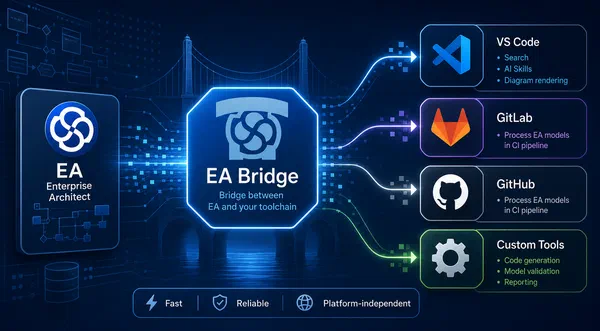
In 2013, we started implementing the EA-Bridge, which provides easy access to EA models inside Eclipse by loading them as Eclipse UML models and, as a by-product, reports syntactical model errors. If the model is valid, all Eclipse-based modelling tools can be used to process EA models, e.g. for model validation, code generation (Xtend, Acceleo, ATL, amongst others), or automated test execution in continuous integration builds.
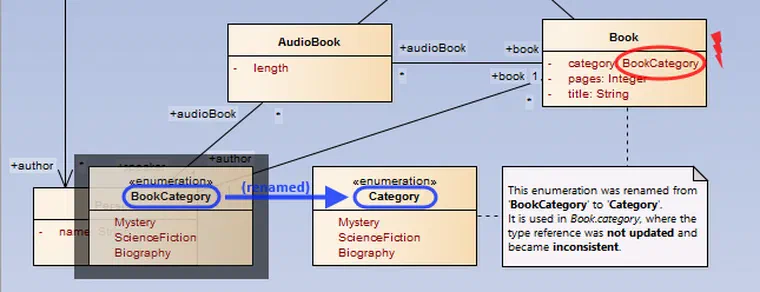
Syntactical model validation is either performed by the EA-Bridge or via built-in Eclipse UML. If the EA model is broken and cannot be loaded consistently (e.g. a type reference is set but invalid), the EA-Bridge reports load errors as ‘EA Model Problems’. Moreover, Eclipse allows providing quick fixes and for some errors, the EA-Bridge already provides such quick fixes. Redirecting or unsetting an invalid type reference is an example of such a quick fix, as shown below. This way, users have a systematic means to fix invalid EA models.
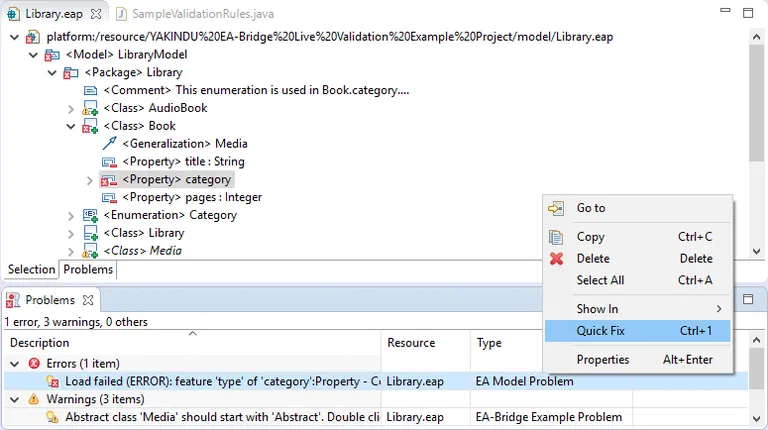
(The EA model loaded with the Eclipse UML editor via the EA-Bridge: resource markers indicate errors and warnings.)
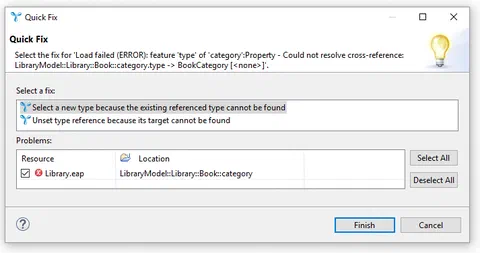
(Quick fixes guide the user to resolve common model errors.)
Custom validation rules and quick fixes
Besides syntactical model validation, it is often reasonable for certain use cases like code generation to restrict the scope of modelling concepts to a specific subset of the UML, e.g. to use only Java or C data types, depending on the target language for code generation. Furthermore, projects often define modelling and coding guidelines, e.g. abstract class names should always be prefixed with ‘Abstract’. The EA-Bridge can also be used to easily define such custom validation rules as illustrated in the code snippet. Java annotations are used to declare custom validation rules and associated quick fixes concisely.
/**
 * This rule reports all abstract classes whose names do not start with 'Abstract'.
 *
 * Furthermore, this validation rule refers to two quick fixes (by ID) that are
 * defined below which can be used in the UI to automatically fix violations of
 * this validation rule.
 */
@EAValidation(severity = Severity.warning, quickfix = { "rename", "toggleAbstract" })
public String validateAbstractClass(Element element) {
    if (isAbstractClassWithoutPrefix(element, ABSTRACT_CLASS_PREFIX)) {
        return String.format("Abstract class '%s' should start with '%s'. Double click "
            + "this in Problems view to navigate to the model element, right-click for "
            + "possible quick fixes.",
            ((Class) element).getName(), ABSTRACT_CLASS_PREFIX);
    }
    return null; // no violation
}

/**
 * This is a quick fix for the validation rule {@link #validateAbstractClass(Element)}.
 * It should repair the model such that the validation rule is not violated any more.
 * The return value indicates whether the model was changed.
 *
 * Parameter id is used by {@link EAValidation} to refer to possible quick fixes.
 * Parameter label is used in the UI.
 */
@Quickfix(id = "rename", label = "Add 'Abstract' prefix to class name")
public boolean fixRenameAbstractClass(Element element) {
    if (isAbstractClassWithoutPrefix(element, ABSTRACT_CLASS_PREFIX)) {
        ((Class) element).setName(ABSTRACT_CLASS_PREFIX + ((Class) element).getName());
        return true; // if the model was changed, 'true' must be returned
    }
    return false; // if the model was not changed, 'false' must be returned
}
Code for a custom validation rule that reports warnings for abstract classes without prefix ‘Abstract’; an additional quick fix can be used to add that prefix automatically.
The Eclipse-based EA-Bridge is available in the Eclipse Marketplace and includes the example discussed here.
The scale a validation framework can reach in production is illustrated by a project in the medical device sector: for an internationally leading company with over 60,000 employees and more than €9 billion in annual revenue, we implemented a custom toolchain component based on the EA-Bridge to validate EA models. Alongside the standard syntactic UML constraints, 44 customer-specific and partly complex semantic constraints are checked.
Since 2024 there is a new generation of the EA-Bridge: a Rust-based core as a CLI tool, complemented by a VS Code extension as the user interface. For model validation, the CLI offers a query command that evaluates jq queries directly against the exported JSON model — no Eclipse setup required, ready to run in CI pipelines. Teams starting fresh with EA-based validation today should reach for this approach. The Eclipse-based approach described in this article remains valid for teams already building on an Eclipse toolchain.
EA Bridge →
Custom Tools at itemis — Tailor-made tooling built on your model-based development: Custom Tool Development →


 Dr. Patrick Könemann

 Dr. Patrick Könemann
7 min read
Dr. Patrick Könemann
7 min read