Problem: Modeling Tasks are Inadequately Supported
A UML profile ensures that all needed concepts can be instantiated in the model. But the instantiation might be complicated and time intensive. The MDG Technology for EMF for instance reuses UML concepts if suitable and introduces tagged values only for additional properties. Consequently, a user needs to find the few relevant input fields in the depth of Enterprise Architect’s properties dialogs. Usability, especially for new users, could be improved with some input form containing only the relevant properties.
Solution: Model Assistants
Add-ins allow one to extend Enterprise Architect with additional functionality such as
- input forms to create or edit elements and connectors,
- synchronisation of changes between two views of an element on different abstraction layers, or
- refactorings which apply a change consistently on the overall model.
These examples have in common that they focus on one task and help the user to perform it in an efficient way — we call them model assistants. Model assistants might be invoked manually by the user via a menu item or automatically after specific changes in the model.
The screenshot below shows Enterprise Architect with an add-in for EMF. The add-in offers a model assistant to edit elements/connectors with an applied stereotype of the MDG Technology for EMF. This assistant comes in two flavours: first, the context menu of a selected element allows the user to open a dialog in which EMF-specific properties can be edited; second, a main menu item opens a custom window that shows the same relevant EMF properties for the selected element. If no EMF stereotype is applied on the selected element, an info message is shown instead.
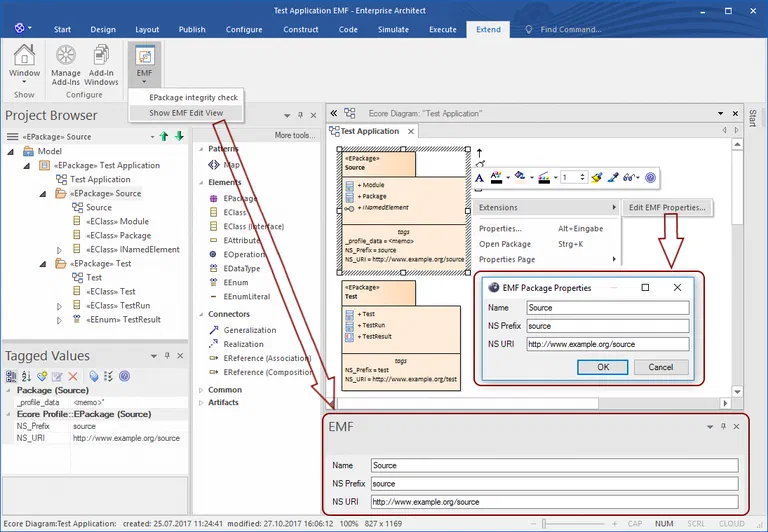
(Model assistant to edit the properties of an EMF-stereotyped element/connector)
Problem: Model Validity
Model assistants help the user to perform one task in an efficient way, but they do not prevent the user from doing something that violates the model. For instance,
- a mandatory tagged value could accidentally be deleted without any warning inside EA, violating the UML profile. A tool processing the model might refuse to load the model or might use a default value for the missing tagged value. As the default value is not part of the model, resulting defects are hard to find.
- Concepts could be used incorrectly, violating their semantics, e.g. by introducing a cyclic inheritance relationship. A tool processing the model should report such defects. If not, invalid artefacts are generated which must be inspected in order to find a defect introduced in the original model — a non-trivial task especially when the model and the artefacts are developed by different persons.
- Modelling conventions of the organisation or the current project could be violated, e.g. by using names with characters that are forbidden in tools processing the model. Such a tool might not detect the violation and either fail or generate artefacts repeating the defect. If the violation is found later, e.g. in a review, the fix also requires adjusting artefacts based on the generated ones.
Consequently, model validity should be checked frequently to find defects as early as possible and reduce the cost of fixing them. It also ensures that the model can be processed further by other tools.
Solution: Integrity Checks
We use so called integrity checks to verify the model’s consistency and validity. They ensure
- that the database containing the EA model is consistent.
- EA’s Project Data Integrity Check ensures a mandatory consistency including for instance a valid containment hierarchy.
- Additional checks are desired for aspects not covered by EA’s integrity check, such as conformance to the used MDG technology; for instance, missing mandatory tagged values are not automatically added.
- that the model conforms to the UML standard and the used UML profiles.
- Such a check is offered by EA and the EA-Bridge. The first is based on Enterprise Architect’s API; the second is based on the Eclipse UML2 implementation.
- that the model conforms to the targeted standard and modelling conventions.
- This includes both a syntactical and a semantical check. Syntactical validity means that each element and connector complies with the constraints of the used modelling language. Semantical validity is stricter and allows only elements and connectors according to the targeted domain; for instance, a connector between a provided and required port of the same component might be applicable but is not desired in the domain.
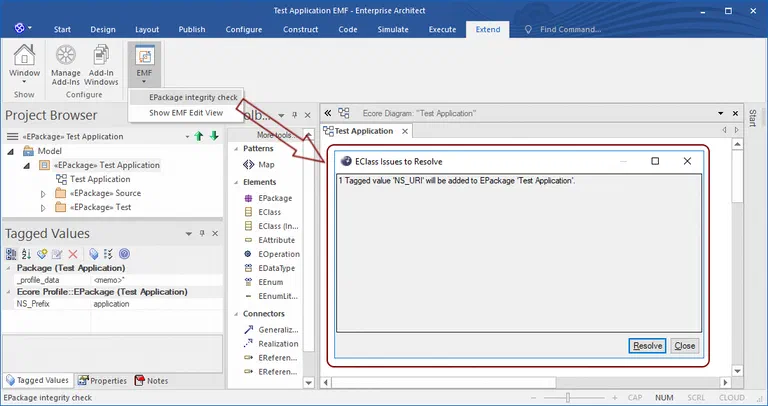
Integrity checks can be executed automatically, e.g. when an EA model is opened, or on demand by the user. Often it is possible to resolve found issues automatically or semi-automatically. Our add-ins typically show all found issues to the user so that they can review them and decide how to resolve each of them. This can be seen in the screenshot below, where the integrity check reports that a mandatory tagged value is missing and suggests re-adding it as the resolution.
The KOSTAL project shows what this looks like in a productive toolchain: the automotive supplier checks all constraints of its UML-based AUTOSAR methodology directly inside Enterprise Architect, and modellers get immediate feedback on every violation. The same validation also runs in standalone mode before the code generator starts, ensuring consistency throughout the development process. Reference: KOSTAL →
Problem: Rollout of MDG Technology and Add-ins
Both MDG technologies and add-ins must be available for all users working with the model. Whereas an MDG technology can be embedded into the Enterprise Architect model, this is not possible with add-ins. Therefore, a rollout of the add-in including all required resources such as an MDG technology is needed.
Solution: Offer an Installer
Instead of embedding MDG technologies in EA models, we prefer to distribute them as part of add-ins. This ensures that both add-ins and MDG technology are always compatible with each other. But it can happen that a model should be edited with a newer version of the add-in. If the newer MDG technology is incompatible with the old one, an integrity check can be implemented to migrate the model.
An installer is ideal for the rollout of the add-in, because it is convenient for users and administrators. Another benefit is that installers can typically update a previous installation. Installers are easy to implement with the WiX Toolset, for instance, because it integrates well into the .NET IDE which is typically used for add-in development.
Summary
In this article, we discussed several issues which often occur when using Enterprise Architect out of the box and which can be addressed with an add-in:
- Modelling tasks are inadequately supported by the standard UI of EA. This includes that the user spends too much time navigating through the EA UI, the absence of custom input forms, and the lack of refactorings. We address this with so called model assistants which help the user to perform specific tasks efficiently.
- Enterprise Architect ensures only basic consistency and validity of the model. We strongly recommend additional integrity checks to ensure consistent and valid models which can be processed further.
- Add-in and MDG technology must be compatible and available in all EA instances. We address this by distributing the MDG technology as part of an add-in and with an installer to roll out the add-in.
Add-ins extend Enterprise Architect from within: they use EA’s COM interface, run in the same process, and can directly control the EA UI. They are our first choice for model assistants and integrity checks that run directly inside the EA instance.
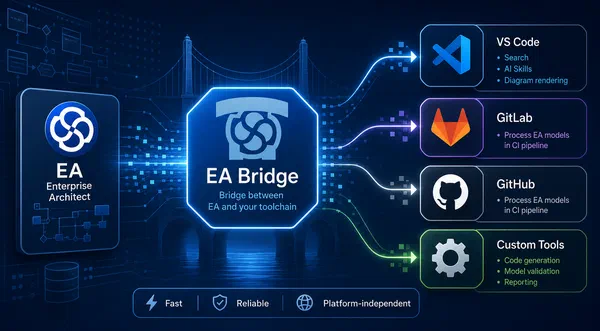
For processing EA models outside of EA (code generation, validation in CI pipelines, documentation), external tools are a better fit. The Eclipse-based EA-Bridge loads EA models as Eclipse UML models, making the full Eclipse modelling ecosystem available. Since 2026 there is additionally a new generation of the EA-Bridge as a Rust-based CLI tool that processes EA models directly without Eclipse or a running EA instance, ready for headless CI pipelines.
EA Bridge →
How EA models are processed with the EA-Bridge for code generation and UML validation is described in the following articles:
Custom Tools at itemis — Tailor-made tooling built on your model-based development: Custom Tool Development →


 Dr. Patrick Könemann


 Dr. Patrick Könemann
7 min read
Dr. Patrick Könemann
7 min read