The UML offers an extension mechanism called Profiles to add certain semantics and additional properties to UML models. This article shows how UML Profiles can be used in Enterprise Architect and how profiled models can further be processed with the EA-Bridge with the exemplary use case of generating source code. Eclipse is no longer a young technology in 2026, but it remains widely used in the automotive and embedded industries — and for teams already building on the Eclipse ecosystem, the approach described here is still the cleanest path.
UML is a great language for describing software systems, but plain UML concepts are rarely sufficient to express domain-specific aspects. Yes, there are tools and frameworks to easily define domain-specific languages, but maybe the tooling is fixed to using Enterprise Architect. We often encounter situations where microcontroller software is modelled with UML and it is, for example, simply not possible to properly tell a plain UML element that it represents an OS task that is triggered by some event with a specific cycle period. If we decide to use UML classes to represent tasks, and we further want to use a code generator to generate some code for them, how should the generator know which class represents an OS task and which may represent something else?
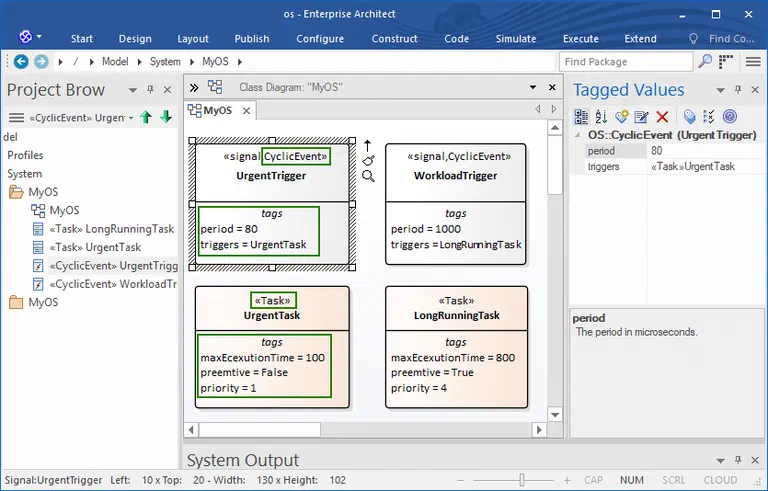
Fortunately, UML offers an extension mechanism via profiles that allows one to specify stereotypes even with additional properties to assign a certain semantics to elements. The example below shows a model where classes represent OS tasks and where signals represent cyclic events that trigger an OS task. Each element has a stereotype applied so that the meaning is explicit. Additional properties are defined as tagged values of these stereotypes, e.g. a period of cyclic events or a reference to the OS task that is triggered by the event. With this additional information, a code generator can decide how to generate code for each model element.
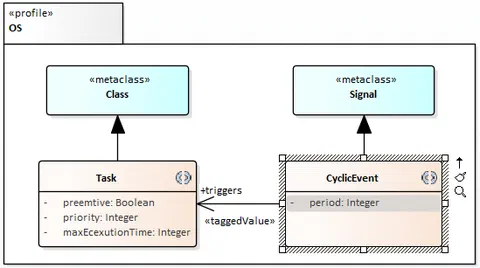
UML profile. The screenshot below shows the profile OS which defines the stereotypes Task (applicable to UML classes) and CyclicEvent (applicable to UML signals). Pre-defined tagged values like period and triggers are modelled as attributes or references of the stereotype.
The EA user guide explains in detail how to define and use UML profiles in EA models.
Loading Profiled UML Models with the Eclipse-based EA-Bridge
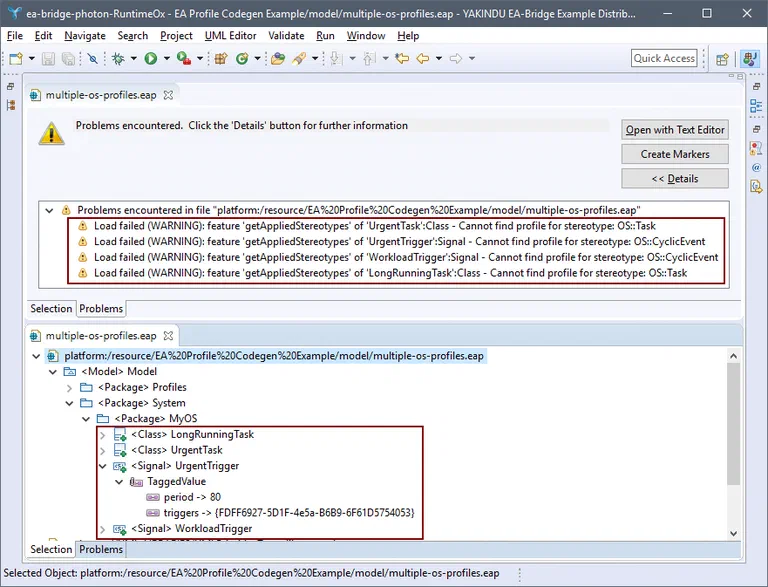
Following the approach in this article, we use the Eclipse-based EA-Bridge to generate code from EA models. Without UML profile support, opening that model with the EA-Bridge was only possible without stereotypes because the profile was not available. The result can be seen in the next screenshot. Warnings were raised telling the user that UML profiles were not found. Consequently, the EA-Bridge is not able to represent tagged values with UML concepts so general annotations of the underlying EMF framework were used instead. The use of annotations only ensures that no data is lost, but does not allow a code generator to access the data in a UML-conform way. Especially the relation between events and tasks (tagged value triggers) only loads as an ID and does not resolve the referenced model element.
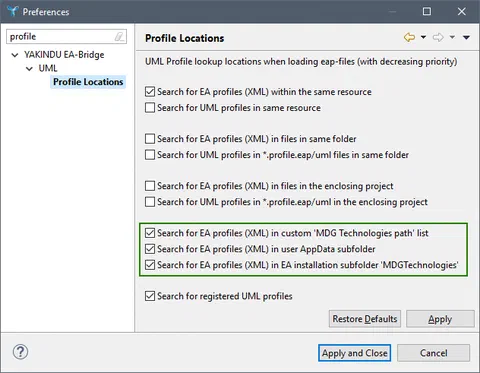
With UML profile support enabled, it is possible to load UML profiles specified in the (XML) formats processed by Enterprise Architect. UML profiles are searched in most of the locations EA supports, especially from the EA model itself as well as from the standard and configured locations on the file system. The screenshot below shows the preference dialog of the EA-Bridge in Eclipse with the options related to UML profiles. This covers almost all of the locations the user can configure in EA. But it does not cover, for instance, UML profiles offered by EA Add-ins. To support these in the EA-Bridge, custom locations can be specified.
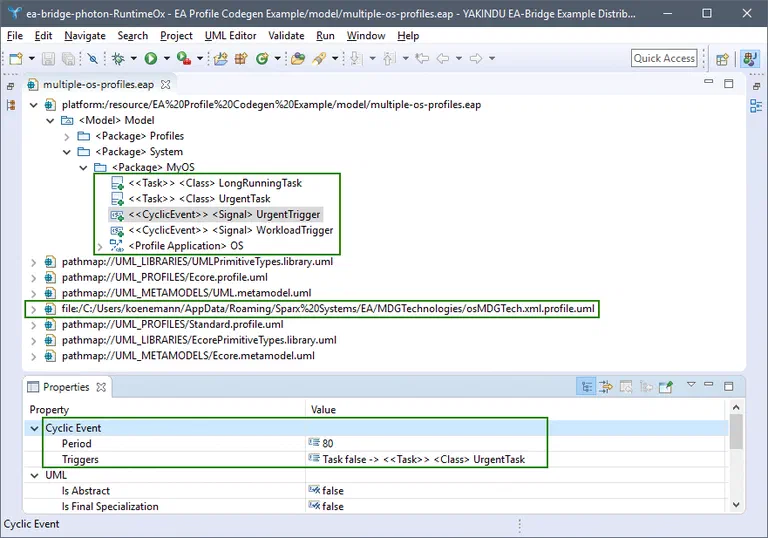
The screenshot below shows again the example from above, this time with UML profile support active. It can be seen that stereotypes are applied and that tagged values are instantiated UML-conform (denoted in double angle brackets like <<Task>>). This is possible because the UML profile as part of an MDG technology was found in a subfolder of the user’s home directory. Please observe that the name of the MDG technology file is osMDGTech.xml. The additional file extension .profile.uml is needed to indicate to Eclipse UML that the file contains a UML profile.
The tagged values of the selected model element UrgentTrigger are listed in the Properties view, grouped by the stereotype Cyclic Event. The tagged value Triggers now resolves task UrgentTask as desired.
Code Generation for Profiled UML Models
One popular use case for the EA-Bridge is its integration with code generators. We typically use Xtend for generating code, as already discussed in this article. The final screenshot shows such a code generator snippet that can also be used with the EA-Bridge from the Eclipse Marketplace. Operations annotated with @EACodegen are called for model elements that are used as parameter types, like a Signal in our case. The returned result of this operation will be saved as file “<element name>.<ext>” where ext is the file extension that is given in the @EACodegen annotation; UrgentTrigger.h in the screenshot.
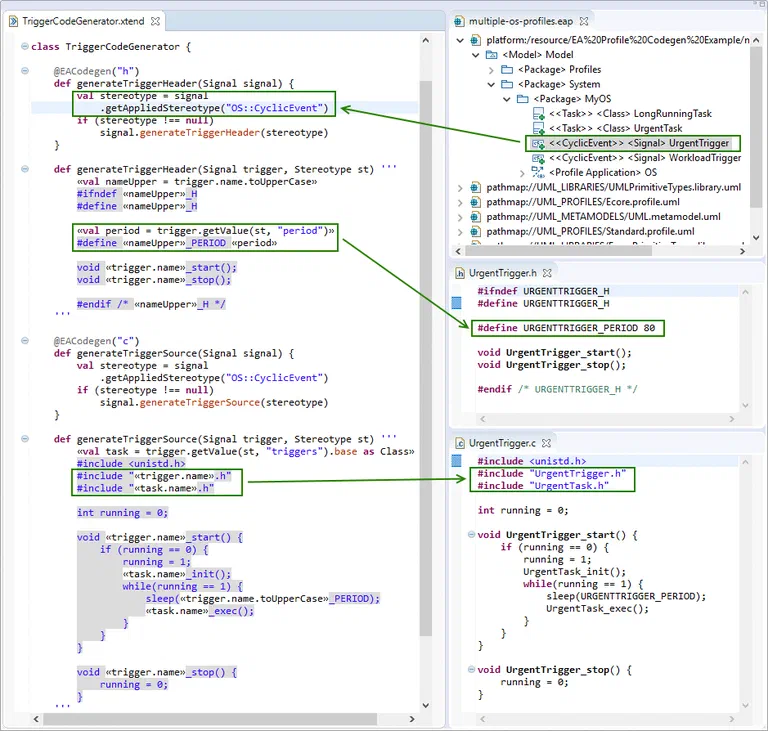
It is quite easy to access stereotype tagged values in Eclipse UML models, as highlighted in the editor. Function <element>.getAppliedStereotype("OS::CyclicEvent") can be used to check whether a specific stereotype is applied — if so, we can generate specific code for UML signals that represent cyclic events. Function <element>.getValue(stereotype, "period") can then be used to access its tagged values. It is even possible to resolve cross references from one stereotyped element to another, e.g. to get the triggered task for an event: <element>.getValue(stereotype, "triggers").base as Class (since getValue returns an Object, we must explicitly cast the result).
Please keep in mind that the “EA-Bridge Live Codegen Example” project is really just an example with only rudimentary error handling. It is useful to quickly get started with a code-generating prototype without starting a runtime instance. If you want to seriously build a code generator, you should do that inside a separate Eclipse plugin, register a builder or a context menu action, and launch it inside an Eclipse runtime instance.
The KOSTAL project shows this approach in production: the automotive supplier models its AUTOSAR architecture in Enterprise Architect using a UML-based methodology where domain-specific stereotypes define the semantics of each model element. The Eclipse-based EA-Bridge loaded the profiled models; customer-specific generators processed the stereotype information directly. Reference: KOSTAL →
Since 2024 there is a new generation of the EA-Bridge: a Rust-based core as a CLI tool, complemented by a VS Code extension as the user interface. Stereotypes and tagged values are part of the exported JSON model, ready to query without any Eclipse setup or MDG configuration. Teams starting fresh with profile-based code generation from EA models today should reach for this approach. The Eclipse-based approach described in this article remains valid for teams already building on an Eclipse toolchain.
EA Bridge →
Summary
UML profiles are very handy for adding custom, e.g. domain-specific information to your EA models. The Eclipse-based EA-Bridge automatically locates and uses UML profiles specified for EA when EA models are loaded. This allows accessing the additional information in a UML-conform way, which makes the implementation of code generators considerably easier.
Custom Tools at itemis — Tailor-made tooling built on your model-based development: Custom Tool Development →


 Dr. Patrick Könemann


 Dr. Patrick Könemann
7 min read
Dr. Patrick Könemann
7 min read