Custom Tool or Standard?
Decision guidance from 20 years of project experience: when a custom DSL pays off, when a UML/SysML profile is the better choice, and how to get from domain analysis to a productive tool.
Download WhitepaperHolistic protection and seamless traceability for cybersecurity, functional safety, and the Cyber Resilience Act
OverviewMethodological excellence and tailored tools for model-based system and software engineering.
OverviewEnterprise software from a single source: AI integration, legacy migration and full-stack development — cost-efficiently and sovereignly hosted.
OverviewAutomotive, medtech, aerospace: every domain has its own modelling languages, constraints and toolchain requirements. We develop custom tools that go where your experts work: as a web-based modelling environment directly in the browser, as a VS Code extension in the familiar IDE workflow, or classically as a desktop workbench, also based on Xtext and JetBrains MPS. The result: fewer media breaks, more generated artefacts, more automated processes, zero workarounds. The tool follows your process and your methodology, not the other way around. That is why every project begins with understanding your workflows before the first line of grammar is written.
Custom tool development means: we adapt the tool to your processes, not the other way around. Instead of forcing experts into the abstractions of an off-the-shelf tool, tools are created that speak exactly the concepts, rules and notations of your domain.
Standard tools and low-code platforms are designed for broad applicability. That is their strength, but also their limit. Where processes are highly specialised, expert knowledge must be represented structurally, or generic abstractions do not fit, friction, workarounds and ultimately knowledge loss arise. Custom tools eliminate these by pouring domain knowledge directly into the tool: as validated models, enforced rules, and consistent generation.
Standard tools force process adaptation: whoever introduces a generic tool also implicitly adopts its abstraction model, and adapts workflows, roles and artefacts until they fit the tool. This is the root cause of workarounds, shadow documentation and often frustration about the tools’ missing capabilities.
The right starting point is not the tool, but the question: how do your experts work? Which concepts, steps and decision rules describe their methodology? Only once these questions are answered can it be assessed whether an off-the-shelf tool is sufficient, or whether a custom tool can represent the methodology more precisely.
At the heart of many custom tools is a domain-specific language (DSL): a notation in which experts work in their own vocabulary. Rules and best practices are not documented but structurally enforced. Knowledge that today resides in the heads of your experts is encoded in the metamodel and thus implicitly available.
DSLs define the vocabulary and even encode the methodology itself. Which concepts exist in the language, which relationships are permitted, which constraints apply: that is the methodology, translated into executable language constructs. A well-designed DSL makes it structurally easy to work methodically correctly and structurally difficult to work incorrectly.
Domain languages can be textual, tabular or graphical — developed with specialised language workbenches such as Xtext or JetBrains MPS, or embedded into modern integration platforms such as VS Code via the Language Server Protocol.
Not every custom tool starts on a greenfield. Many standard tools (e.g. Enterprise Architect, Rhapsody, Capella) offer extension mechanisms through which additional functionality can be integrated without replacing the tool. Such extensions are also custom tools: tailor-made, domain-specific, adapted to your process.
The same principle applies to the modelling language itself: generic languages such as UML do not need to be replaced by a new DSL if they can be adapted precisely enough to a methodology through profiles. Stereotypes define domain-specific concepts, tagged values structure metadata, constraints enforce methodical rules, without replacing the base tool. In an automotive tier-1 and a medtech project, we deliberately advised against a custom DSL after the domain analysis and instead used UML with a project-specific profile. The result was a methodically precise environment with minimal tool change.
Custom tools are not a universal remedy. They pay off where a small group of highly specialised experts works with concepts that no standard tool adequately represents. For large, heterogeneous user groups with generic requirements, standard products are usually the better choice.
The core question: do the abstractions and functions of an existing tool fit your domain well enough? If so, use it. We also recommend our own products such as itemis CREATE or itemis ANALYZE where these are a better fit than a custom tool.
In over 20 years, we have learned: not every domain needs its own language. For an automotive tier-1 supplier and a medtech company, we deliberately advised against a custom DSL after the domain analysis, as UML was sufficient. Instead, we successfully integrated the UML tool into the respective toolchain.
Structural advantages at a glance: Domain knowledge in the tool · Validation while typing · Consistent generation · Integrated simulation · No vendor roadmap dependency · Knowledge stays within the organisation
For decades the assumption was: custom software is expensive, so processes are adapted to standard tools. This calculation is shifting. AI dramatically reduces the marginal cost of custom development, and shifts the make-or-buy decision anew.
Grammar iteration, generator templates, test generation, automated documentation: AI intervenes in every phase of custom tool development and significantly reduces throughput times. One of our own products, which we had originally developed over several years, was rebuilt for VS Code in four weeks with AI support, including a domain-specific AI skill that understands the underlying models.
AI is merely a tool here, because at itemis architecture and domain modelling remain in human hands. Experienced architects and domain experts make the key decisions. In customer projects we have repeatedly revised AI-generated architecture decisions because the AI, lacking domain knowledge, led them in the wrong direction.
Custom tools with integrated AI functions are more than an LLM plugin on top. The domain semantics are structurally anchored in the tool: as precise context for every AI component. An assistant in a generic tool gives merely generic suggestions, whereas an assistant in a custom tool knows the language, rules and models of your domain and can therefore carry out its tasks in a targeted way.
The more precise the domain language, the more precise the AI support. Generic tools with AI plugins scale in breadth. Custom tools with integrated AI scale in depth: precisely where expert knowledge resides and generic suggestions are not enough.
AUTOSAR architectures, ECU configuration, signal management: complexity is growing, generic tools are reaching their limits. We develop custom tools that integrate deeply into existing automotive toolchains.
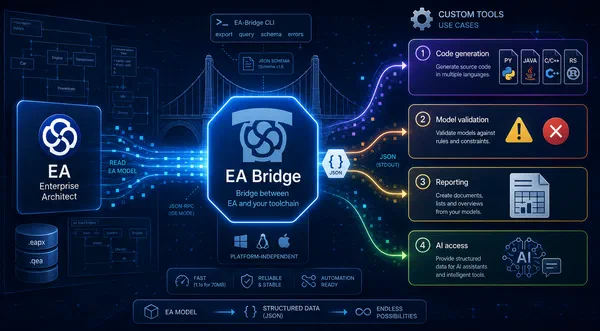
ETAS uses itemis CREATE for integrating graphical statecharts into ASCET-DEVELOPER. With itemis support, KOSTAL significantly improved its development process including the AUTOSAR toolchain with the itemis EA-Bridge.
Domain experts model business logic that must be translated directly into executable software. DSLs bridge the gap between domain knowledge and code: for actuarial mathematics, credit models and microservice configurations.
The Zurich Group generates actuarial functions directly from a DSL. Atruvia uses an itemis DSL as a framework extension for modelling and code generation. For a leading financial company (EUR 1.5bn revenue, 9,000 employees) we developed an MPS-based modelling environment for automated microservice generation.
IEC 62304, ISO 13485, MDR: every change must be traceable, every requirement must be trackable. Custom tools integrate modelling, code generation and regulatory documentation into a consistent process.
For an internationally leading medical technology company with over 60,000 employees and EUR 9bn annual revenue, we developed a toolchain component for modelling and C++ code generation and integrated it into the existing development environment.
Formally describe configuration and behaviour, generate consistently, deploy safely to the target hardware, without manual sources of error. Custom tools create reliability here as software complexity grows.
Since 2023 we have been modernising the tool landscape for early semiconductor development for a globally leading semiconductor manufacturer (55,000 employees, EUR 15bn revenue) through a central MPS-based modelling environment. As a single source of truth, the system replaces fragmented document and tool structures and integrates an AI agent that gives end users intuitive access to the complex domain knowledge.
Custom tool development is not a single-stack topic. The choice depends on two questions: which tool is suitable for designing the domain language? And where should the tool run: in the IDE, in the browser, as an extension of an existing tool? We think both axes together.
Language workbenches provide everything needed for building a domain language: editor support, validation, code generation and model processing. Two paradigms dominate:
Xtext stands for textual DSLs: the models exist as text, are therefore diff- and merge-able and can be seamlessly integrated into CI/CD pipelines. itemis is part of the founding community of Xtext (since 2006) and provides active committers.
Langium is the more modern, TypeScript-native route to textual DSLs: without a Java stack, designed from the ground up for the Language Server Protocol and therefore able to run directly in VS Code and its derivatives as well as in the browser.
JetBrains MPS enables projectional editing: notations that cannot be represented in a text format: tables, mathematical expressions, graphical elements. Particular strength: multiple domain languages can be cleanly combined. itemis is the main maintainer of central MPS extensions (iets3, mbeddr) and a JetBrains partner with 10 years of experience with this technology.
VS Code & Language Server Protocol: lightweight, modern, low barrier to entry. The language server runs independently of the editor and can be integrated into any LSP-capable environment. Our recommended stack for greenfield projects.
Web & cloud — for distributed teams and browser-based collaboration: fully featured modelling environments in the browser, e.g. built on the established cloud-IDE framework Eclipse Theia or with Modelix (both open source).
Eclipse RCP: proven for extending existing Eclipse-based toolchains and migration projects. However, not recommended for greenfield projects.
Extensions of standard tools: EA, Rhapsody, Capella: many standard tools offer extension mechanisms (add-in APIs, plugin frameworks) through which custom tools are integrated without replacing the existing tool. itemis has developed its own product with the EA-Bridge for processing Enterprise Architect models.
| Requirement | Recommendation |
|---|---|
| Textual DSL, IDE integration | Xtext + VS Code/Langium |
| Complex language composition, formal notation | JetBrains MPS |
| Browser-based modelling, distributed teams | Web platform + Modelix |
| Extend existing Eclipse toolchain | Eclipse RCP |
| Extend UML tool without replacing it / e.g. EA | Tool-specific plug-ins / MDG + EA-Bridge |
| Migration Eclipse to modern environment | Xtext/MPS + VS Code/Langium |
Custom Tool or Standard?
Decision guidance from 20 years of project experience: when a custom DSL pays off, when a UML/SysML profile is the smarter choice, and the four sources of value that make custom tools worthwhile long-term.
Schedule a call with Dr. Patrick Könemann and Dr. Klaus Birken.

Decision guidance from 20 years of project experience: when a custom DSL pays off, when a UML/SysML profile is the better choice, and how to get from domain analysis to a productive tool.
Download Whitepaper
How the Portalon plugin connects AI coding agents like Claude to the live model of a JetBrains MPS project via MCP — structurally safe edits, validation, and language-engineering skills, on your current MPS version.
Read Article
Dr. Klaus Birken
10 min read
Why dynamic behavior belongs in the interface contract: protocol state machines formally specify the allowed order of events – with Franca IDL as an example and a look at Dezyne, P, and session types.
Read Article
Dr. Klaus Birken
8 min read
How the itemis EA Bridge provides Enterprise Architect models as stable, machine-readable data, enabling custom code generation, validation, and documentation tooling.
Read Article
Dr. Patrick Könemann
10 min read
A design FMEA is mandatory under ISO 26262 — and expensive to create and maintain by hand. This whitepaper shows how the algorithmic nature of the FMEA method enables full automation from existing engineering work products.
Download Whitepaper
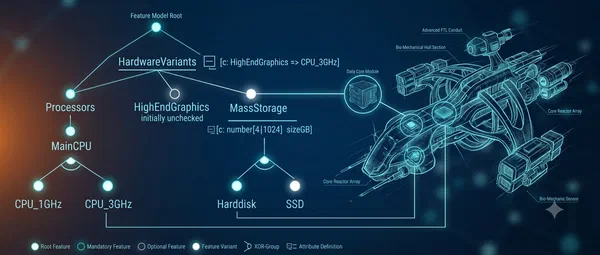
Loosely coupling feature models to development artifacts is convenient – but it has hidden risks. This article shows the advantages of tight integration: early error detection, implicit variation points, and automatic consistency checks.
Read Article
Dr. Klaus Birken
6 min read