Artifact properties
Properties on the right of the Data Explorer, below Artifact Search, shows the details of what you selected. As long as nothing is selected, it says "No properties available for selected element".
Properties of an artifact
Select an artifact (see Follow links between artifacts). Properties shows:
- Artifact Name: the name of the artifact, shown in the color of its artifact type.
- Attributes: each attribute of the artifact, its value on top and the name of the attribute below it.
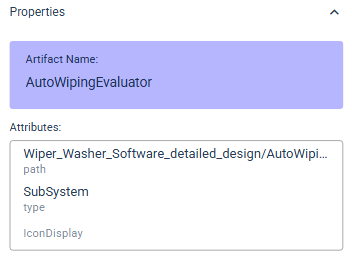
Which attributes an artifact has depends on its artifact type and on how the type is configured in ANALYZE Desktop. The concepts behind them are explained in Artifact properties and Custom attributes of artifacts.
If several artifacts are selected, Properties shows the one you selected last.
Properties of an artifact type
While no artifact is selected, click the header of a container. Properties then shows its artifact type:
- Artifact Type Name: the name of the artifact type.
- Artifact Type Provider: the adapter that reads the artifacts of this
type from their tool, for example
yt-adapter-excelfor artifacts in an Excel file.

Which tools itemis ANALYZE connects to through adapters is listed in Connecting itemis ANALYZE to various tools. How an adapter reaches the data is explained in Data accesses.