Accept an invitation
One way to join an organization is an invitation from someone who manages its members; how they invite people is described in Invite people to the organization. The invitation is made out to your email address, and you accept it while signed in with the account that has this address.
The invitation comes with a link. If your installation sends mail, you receive the link by mail. The person who invited you can also copy the link and send it to you another way.
Accept the invitation
-
Open the link of the invitation. If you are not signed in, sign in with the account whose email address the invitation was sent to.
-
The page names the account you are signed in with and the organization that invited you.

-
Click ACCEPT INVITATION.
ANALYZE Web App confirms with "Welcome to …" and opens the project list of the organization. You see the projects you have access to, so right after you joined the list may still be empty.
The organization you joined becomes your default organization: ANALYZE Web App opens it when you sign in. To work in another of your organizations, see Select an organization.
If you open the link again later, ANALYZE Web App tells you that your invitation was already accepted and opens the organization.
When the invitation cannot be accepted
This invitation has expired. Please ask an administrator to renew it. An invitation is valid for a limited time. Ask someone who manages the organization's members to renew it; you can then use the same link again.
There is nothing to claim in … for …. No invitation to this organization is waiting for the account you are signed in with. Invitations are matched to the email address you sign in with: if you were invited under a different address, sign out and sign in with that one, or ask the person who invited you to invite the address you use.
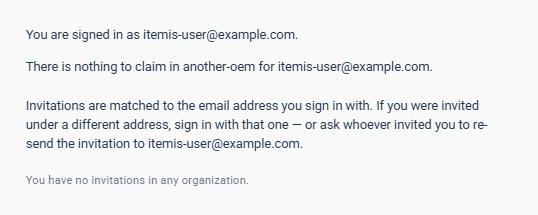
Below this message, Your invitations in all organizations lists the invitations waiting for your account in other organizations, each with its own ACCEPT INVITATION button. An expired one is marked as such. If there are none, the page says "You have no invitations in any organization."