[Pro] TrafficLight with Multi State Machines
This example of a traffic light control demonstrates how to model multiple state machines that communicate with each other. It shows how you can embed a statechart as a sub machine into another statechart, control its life cycle, and communicate with the sub machine via in and out events. In this example, you will learn:
- How to embed a statechart as a sub machine of another statechart
- How to control a sub machine's life cycle
- How to communicate with a sub machine by raising its in events and reacting on its out events
- How to change variables of a sub machine
- How to ask which of the sub machine's states is active
- How to test a multi state machine scenario
You can find more information on using the multi state machine feature in the online documentation.
Overview
The example is a traffic control of a street crossing using traffic lights. While a single traffic light is not so complex the coordination of different traffic lights on a crossing is a good example to highlight the collaboration between different state machines. 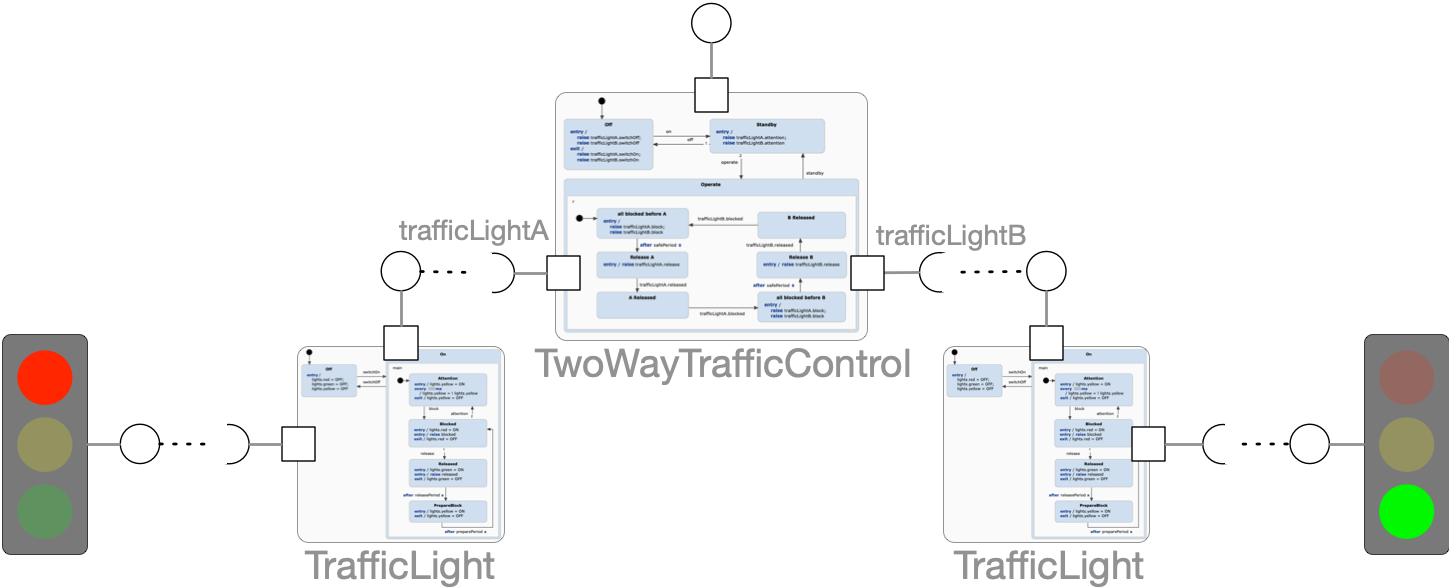 The example consists of a system of three state machine instances. There are two instances of the statechart TrafficLight . Each instance just cares about controlling the different modes of a single traffic light. The TwoWayTrafficControl coordinates both traffic lights and makes sure that the traffic is always safe by making sure that no two traffic lights are green at the same time.
This is the example that is used in our documentation on multi state machine modeling. We recommend to read that chapter in order to fully understand this example.
Get this example
The complete project — statechart models, sources and build files — lives in the itemis CREATE examples repository. Inside itemis CREATE for Eclipse you can import it directly with the example wizard.