Multi State Machines
This example demonstrates the usage of multi state machines. For more details, please also refer to our documentation.
Multi State Machine Modeling
Using multiple state machines allows to split up large, complex models into smaller ones, which can be reused. Thus, complex systems can be modeled step by step in separated components. To achieve this, statecharts can import other statecharts and instantiate them.
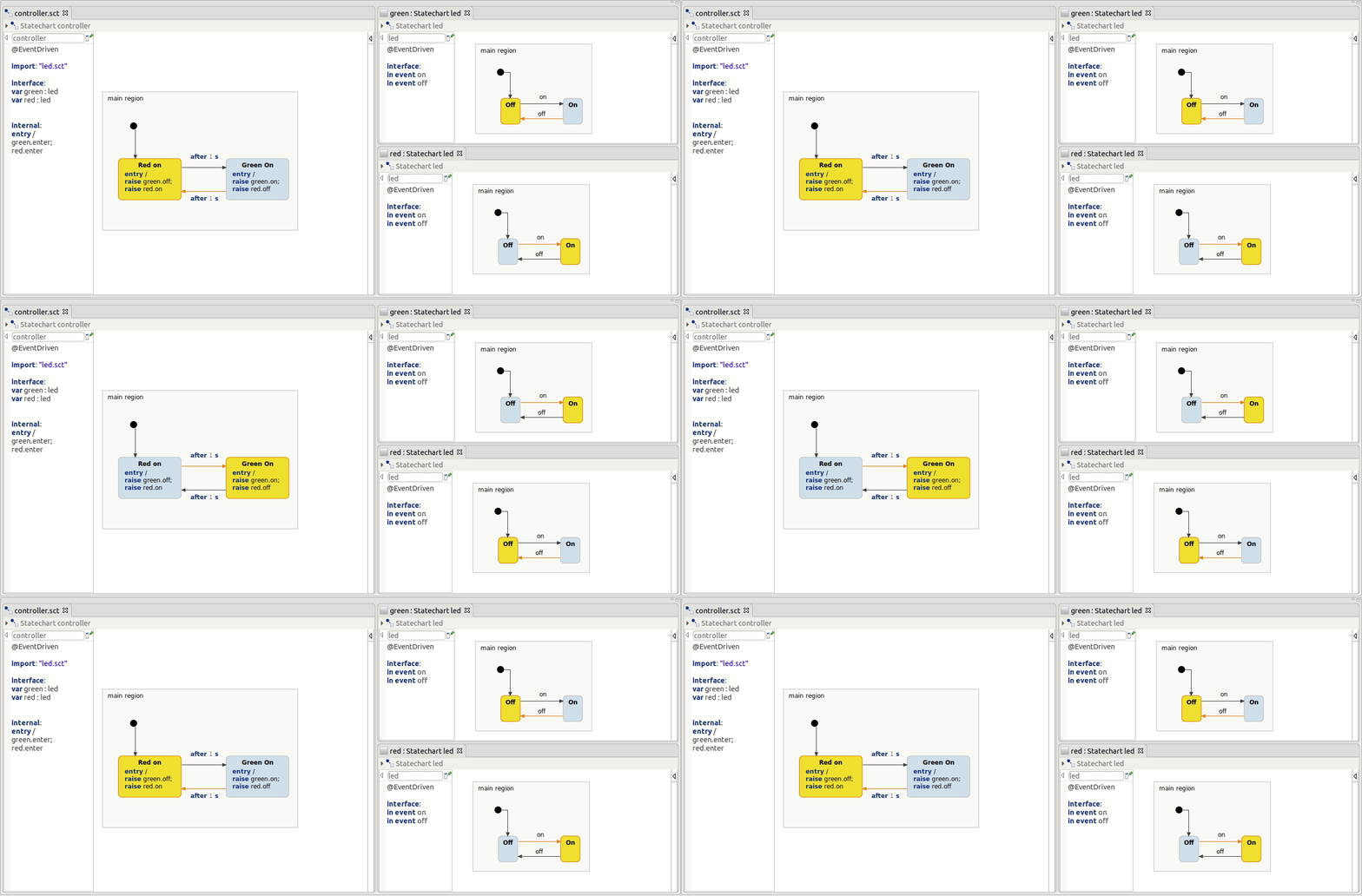
As an example we will use a simple light controller that controls two LEDs. Each LED's behavior is defined by the same state machine. The controller uses this state machine twice: once for the red and once for the green LED. Both LED state machines are controlled separately to toggle the LEDs in an alternating fashion.
Importing State Machines
State machines can be imported using the import: "" statement. There are no restrictions importing state machines. Combining different execution styles, e.g. @CycleBased(200) and @EventDriven, is supported, as well as cyclic dependencies.
Imagine three different state machines: A, B, C, where A is @CycleBased and B and C is @EventDriven
The following dependency chain is allowed: A -> B -> C or A -> C
Cyclic dependencies are also allowed: A -> A or A -> B -> A
Using State Machine Types
Importing allows the user to use the state machine as a type, which can be used for variables, operation parameters or even events. Following examples show possible usages of the led state machine type:
var machine : ledoperation myOp(param : led)in/out event : led
With this approach, multiple instances of one state machine type can be created and used, which allows an easy, multiple reuse of existing models.
Defining a variable with a state machine type allows the user to access the state machine's API, which is usually generated.
machine.enter() // starts the state machinemachine.runCycle() //only for @CycleBased state machines, used to invoke a run-cycle stepmachine.isActive() // true, if at least one state is activemachine.isStateActive(state : ledStates) // true, if given state is activemachine.exit() // stops the state machine
In order to communicate with a sub machine, its in events can be raised with the raise command, like in this example with raise red.on.
It is also possible to access a sub machine's interface members, like variables or operations.
Simulating Multi State Machines
In order to simulate a multi state machine scenario, just simulate the root machine, in this example the controller machine. Simulating the controller machine automatically sets the simulation up to also simulate all sub machines. These can be selected in the simulation view.
Get this example
The complete project — statechart models, sources and build files — lives in the itemis CREATE examples repository. Inside itemis CREATE for Eclipse you can import it directly with the example wizard.