Testing State Machines with SCTUnit
This example demonstrates how to write tests for statecharts using SCTUnit. It demonstrates how to write tests effectively, how to run them and use a coverage analysis to check if the model has been tested completely.
Example Application
As an example application we will use the light switch example with brightness adjustment from the Basic Tutorial.
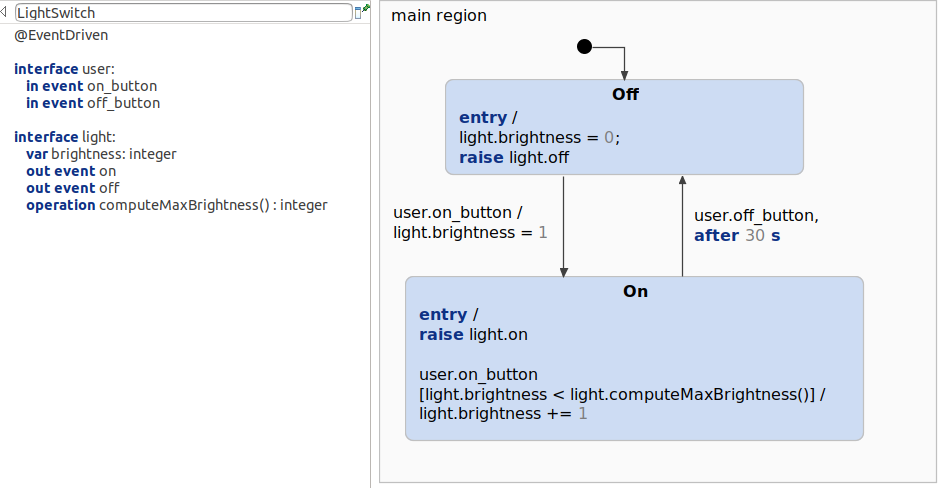
The light switch model simply consists of two states, On and Off, and respectively two incoming events on_button and off_button. Each time the event on is received, the brightness is increased until a maximum brightness is reached. The maximum of the brightness will be calculated by the operation computeMaxBrightness(), which returns an integer. This operation will be mocked later on in the test. Additionally, the light will automatically turn off after 30 seconds. Thus, all testable modeling components are used:
- In Events
- Out Events
- Timed Events
- Variables
- Operations
Test Strategy
There are different ways of how to write tests. For this example series we are using the Given-When-Then (GWT) way to write the tests:
- "The given part describes the state of the world before you begin the behavior you're specifying in this scenario. You can think of it as the pre-conditions to the test."
- "The when section is that behavior that you're specifying."
- "Finally the then section describes the changes you expect due to the specified behavior."
See: https://martinfowler.com/bliki/GivenWhenThen.html
Let's transfer this to our example, where we want to test the behavior of the model. For example we want to test if the light will be turned off while it is on and the off button is pressed:
- Given is a predefined state machine. In this case, the statechart shall be in the
Onstate. - When pressing the off button by raising the
off_buttonevent... - Then the state machine should be in the
OffState. So we assert this.
Using this way of testing, we can test the model step by step in small, separated pieces. Thus, later extensions of the model can be adapted easily while ensuring that the functionalities, which may be mapped to requirements, are fullfilled.
SCTUnit Test
The SCTUnit test itself contains three different parts. The main part obviously are the tests, which are operations annotated with @Test. Additionally, there are other operations, which do two things:
- Set the state machine to a predefined state (Given).
- A
pressUserButtonoperation, to raise events (When). - Helper functions that do the assertions (Then).
The test can be executed with Right click -> Run As -> SCT Unit. Further informations on how to use the SCTUnit language can be found in our documentation.
Test implementation
This is the complete test implementation:
testclass LightSwitchTest for statechart LightSwitch {

	/* Constants for testing purpose. */
	const ON : boolean = true
	const OFF : boolean = false
	const EVENT_RAISED : boolean = true
	const EVENT_NOT_RAISED : boolean = false

	/*
	 * The LightSwitchTest contains different test cases:
	 * - initially turned off
	 * - turn light on
	 * - stays turned off by pressing off in 'Off' state
	 * - raise brightness with default mock
	 * - raise brightness to an expected value
	 * - raise brightness to its maximum
	 * - brightness does not exceed the maximum
	 * - turn light off using the off button
	 * - turn light off after 30 s
	 * - light stays on after 29.999 s
	 */

	@Test
	operation testInitiallyTurnedOff() {
		// given
		lightIsOff()

		// when
		// nothing happens

		// then
		assertLightIsOff(EVENT_RAISED)
	}

	@Test
	operation testTurnOn() {
		// given
		lightIsOff()

		// when
		pressUserButton(ON, 1)

		// then
		assertLightIsOn(1, EVENT_RAISED)
	}

	@Test
	operation testStaysTurnedOff() {
		// given
		lightIsOff()

		// when
		pressUserButton(OFF, 10)

		//then
		assertLightIsOff(EVENT_NOT_RAISED)
	}

	@Test
	operation testRaiseBrightness() {
		// given
		mock light.computeMaxBrightness returns (5)
		lightIsOn()

		// when
		pressUserButton(ON, 1)

		// then
		assertLightIsOn(2, EVENT_NOT_RAISED)
	}

	@Test
	operation testRaiseToMaxBrightness() {
		// given
		mock light.computeMaxBrightness returns (5)
		lightIsOn()

		// when
		pressUserButton(ON, 5)

		// then
		assertLightIsOn(5, EVENT_NOT_RAISED)
	}

	@Test
	operation testRaiseToMaxBrightnessDoesNotExceedMaximum() {
		// given
		mock light.computeMaxBrightness returns (5)
		lightIsOn()

		// when
		pressUserButton(ON, 10)

		// then
		assertLightIsOn(5, EVENT_NOT_RAISED)
	}

	@Test
	operation testTurnOff() {
		// given
		lightIsOn()

		// when
		pressUserButton(OFF, 1)

		// then
		assertLightIsOff(EVENT_RAISED)
	}

	@Test
	operation testTurnOffAfter30Seconds() {
		// given
		lightIsOn()

		// when
		proceed 30 s

		// then
		assertLightIsOff(EVENT_RAISED)
	}

	@Test
	operation testNotTurnOffAfterLessThan30Seconds() {
		// given
		lightIsOn()

		// when
		proceed 29999 ms

		// then
		assertLightIsOn(1, EVENT_RAISED)
	}

	/* Setup for light off (given):
	 * - State Off is active
	 * - Brightness is 0
	 * - Light off is raised
	 * - Light on is not raised
	 * - computeMaxBrightness has not been called
	 */
	operation lightIsOff() {
		enter

		assert active (main_region.Off)
		assert light.brightness == 0
		assert light.off
		assert !light.on
		assert called light.computeMaxBrightness 0 times
	}

	/* Setup for light on (given):
	 * - State On is active
	 * - Brightness is 1
	 * - Light off is not raised
	 * - Light on is raised
	 * - computeMaxBrightness has not been called
	 */
	operation lightIsOn() {
		enter
		raise user.on_button

		assert active (main_region.On)
		assert light.brightness == 1
		assert !light.off
		assert light.on
		assert called light.computeMaxBrightness() 0 times
	}

	/* Press the on or off button (when):
	 * - raise the 'on' or 'off' event several times
	 */
	operation pressUserButton (button : boolean , value : integer) {
		while (value > 0) {
			if (button == ON) {
				raise user.on_button
			}
			else {
				raise user.off_button
			}
			value -= 1
		}
	}

	/*
	 * Assertions for light is on (then):
	 * - brightness is set to the expected value
	 * - out event 'on' is raised (or not)
	 * - out event 'off' is not raised
	 */
	operation assertLightIsOn(brightness : integer, onIsRaised : boolean) {
		assert light.brightness == brightness
		assert light.on == onIsRaised
		assert light.off == false
	}

	/*
	 * Assertions for light is off (then):
	 * - brightness is 0
	 * - out event 'on' is not raised
	 * - out event 'off' is raised (or not)
	 */
	operation assertLightIsOff(offIsRaised : boolean) {
		assert light.brightness == 0
		assert light.on == false
		assert light.off == offIsRaised
	}
}
Coverage
Itemis CREATE supports another feature to improve the testing quality: Coverage. Each time a test is executed, a coverage analysis is started. The coverage score indicates how many of the state machine paths have been tested.
Let's take the LightSwitchTest and remove every test except for the very first one - testInitiallyTurnedOff. Executing the test will also run a coverage analysis, as mentioned before. The result of the coverage analysis is displayed in the coverage view: 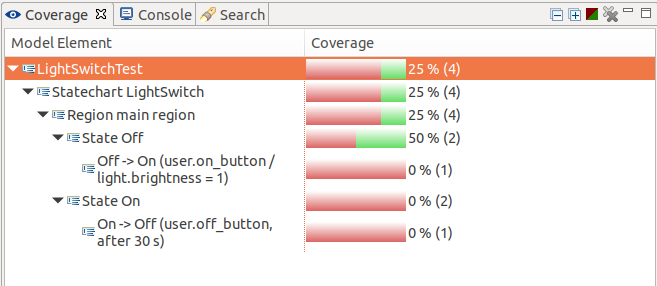 As only the initial state has been entered, the
 On state is not covered at all by the test. The Off state is only covered in parts, as no outgoing transition is taken. The coverage state is visualized in the model when you select an element from the coverage view: 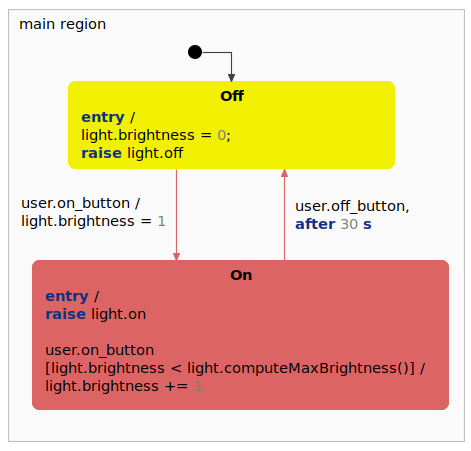
Adding more and more test cases will increase the coverage up to 100%.
Get this example
The complete project — statechart models, sources and build files — lives in the itemis CREATE examples repository. Inside itemis CREATE for Eclipse you can import it directly with the example wizard.