Security Analyst 22.2
This release predates the rename of YAKINDU Security Analyst to itemis SECURE, which happened with 22.4. The product names below are the ones used at the time.
Local Risk Level
In the attack tree and all editors that concern attack steps, controls or threat scenarios, the display of the well known triplet of feasibility, impact and corresponding risk has changed. Now, Security Analyst highlights the local rating and makes sure that the triplets adhere to the configured risk matrix.
You might wonder what local means. If you take a look at AS.3 in the ISO/SAE 21434 headlamp example, you'll notice that the displayed risk level has changed and no longer takes into account the implemented control up in the attack tree. Instead, a consistent triplet is shown which leads to less confusion.
If the global risk level is of interest, just walk up the attack tree and take a look at the calculated risk at the related attack steps or fast forward to the threat scenario.
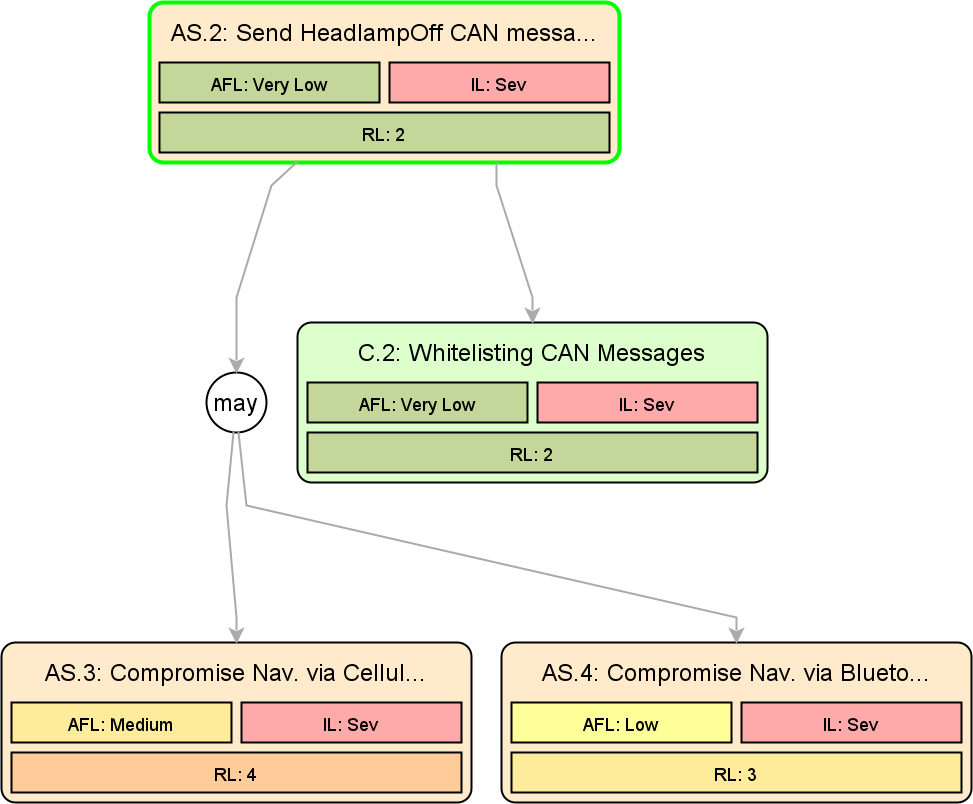
This does just change the displayed values. We are not sacrificing precision when calculating the risk.
Item Definition & Analysis Excel Import
Based on openXSAM and our experience with the ISO/SAE 21434 model, we have designed our itemis Excel template that can be used to exchange TARA data without the need for learning any XML syntax. The template is still evolving; you may download the most recent version already now via the download page.

You can import the file into the currently selected TARA model via the corresponding menu entry. Please note that as of now, only the item definition and security analysis import is supported. Method configuration and catalogs are yet to come. Furthermore, make sure that your method configuration and catalog are compatible.
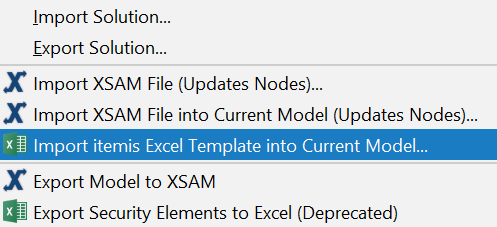
Creating a new empty ISO/SAE 21434 project takes care of this.
:::note Privacy note The itemis Excel template import is powered by the itemis cloud. :::
Extended Impact Factors
Impact Categories can now be marked as hidden in the inspector, which hides these categories in the Risk Level Tables, e.g. in the Threat Scenarios.
A new Impact aggregator was added which aggregates Impact Options per stakeholder, e.g. MAX aggregation for Stakeholder RU and SUM aggregation for Stakeholder OEM. This new feature is configured in the Risk Model.
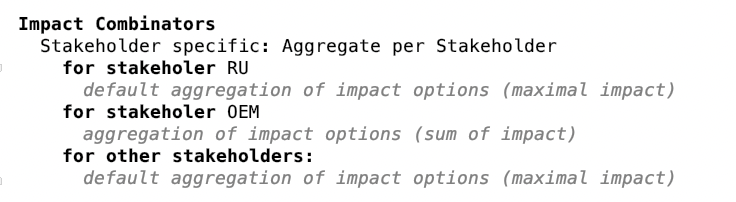
Impact Scaling was changed from int to double, to allow more precise scaling.
Furthermore, the standard MAX and SUM aggregators now have the option to ignore the impact scaling. This can be configured in the inspector of the aggregators.
This is not required by ISO/SAE 21434 and is an advanced feature for complex method configurations. For most Security Analyst users, we recommend keeping the configuration simple and starting with a common impact aggregator for all declared stakeholders.
Multiple Feasibility Models
To make it easier to model different threat agents, Security Analyst now supports multiple feasibility models per TARA. These feasibility models have their own set of Categories and Options.
Attack Steps, Threat Classes, Controls and Control Classes now allow you to choose a Feasibility. If there are multiple feasibility models available, one can be selected for Attack Steps and Controls to be active, or they can be derived from the respective class.
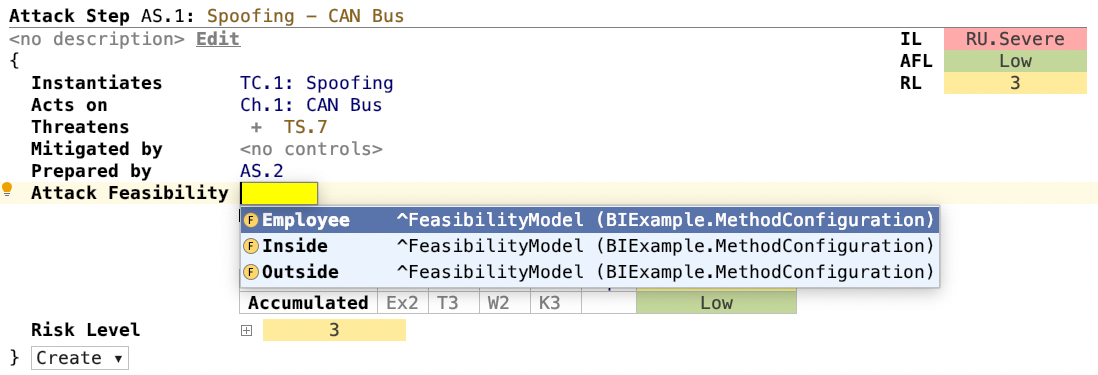
Note that only one feasibility model per attack tree is allowed and during the Risk Level calculation only the Feasibility Options of the selected feasibility model are considered.
If multiple feasibility models exist in a project there will be one risk matrix for each feasibility model in the Risk Model.
This is not required by ISO/SAE 21434 and is an advanced feature for complex method configurations. For most Security Analyst users, we recommend keeping the configuration simple and starting with just a single feasibility model.
Impact Levels per Stakeholder
A new expert feature for defining impact levels per stakeholder is added in this new release.
If all Impact Levels in the Impact Model are prefixed with a Stakeholder's name, this new feature is implicitly enabled.
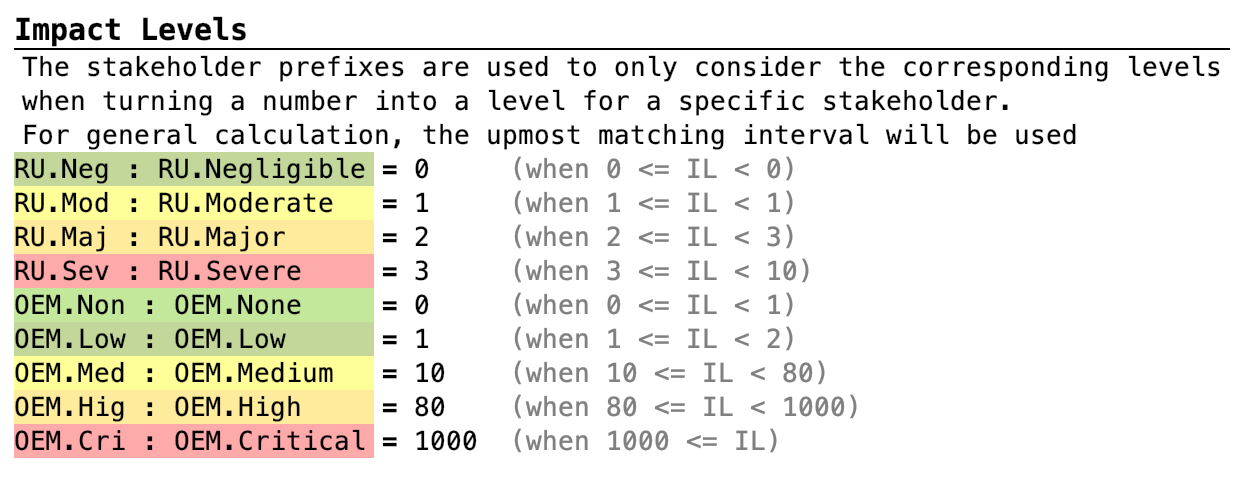
In this mode the same value can be assigned to multiple Impact Levels, e.g. OEM.Non = 0 and RU.Neg = 0.
To best utilize different treatments of the Stakeholder-specific Impact Levels, a custom impact option aggregator is needed. If this feature is enabled, you will see one Risk Matrix per Stakeholder in the Risk Model.
This is not required by ISO/SAE 21434 and is an advanced feature for complex method configurations. For most Security Analyst users, we recommend keeping the configuration simple.
Custom Factors
In the Risk Model you can now define custom factors within custom impact aggregators and use these for defining your own expressions. These expressions are identified by names and define multiple levels, each level being a double value.
In the ProjectInfo of the Analysis you can then reference the custom factor and select the active level. This allows you to control the calculation results from outside the Method Configuration (Risk Model), e.g. depending on your TARA's project phase.
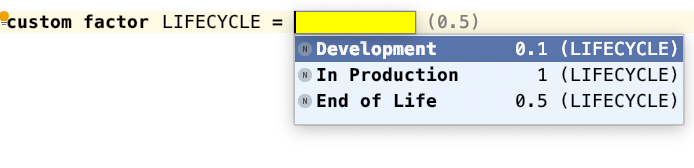
This is not required by ISO/SAE 21434 and is an advanced feature for complex method configurations. For most Security Analyst users, we recommend keeping the configuration simple, which does not require custom aggregators at all.
Various fixes and improvements
- Change default project location from
MPSProjectstoSECUREprojects - Renamed Damped by in Threat Scenarios to Lessened by
- Risk calculation caches are now cleared when switching branches
- New check that at least one stakeholder exists and improved error message in impact model if there is no stakeholder defined
- Update and improve tooltips in assistants
- Aligned the provided example's feasibility categories with ISO/SAE 21434
- XSAM: the serialization name for
SecurityControlchanged toControl; for the import the old nameSecurityControlis still supported - Improved Security Objective to Threat Scenario migration
- Preparations for simplified threat scenario usage: stay tuned!
Version Mapping
The following table can be used to determine the Security Analyst version based on the internal plugin version com.moraad.core that is stored in the .msd file of every solution:
<language slang="l:2bca1aa3-c113-4542-8ac2-2a6a30636981:com.moraad.core" version="<com-moraad-core-version>" />
| com.moraad.core version | Security Analyst version |
|---|---|
| 80 | 22.2 |
| 78 | 22.1 |
| 74 | 21.3 |
| 73 | 21.2 |
| 72 | 21.1.1 |
| 71 | 21.1 |
| 64 | 20.4 |
| 63 | 20.3.1 |
| 61 | 20.3 |
| 59 | 20.2.1 |
| 58 | 20.2 |
| 55 | 20.1.1 |
| 54 | 20.2.1 |
| 49 | 19.4.1 |
| 48 | 19.4 |
| 46 | 19.3.1 |
| 44 | 19.3 |
| 41 | 19.2 |
| 37 | 2.5.1 |
The source document lists 20.2.1 twice, for core versions 59 and 54. The entry for 54 is likely a typo; it has been left as written.