itemis SECURE 22.4
Rebranding

We are pleased to inform you that the previously announced changes regarding YAKINDU Security Analyst are valid from now on and the tool will therefore be called itemis SECURE in the future.
Functions and features remain identical for itemis SECURE. The changes are only characterized by visual changes as well as the new name and the matching new logo.
The new identity reflects our expanded global reach and commitment to providing a comprehensive Threat Analysis & Risk Assessment solution for you. With our state-of-the-art technology and our expert team, we are confident that itemis SECURE will be your preferred go-to solution for all your TARA needs.
The rebranding is more than just a name and appearance change, it reflects our dedication and commitment to providing the best TARA tool in the industry. After extensive market research, we recognized that a strong, new name and a modern design were needed to reflect the powerful capabilities of our product. Our new identity represents our commitment to meeting the evolving needs of our customers and staying ahead of the curve in the field of cybersecurity in the automotive industry. For this reason, we named the solution itemis SECURE to highlight what we promise: to help you to perform your TARAs in the best way possible to secure your products! The protective shield in our new logo is intended to further emphasize our promise.
itemis SECURE will continue to help you stay ahead of the ever-changing threat landscape, with state-of-the-art technology and expert support.
We've also rebranded some of the assets like our homepage. However, some landing pages still rely on the old branding. Moving forward, we will rebrand all our existing assets, and of course, we will build any new asset using the new brand identity.

The updated user guide documents the renamed product.
ISO/SAE 21434 Terms in XSAM
Our implementation of openXSAM got even closer to ISO/SAE 21434. Starting with this release, the XSAM element names are aligned with the established terms of the standard. This is true for imports as well as exports.


We kept compatibility to your existing models!
Floating License Borrowing
If you use a Floating License without auto-borrowing support, you can borrow your license for a few days, depending on the maximum borrowing period specified in your license. The advantage of a borrowed Floating License is that you can work without connecting to the license server, e.g. at a location without an internet connection or on an airplane. The second advantage is that your license is locked to you during the borrowing period and cannot be used by anyone else in the meantime, even if you are not currently using your itemis SECURE. Thus, you cannot be blocked by unavailable licenses during this time. Your borrowed Floating License will automatically expire after the number of days you borrowed it for. However, you can return your borrowed Floating License at any time before that and make it available to others while you are not using it.
If central license management is to be used, a configuration file called yml.properties must be placed in the <USERPROFILE>\.itemis directory. Your administrator will preconfigure this file with the license server address and available Floating License features associated with your license and supply it to you.
Manual Borrowing
You can borrow a Floating License in File > Settings > Appearance & Behavior > itemis SECURE General > License Borrowing. The borrow duration input field suggests the maximum number of days you can borrow your license for as long as it is empty. If you want to borrow your license for the entire borrowing period, you can simply click the Borrow Floating License button, otherwise you may enter a number of days between 1 and the suggested maximum.
Be aware that you need an established connection to your license server to successfully borrow your license and that it may take about a minute in case of errors.

Automatic Borrowing
With Floating Licenses supporting auto borrowing, a license will be automatically borrowed for a long period of time on the first start of itemis SECURE with a connection to the license server. The advantage is that your license is locked for you during the borrowing period and cannot be used by anyone in the meantime, even if you are not currently using itemis SECURE. Hence, you cannot be blocked by unavailable licenses during this time. From this point on, you can work without connecting to the license server until the borrowed license expires. Any further start of itemis SECURE with an existing connection to the license server will extend the borrowing period completely. To make your license available to other users again, it must expire. It is not possible to return the borrowed license early.
Improved Large Model Support
Since itemis SECURE calculates all possible attack paths throughout the modeled attack graph, large models pose a tough challenge. It is not trivial to keep itemis SECURE responsive while calculating thousands of attack paths and damage transformations. In version 22.4 we are introducing major improvements under the hood to improve the performance by a large magnitude which means in other words: support for even larger models.
We have continued to improve performance for large and highly interconnected models and will continue to do so in the future. The changes affect computing performance, responsiveness as well as memory consumption.
In rare cases, it may be useful to limit the number of considered attack paths. This limit can now be set as a beta feature and can be found in File > Settings > Appearance & Behavior > itemis SECURE General > Calculation. We recommend a default of 1,500,000 paths.
If certain attack tree segments exceed this boundary, the risk value at this corresponding node will not be accurate. In this case, please refer to our modeling guidelines or contact us.
Feasibility Combination Tailoring
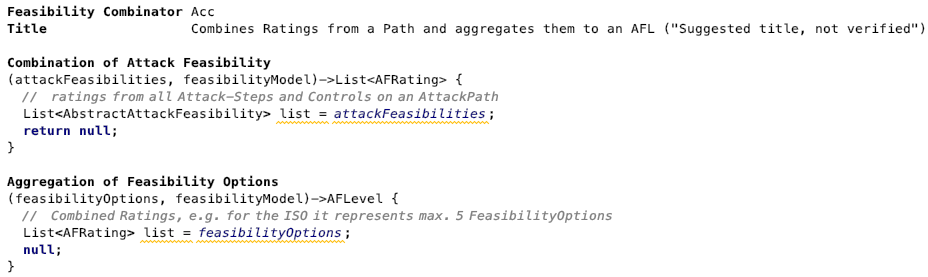
We have made adjustments to the method configuration that allows you to customize the aggregation of attack capabilities. Nevertheless, you should familiarize yourself with the BaseLanguage before changing the aggregation or contact us.
Various Fixes and Improvements
-
Fixed issue that prevented report generation in some cases
-
Improved logging and error messages (e.g. regarding licenses)

-
Prepared for upcoming platform migration
Before migrating your projects to SECURE 22.4 you have to migrate to SECURE 22.3 first!
Version Mapping
The following table can be used to determine the itemis SECURE version based on the internal plugin version com.moraad.core stored in the .msd file of every solution:
<language slang="l:2bca1aa3-c113-4542-8ac2-2a6a30636981:com.moraad.core" version="<com-moraad-core-version>" />
| com.moraad.core version | itemis SECURE version |
|---|---|
| 87 | 23.1 |
| 86 | 22.4 |
| 81 | 22.3 |
| 80 | 22.2 |
| 78 | 22.1 |
| 74 | 21.3 |