itemis SECURE 23.2
Overview
With SECURE 23.2 we introduce several usability and functionality improvements and updates. Furthermore, we updated our installer to allow installations without admin rights.
We believe these enhancements will significantly improve your experience with SECURE, making it even more effective for security analysis and documentation. We're dedicated to continually refining our tool, so stay tuned for more improvements in future releases. We appreciate your continued support and look forward to further improvements in future releases as we strive to make SECURE the best tool for your TARA process needs.
Usability Improvements
For this release, we improved the user experience of SECURE and fixed common pain points amongst a variety of use cases and scenarios.
Improved Clarity for Drop-Down Menus
The most common user concern was the lack of clarity regarding where the drop-down menus could be accessed. Additionally, the keyboard command for drop-down menus (Ctrl + Space) was not discoverable for many users. To address these issues, we've made the following changes:
-
Universal text color scheme: We've introduced a color scheme to indicate the functionality of fields within SECURE.


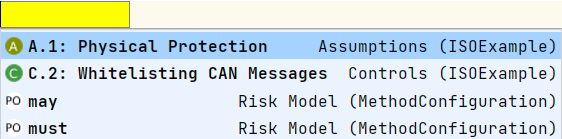
- Gray text indicates a field that stores plain text.
- Blue text indicates a field that has drop-down menu capabilities.
-
Mouse-click access: Users can access drop-down menus by simply left-clicking the mouse, providing an alternative and more visible way to interact with the menus.
With these enhancements, users, whether new or experienced, will find it easier to identify and use drop-down menus within SECURE, especially those who prefer a combination of keyboard and mouse inputs.
We're committed to continually improving the UI/UX of SECURE. Stay tuned for more enhancements and features in future releases.
Import/Export Enhancements
Persistent File Import Path
SECURE now retains the most recent path used for Open File… dialogs (including use cases like XSAM Import) across restarts, saving users time and effort.
Persistent File Export Path
SECURE now retains the most recent path used for Save File… dialogs (including use cases like XSAM Export and Create Report) across restarts, saving users time and effort.
Custom Export File Names
SECURE now suggests meaningful default file names for Save File… dialogs across restarts, saving users time and effort.
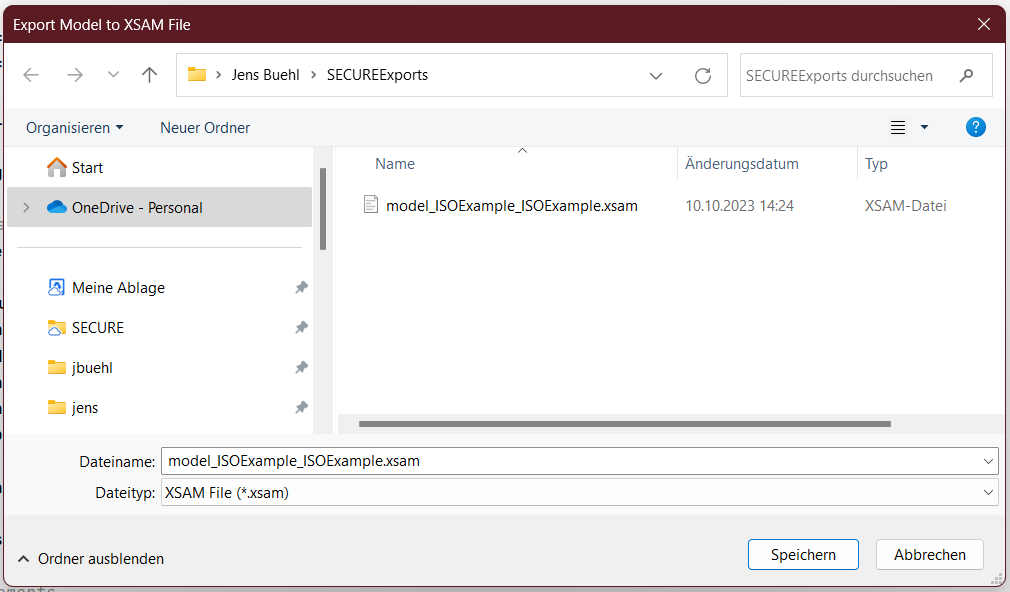
Table View Enhancements
Sorting in Table-Views
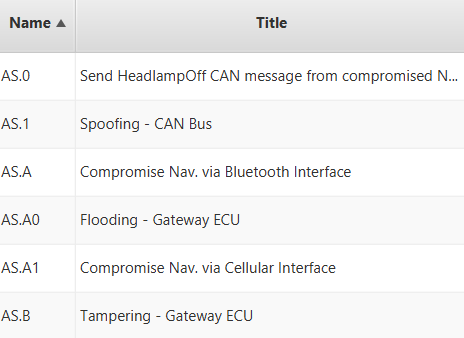
The header columns in TableViews are now number-aware and comparable, allowing for more natural sorting.
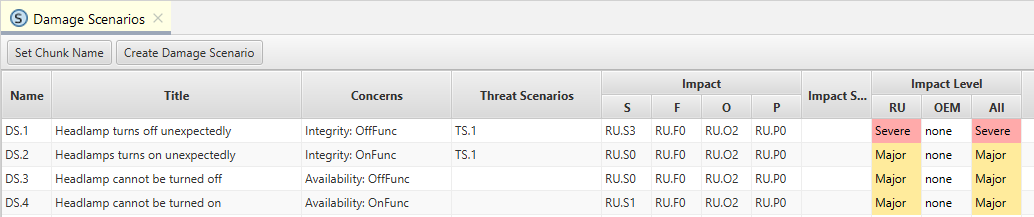
Sorting in Damage Scenario Table
In Damage Scenarios, the Threat Scenarios column is now compared based on the name of the first Threat Scenario, improving clarity and organization.
Various Improvements
These improvements aim to enhance the overall user experience of SECURE, making it more efficient, user-friendly, and intuitive.
Path Explorer
We've renamed the Debugger view to Path Explorer to better reflect its functionality and make it more user-friendly.
Damage Scenario Fields moved
The Normal Behavior and Operational Situation fields in Damage Scenarios have been moved to the inspector for improved accessibility and workflow efficiency.
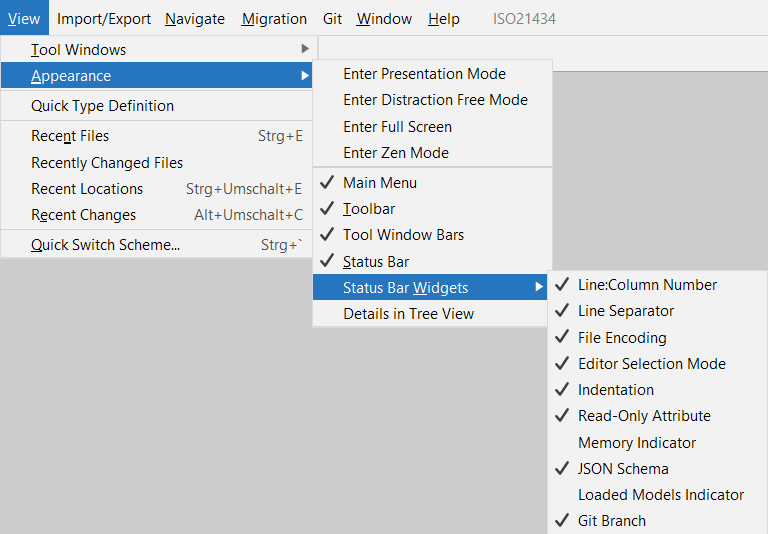
Loaded Models Indicator Status Bar Widget
The Loaded Models Indicator Status Bar Widget is now disabled by default, streamlining the interface. Users can enable it as needed.
Path-Count Enhancement
We've updated PathCounts to display as "(less-or-equals to <number>)" since we calculate upper limits and no exact results, providing more accurate information.
Reports and Checklists
In this release, we've focused on making your experience with Reports and Checklists in SECURE even more efficient and user-friendly. We've addressed several minor issues, aimed at improving the creation of artifacts from your security analysis.
Coherent Color Theming in Reports
Reports now feature a consistent color theming based on the template file used. This cohesive design not only enhances the visual appeal but also improves readability and coherence across your reports.
Tailoring of the template is yet to come.
Rationale Links in Checklists Fixed
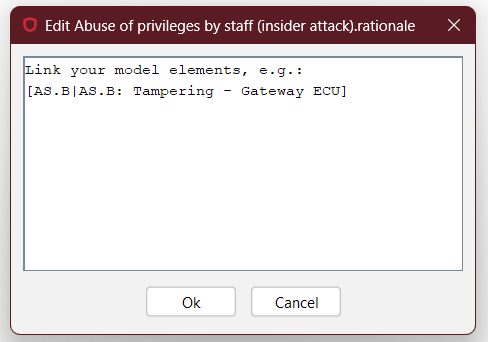
We've resolved the issue with rationale links in checklists, specifically those related to UN R155 Threats. This ensures that users can easily access and reference the necessary rationale when needed. Also, you can now seamlessly navigate these links for better reference and context.
Customized Damage Scenario Reports
In Damage Scenario reports, tables have been updated to allow the omission of the Impact Scale column, giving more control over the information presented in your reports. This is also simplifying the presentation and making it more focused on essential information.
Save Dialog
Prior to report creation a save dialog is shown to select the path and change the proposed filename if needed. The report path is remembered throughout restarts.
Assistants
We've also made significant improvements to our assistants to streamline your workflow and provide you with more helpful guidance.
Risk Treatment Rationale Placement
We've moved the Risk Treatment rationale to the inspector and allow multi-line rationales, making it more easily accessible and ensuring a smoother workflow when managing risk treatments.

Smart Suggestions for Risk Treatments
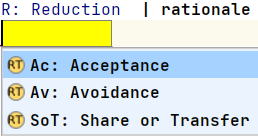
The treat via field in the assistant now suggests only Risk Treatments that haven't already been inserted, saving you time and preventing duplicates.
Clear Guidance for Empty Rationale Fields
We've introduced info-messages for empty rationale fields in both assistants and checklists. These messages help ensure that all necessary information is provided, improving the completeness and clarity of your documentation.
Flexible Risk Treatment Rationales
You can now clear Risk Treatment rationales, offering greater flexibility when managing and documenting risk treatments.
Obfuscator
We've made several minor but noteworthy updates to the Obfuscator.
Preserved Chunk Element Titles
The Obfuscator now retains (obfuscated) titles of Chunk Elements, enhancing the readability and understanding of your content.
Preserved Folder Structure
Virtual folder preservation with obfuscation: chunks maintain their folders, but these are now obfuscated as well. This ensures that organizational structures remain intact while protecting sensitive information.
Fixed Obfuscation of the Composition preserving its functionality
In case you need to obfuscate the used Composition for any purposes, this is now possible without affecting the functionality of the analysis and calculation. That means that we decided to preserve some more information (namely, numerical limits for Impact and Attack Feasibility Levels) and found ways to keep but obfuscate other parts of the solution (for example the names of the Impact Levels). All of this while preserving the confidentiality of the information stored in the Composition.
XSAM Integration Enhancements
In this release, we've introduced several enhancements to streamline your toolchain integrations with XSAM. These changes are designed to save you time and effort by simplifying the process while ensuring a flexible integration experience and improve your overall workflow.
Export of the Calculated Triple (IL, AFL, RL)
We've made it even more convenient for users by now exporting the calculated triple (Impact Level, Attack Feasibility Level, and Risk Level) directly to XSAM. This way you can use them for any processing steps on XSAM level, without having to consult SECURE again.
Full Vector of Feasibility Ratings
The entire vector of feasibility ratings, including derived values, is now seamlessly exported to XSAM. This comprehensive export ensures that you have all the necessary data readily available for your toolchain integrations.
User-Specified Export Path
We've given you more control and flexibility by allowing the specification of a user-defined export path for XSAM. Instead of a fixed temporary folder for all XSAM exports, you can now choose a path that suits your workflow. What's more, this user-specified path is retained across tool restarts, enhancing the consistency of your exports.
Calculation and Performance
Consecutive Attack Feasibility Calculation
Consecutive attack feasibility is now calculated, even when some feasibility categories are left empty. This improvement ensures that you receive comprehensive and accurate results.
Optimized Attack Trees
We've optimized Attack Trees, resulting in smaller and more efficient representations, making your analyses more manageable and faster.
New (Beta) Calculation Approach
We've introduced a new (beta) calculation approach that employs a lazy iterator instead of an eager list-builder. This approach sets the stage for future performance enhancements.
Installer
We fixed an issue with the installer that prevented installation of itemis SECURE without admin rights. We re-introduced "per user installations": users can now install this application on a per-user basis, providing greater flexibility in deployment and management. By enabling per-user installations we make sure that users without admin rights can run the setup successfully.
Version Mapping
The following table can be used to determine the itemis SECURE version based on the internal plugin version com.moraad.core stored in the .msd file of every solution:
<language slang="l:2bca1aa3-c113-4542-8ac2-2a6a30636981:com.moraad.core" version="<com-moraad-core-version>" />
| com.moraad.core version | itemis SECURE version |
|---|---|
| 89 | 23.2 |
| 88 | 23.1.1 |
| 87 | 23.1 |
| 86 | 22.4 |
| 81 | 22.3 |
| 80 | 22.2 |
| 78 | 22.1 |
| 74 | 21.3 |