itemis SECURE 24.1
Overview
SECURE 24.1 marks the much-anticipated introduction of a significant enhancement for an even more comprehensive ISO/SAE 21434 coverage: the Concept Phase, also referred to as "ISO/SAE 21434 Clause 9". This addition is geared up to elevate your analysis results significantly, enhancing coherence and providing a structured documentation approach for the inclusion of aspects such as Controls and Assumptions in your analysis. We believe these enhancements will not only streamline your workflow but also contribute to more effective security analysis and documentation within itemis SECURE. We're dedicated to continually refining our tool and we assure you that more improvements are on the horizon in future releases. We value your ongoing support and eagerly anticipate additional enhancements in future releases, improving itemis SECURE to become the ultimate tool for your TARA process requirements. Stay engaged for updates!
The Security Concept Phase - Quick Start
As many of our valued customers may already have ongoing projects and analyses initiated before our introduction of the Security Concept support, we are dedicated to assisting you in seamlessly transitioning and promptly incorporating Security Concepts in your workflows. To facilitate this process, we have introduced an automated action with this version. This feature allows for the effortless addition of necessary components to your existing TARA projects. Explore further details in the dedicated section Help to integrate the Security Concept Phase into existing projects. All the existing examples have undergone an update, now enriched with the incorporation of new chunks and furthermore contain new instances of the new types as well.
After migrating your projects to the new version, you may encounter new errors in the Method Configuration. Please refer to the section A Risk Treatment now "leads to" either the Goal-type or the Claim-type for comprehensive guidance on resolving these potential errors.
In addition you can find a link to some introductory videos on how to use the new Concept Phase elements. Simply access these resources conveniently through the main menu under Help > Concept Phase Video Tutorial. This resource will provide you with step-by-step insights into leveraging the new features seamlessly.
Security Concept Phase
The concept phase involves consideration of vehicle level functionality, as implemented in items, with the item definition serving as the foundational element for subsequent activities.
In the concept phase you may specify cybersecurity goals for the item (i.a.w. ISO/SAE 21434 clause 9.4), which represent the highest level of requirements. For this purpose, cybersecurity risks are assessed, which is derived from existing TARA activities (i.a.w. ISO/SAE 21434 clause 15). Additionally, you may specify cybersecurity claims, elucidating the rationale behind considering risk retention or sharing as appropriate strategies.
The cybersecurity concept (i.a.w. ISO/SAE 21434 clause 9.5) encompasses cybersecurity requirements and requirements on the operational environment. These are derived from cybersecurity goals and cybersecurity claims, that are based on a comprehensive perspective on the item. If you already possess an existing TARA model, itemis SECURE provides guidance on deriving requirements from Assumptions and Controls within your attack trees.
New Element Types
We've introduced new types aligning with ISO/SAE 21434 to enhance compliance. All of these types are encapsulated within the Security Concept folder.

Requirements
A new chunk reflecting Cybersecurity Requirements has been added. A Requirement can be easily added in the same way as all existing security analysis elements, allowing easy linkage with controls or assumptions.
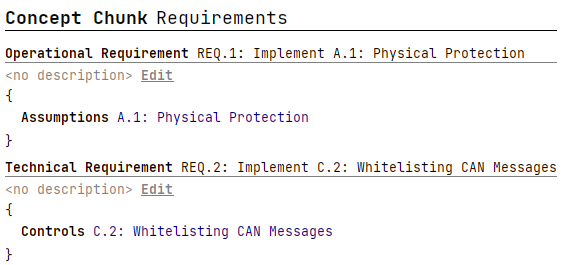
A Requirement consists of a title, name, and a list of elements which can be either Assumptions or Controls. Based on the type of elements within, a Requirement is classified into two categories: Operational and Technical. An Operational Requirement is linked to Assumptions, whereas a Technical Requirement is associated with Security Controls.
If a user attempts to add different types of elements to one Requirement, a warning will be displayed.
We recommend using our assistants to derive Requirements from existing Controls and Assumptions rather than manually crafting them.
Goals
A new chunk reflecting Cybersecurity Goals has been added. Adding a Goal follows the same intuitive process as all other existing security analysis elements.
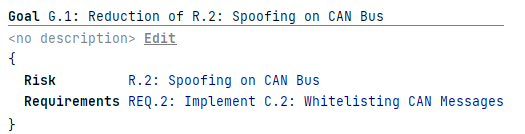
Each Goal comprises a title, name, risk and a list of requirements.
The assigned risk should be a risk that has been treated as Reduced in the Risk Treatment chunk; otherwise, a warning will be displayed. Additionally, only technical requirements should be assigned to a Goal; failure to adhere to this will cause a warning. Further details such as Cybersecurity Assurance Level (CAL), cause of compromise and other details are available in the inspector.
We recommend using our assistants to derive Goals from reduced Risks instead of crafting them manually.
Claims
A new chunk type reflecting Cybersecurity Claims has been added. Adding a Claim is a straightforward process, following the same approach as all other existing security analysis elements.

Each Claim comprises a title, name, risk and a list of requirements.
The assigned risk should be a Risk that has been treated as Shared or Retained in the Risk Treatment chunk; otherwise, a warning will be shown. Only Operational requirements should be assigned to a Claim; deviation from this will cause a warning. Cybersecurity Assurance Level (CAL), cause of compromise and other details can be accessed through the inspector.
We recommend using our assistants to derive Claims from shared or retained Risks instead of crafting them manually.
Security Concepts
An addition introduces a new section dedicated to Cybersecurity Concepts. A Concept can be easily added in the same way as all other existing security analysis elements.
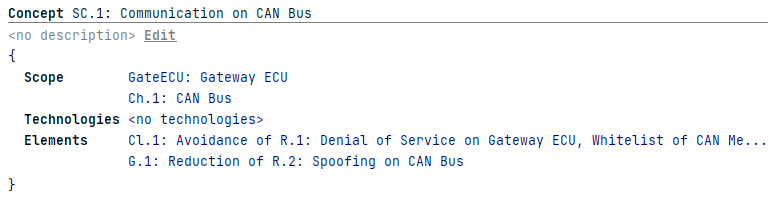
Each Concept is composed of a title, name, a Scope (represented as a list of System Elements), and a list of Technologies, along with a list of elements (Goals or Claims). In the absence of a specified Scope or a single Technology, the Concept is not confined to a specific subset of all Goals and Claims. Implicitly, it is meant to encompass all Goals and Claims within the system.
We recommend using our assistants to populate the Security Concept based on the given scope instead of assigning Goals and Claims manually.
New Assistants
In conjunction with the newly introduced types, we've incorporated new assistants to facilitate the derivation of new instances from existing TARA elements, such as Risks and Controls.

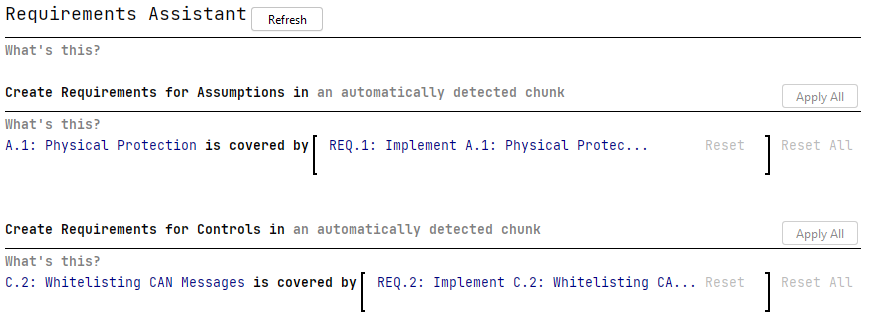
Requirement Assistant
To document the purpose of Controls and Assumptions, the Requirement Assistant will help you in creating Technical and Operational Requirements for your project. The assistant provides recommendations to add technical requirements for Controls and operational requirements for Assumptions.
Goal Creation Assistant
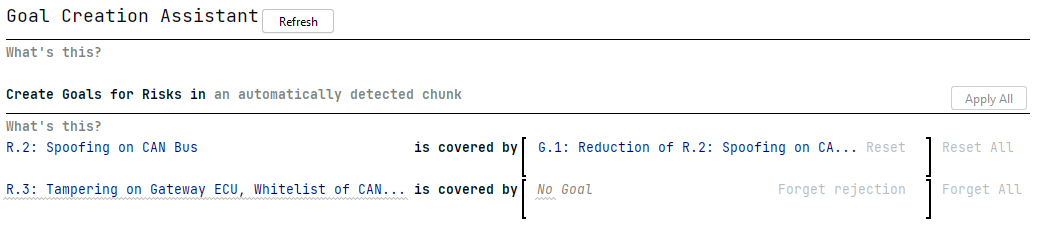
Facilitates the seamless generation of Goals associated with reduced risks or risks aligned with your customized Risk Model. The assistant automates the process by assigning meaningful titles to these Goals for enhanced clarity and efficiency.
Claim Creation Assistant
Simplifies the creation of Claims for retained or shared risks, or risks identified by your customized Risk Model. The assistant streamlines the process by automatically assigning meaningful titles to these Claims, enhancing efficiency in the risk management workflow.

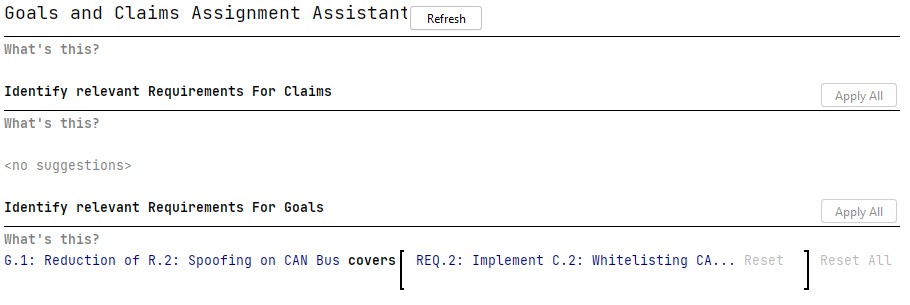
Goals and Claims Assignment Assistant
Assigns relevant requirements to Goals and Claims. A Requirement is relevant for a Goal or Claim, if — based on the Attack Tree of the Goal's or Claim's Risk — the Control or Assumption of the Requirement may influence the calculated Risk Level. This ensures a targeted and effective linkage between requirements and the fundamental security goals.
Concept Update Assistant
Facilitates the addition of Goals and Claims to a Concept based on the Concept's Scope and Technologies. It ensures alignment with the risk, targeting the same scope as defined by the concept.
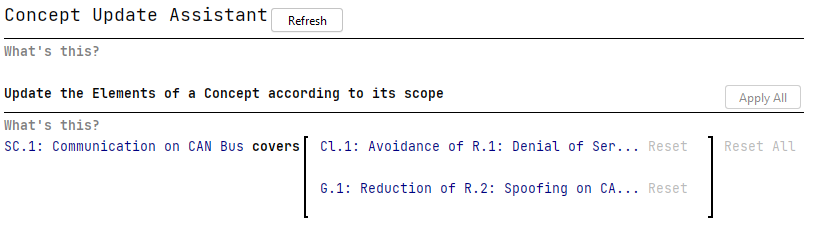
If the Risk of a Goal or Claim targets the same scope as the concept (or a scope that can be derived from the Production Rule Set), these elements should be added to the Concept as Elements.
Showcasing the new features
We have ensured that you can review the application of the new types and assistants in our provided examples. This feature is designed to assist you in becoming acquainted with their functionality and incorporating them seamlessly into your own existing projects.
Help to integrate the Security Concept Phase into existing projects
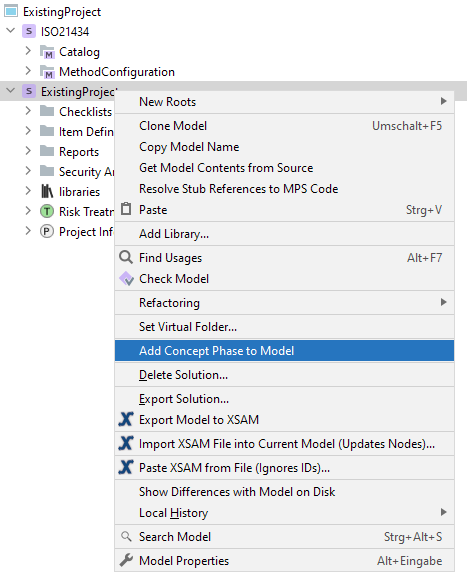
To support your initiation of the Concept Phase within your existing projects, we provide an action to create the basic chunks and assistants as well as a dedicated Report chunk, enabling you to promptly commence documenting the purpose of Controls and Assumptions.
Assuming you lack any chunks of the new Security Concept Phase, an action within the context menu of Analysis Solutions will appear, which allows you to add all the new Assistants and default chunks into the selected model, streamlining the setup process for seamless integration.
Changes to existing features due to the Security Concept Phase
In some cases we have revised necessitated updates to existing workflows to accommodate for the Security Concept Phase. Primarily, these changes were made to establish a "link" between existing entities and the new elements, aiming to create a more cohesive and user-friendly experience.
A Risk Treatment now "leads to" either the Goal-type or the Claim-type
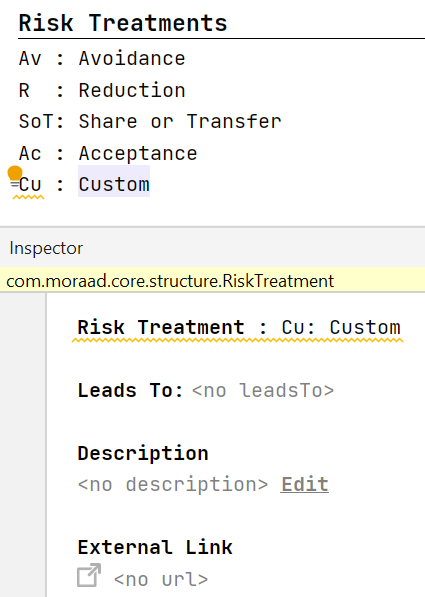
As our Risk Model is highly customizable, the choice of Risk Treatments is at your discretion. However, for the optimal integration with the new Security Concept Phase types, itemis SECURE requires information of how these elements fit into the existing design of Risk Treatments and how their associated Risks will be addressed. As such, it is necessary to specify whether a Risk treated by your custom Treatments would lead to Goals or Claims.
:::note Note on migration For the default Treatments provided with itemis SECURE, aligned with ISO 21434 recommendations, we offer assistance in migrating your existing models. When you open your project with the new version, educated guesses will be made based on these sources. However, for any custom Treatments it is up to you to provide this information. To identify whether your Risk Model requires additional input, check the Composition solution or the MethodConfiguration model, as missing leads to values will result in warnings. Alternatively you can execute the Pre-Update Check (under Migration → Run Pre-Update Check in the main menu) after migrating your project, as this will highlight missing leads to values as "migrate manually" results. :::
General Assistant Changes
To improve user experience and bolster traceability, significant changes have been made to Assistant functionality. These enhancements aim to provide users with a more intuitive and efficient workflow, ensuring a smoother experience when working with Assistants in SECURE.
Adding a New Assistant
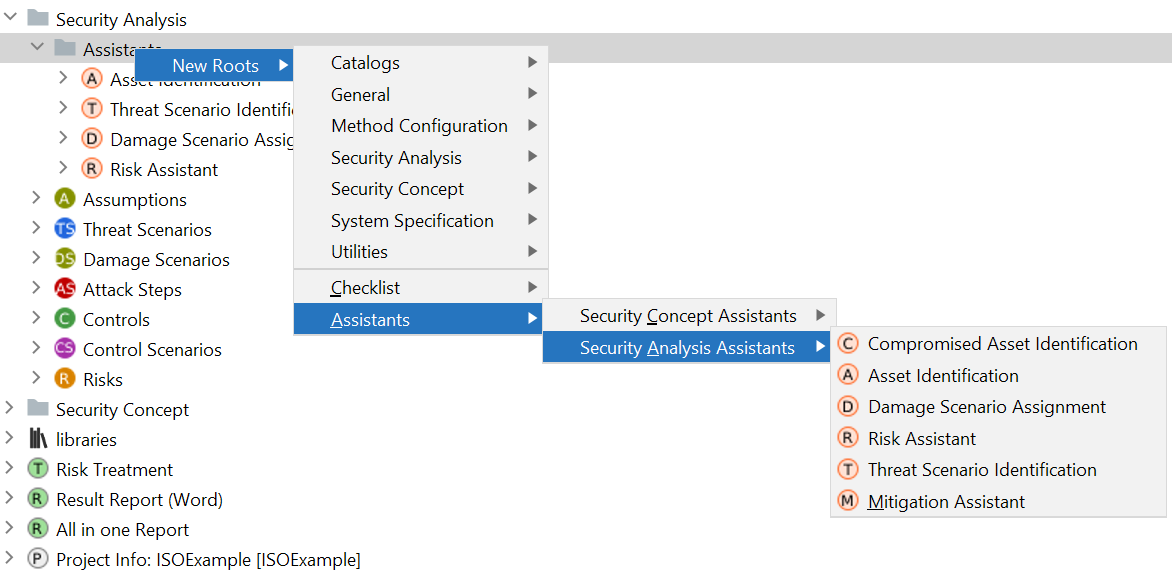
Instead of selecting Utilities > Assistant, users are now required to add a new Assistant by navigating to Assistants > [Assistant Category] > [Exact Assistant Type]. The former context menu entry created unspecified assistants that had to be assigned a type afterwards. This option has been removed. Assistants for the Security Analysis phase and the newly introduced Concept Phase Assistants are now organized into distinct lists, enhancing usability by providing clear categorization.
Changing Assistant Type
The type of an Assistant cannot be changed after creation. To promote consistency and traceability, users are now required to choose the Assistant type during the creation process and will no longer have the ability to modify it later. This ensures improved traceability, by preventing the inadvertent loss of "Rejected" decisions and removal of all rationales that occurred when switching the type of an existing Assistant in the past.
Unassigned Assistants
If an Assistant in your model lacks a type assignment, it is recommended to simply delete the Assistant and create a new specific one for the intended use case. This ensures accurate type assignments and optimal functionality.
Updated Folder Structure
Assistants are now organized in folders under their respective portion of the solution for new projects. This organizational change reflects the segmentation of Assistants aligned with different segments of SECURE, providing a more structured and easily navigable environment.
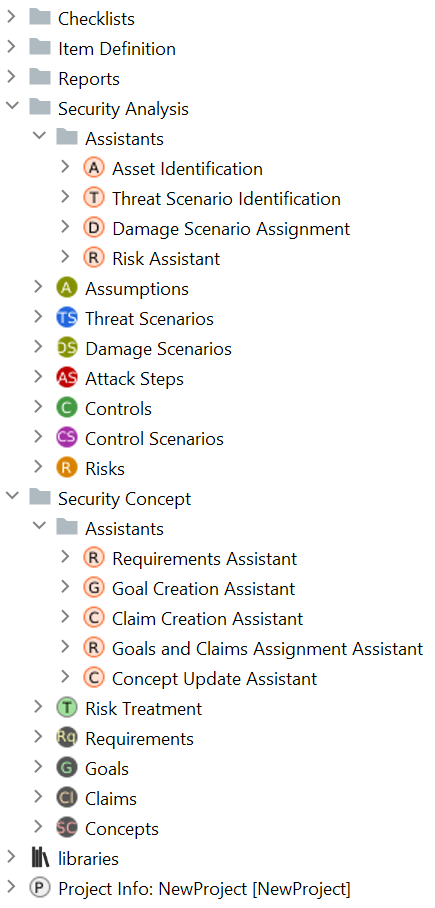
In alignment with its close association with the Concept Phase, the Risk Treatment chunk has been relocated to the Concept Phase sections for improved coherence.
Improvements and Fixes
Subtractive Control Scenario Definitions
Control Scenarios can now specify a set of Controls that should NOT be included. Use cases could include a Control Scenario that contains "All Controls" except "Control 2", or a Control Scenario that contains elements in "Control Group 1" except elements in "Control Group 2". This feature can be activated through the Inspector of the Control Scenario.
Default visibility of the Assistant's explanation text
To optimize space, we have reinstated the default setting to hide explanations. You can access the explanation by clicking on the What's this? link within the assistants.
Fixed unavailable rationale for Risk Assistant
An oversight has been rectified in the Risk Assistant, which initially lacked the option to provide rationales when an assistant suggestion was rejected. This has been fixed, users can now seamlessly add rationales within this assistant as well.
Fixed Risk Treatment chunk
In the previous version, deleting a risk in the risk chunk resulted in a disruption of the Risk Treatment chunk. Although deleting a risk in the new version may still leave dangling references, requiring users to resolve them by updating the Risk Treatment, the UI of the Risk Treatment chunk will no longer undergo changes due to the deletion of a risk.
Report Comment Obfuscation
To prevent some of the red texts in chunks, we have made changes to the obfuscator. Comments in reports will now be replaced with constant text to avoid confusion and enhance clarity.
Cross-Solution References to TARA elements
Attack Steps, Controls, and other elements are now referenceable from other solutions within the same project, promoting seamless integration and collaboration.
Default "AllControls" Scenario Activation
This release addresses an oversight in the "All Controls" scenario within newly created projects. Previously, this scenario failed to declare the activation of all controls. With the fix, the default scenario now accurately represents and activates all controls, ensuring a more robust default setup.
Reduction of Unnecessary Warnings
To enhance user experience, we've streamlined the warning system for Attack Steps without a linked threat class. Instead of several warnings, a single, clearer and more concise warning is now issued, enhancing the overall clarity of the warnings provided.
Fixed occurrence of deprecated element
A menu entry enabling the addition of a deprecated version of the Technology type to your project has been removed. If any issues arise due to this modification, we recommend resolving them by executing re-runnable migrations from the Migration menu.
Fixed Name Pattern
This version resolves an issue with Name Patterns when integrating minus characters or question marks, preventing automatic element numbering from breaking. Additionally, an error message will appear if your name pattern contains digits. Digits in Name Patterns have always been a problem; this new error message proactively informs users about the potential break in auto-numbering, alerting them to the issues before producing elements with identical names.
Prevent Warnings about Multiple Terminology Profiles
In previous versions, the setup of new projects triggered warnings due to multiple terminology profiles. We've resolved this issue by eliminating the cause of these warnings, ensuring a smoother project setup experience without unnecessary warnings in fresh and empty projects.
Rename option for collapsed Models
For solutions with only one model, known as "collapsed" models, renaming posed challenges. Hence, we have introduced a convenient action in the context menu of these collapsed models, enabling users to rename the solution and the model simultaneously. Please note that this action effectively re-creates portions of your project under the new name, potentially resulting in version control system (VCS) changes if your project is under version control.
Fixed broken editors when adding new Architectures to Catalog entries
Previously, adding new Architecture types to Control Classes or Threat Classes triggered errors on the top of the main editor within the RCP. That problem has been fixed, you can now seamlessly insert new Architectures without causing errors.
Several smaller UI/UX Improvements and Fixes
We made additional small changes to the UI to enhance overall consistency. These continuous improvements make it easier and faster to use the tool for both new users and veterans of the tool.
Version Mapping
The following table can be used to determine the itemis SECURE version based on the internal plugin version com.moraad.core stored in the .msd file of every solution:
<language slang="l:2bca1aa3-c113-4542-8ac2-2a6a30636981:com.moraad.core" version="<com-moraad-core-version>" />
| com.moraad.core version | itemis SECURE version |
|---|---|
| 91 | 24.1 |
| 90 | 23.3 |
| 89 | 23.2, 23.2.1 |
| 88 | 23.1.1 |
| 87 | 23.1 |
| 86 | 22.4 |
| 81 | 22.3 |
| 80 | 22.2 |
| 78 | 22.1 |
| 74 | 21.3 |