itemis SECURE 24.2.1
Overview
The release of patch 24.2.1 of itemis SECURE addresses the limitations encountered when exporting models to XSAM. The updated version now allows users to reuse report templates and export completed UN R155 checklists.
Furthermore, we have resolved a few minor issues that should enhance the tool's usability and comprehensibility. We are confident that these enhancements will markedly improve your experience with SECURE, making it even more effective for security analysis and documentation.
We are committed to continuously refining our tool, so please stay tuned for more improvements in future releases. We appreciate your continued support and look forward to further improvements in future releases as we strive to make SECURE the best tool for your TARA Process needs.
Export/Import
Added Support for Export and Import of Report Templates
Previously, users had to define reports in each project anew. This meant that they were unable to define some report templates in one project and then easily copy them over to another project. To address this limitation, we have incorporated support for reports in the XSAM format. The new functionality allows you to export entire models, including their associated reports, or just the reports as individual nodes. These exported models and reports can then be imported into other projects at a later stage. This should enable you to generate all your reports from different projects according to a common schema, which you only have to define and export once.
Given that XSAM still has a few limitations, this feature is not able to support a full export of reports. Please note that two aspects have to be considered:
-
Reports contain links to Project Info chunks and their content. If you import a report into a different project, these references will be broken. You can identify them if you see red error markings on the Project Info report item and the link item. The simplest solution is to delete them and create new report items for the project info instances in the current scope.

Example of a Project Info report item before export and after re-import in a different project.
-
XSAM does not support System Diagrams and Risk Treatment chunks. Therefore, if you utilize these two types of report items, their links will not be written out to the XSAM file and, consequently, cannot be restored from the XSAM format. In these instances, importing these two report item types will always succeed, but they will not be linked to any existing elements. Consequently, for instance, the System Diagram report item will simply utilize the default/first System Diagram for report generation. You can readily address these gaps by referencing nodes that are currently available in the context.
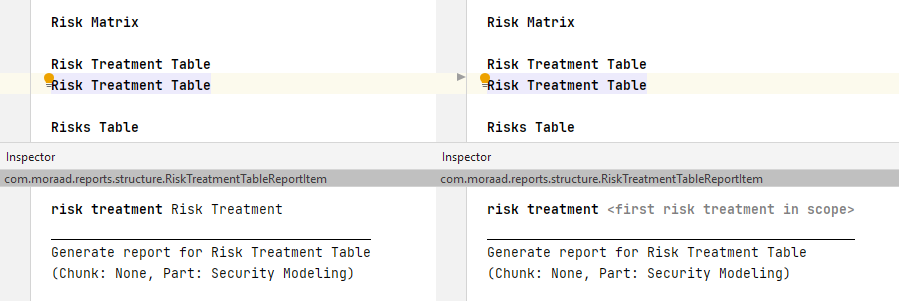
Example of a Risk Treatment Table report item before export and after re-import.
Added Support for Export and Import of Checklists
To ease the type approval process, the UN R155 Checklist is a useful (sometimes necessary) tool to comply with requirements. We have expanded our offering here to support you better. Besides the already existing option to export checklists in the form of a report item, we added an export and import functionality via our XSAM format, which should facilitate the conversion of checklist data into other formats.
The XML-based XSAM format — being an open standard — is designed to be processable by various tools. In addition, the support for checklists in XSAM now also allows you to share your current assessment of checklist points with colleagues and industry partners via a model-export.
Improved Action Descriptions
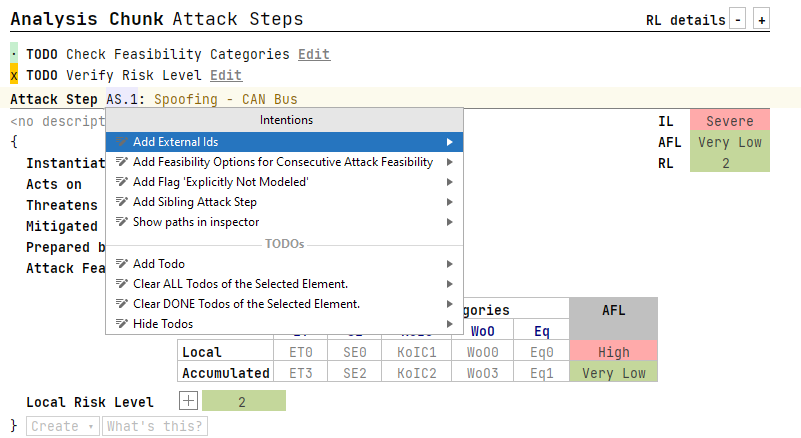
The descriptions to Clear ALL Todos and Clear all DONE Todos were misleading in suggesting that they would clear all respective todos globally. The descriptions have been updated to clarify that these actions are only affecting todos associated with the selected element.
Fixed generated File Names
Some of the proposed file names when exporting nodes to XSAM did not adhere to restrictions for file paths and file names in Windows. To avoid any issues when exporting nodes, we decided to limit our file name proposals to the following character set: letters, digits, minuses, underscores, and spaces. Other characters from the selected nodes' names will be dropped. If the file system supports them, you can always add other characters back into the file name.
Version Mapping
The following table can be used to determine the itemis SECURE version based on the internal plugin version com.moraad.core stored in the .msd file of every solution:
<language slang="l:2bca1aa3-c113-4542-8ac2-2a6a30636981:com.moraad.core" version="<com-moraad-core-version>" />
| com.moraad.core version | itemis SECURE version |
|---|---|
| 92 | 24.2, 24.2.1 |
| 91 | 24.1 |
| 90 | 23.3 |
| 89 | 23.2, 23.2.1 |
| 88 | 23.1.1 |
| 87 | 23.1 |
| 86 | 22.4 |
| 81 | 22.3 |
| 80 | 22.2 |
| 78 | 22.1 |
| 74 | 21.3 |