itemis SECURE 24.2
Overview
With SECURE 24.2, we are excited to bring a range of enhancements designed to elevate your experience with itemis SECURE. These improvements make security analysis and documentation more efficient and effective. We strongly believe these enhancements will greatly improve your workflow and overall satisfaction.
This release marks an important step towards the long-awaited SECURE in the Web. The first major transition is the introduction of centrally managed catalog data and workflows. While work is still in progress, you are welcome to contact us to experience these improvements in action or to use the public catalogs from the Automotive Security Research Group (ASRG).
Additionally, we have finalized the Concept Phase for enhanced ISO/SAE 21434 compliance, providing more detailed assessments of attack feasibility levels. We've also enhanced the import and export processes and streamlined reports and assistants.
Our commitment to continually refining itemis SECURE ensures ongoing improvements in future releases. We sincerely appreciate your continued support and are dedicated to making itemis SECURE the optimal tool for your TARA process and prepare you for challenges ahead, such as whole vehicle validation and AI assisted TARAs.
Managed Catalogs
Usage
So far, all your TARA modeling took place within one project. Now, in light of a planned transition to a web-based or hybrid TARA modeling and analysis approach, we started to enable more and semi-automated collaboration. This so far is limited to one-directional updates to the locally used catalog, but this will only be the starting point going forward. You can expect more web-based tools and collaboration capacities in the upcoming releases.
The first web-based data management tool that we are able to deploy now, focuses on the used catalog of Threat Classes and Control Classes. This offers multiple experts the chance to inspect, analyze, and propose changes to a centrally stored catalog model at the same time. Accepted changes to this catalog will automatically create and release new versions of the catalog without having to touch any version control systems like git.
In the current form, the itemis SECURE RCP can subscribe to changes of this central catalog and update in case new versions become available. A RCP user so far is not able to propose changes from within their tool, only change proposals within the web-UI are possible.
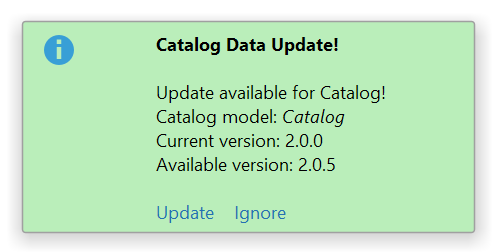
Once configured, itemis SECURE will continuously check for new versions of the configured catalog. When a new catalog version is published, a tooltip notifies you about the change and allows you to update the catalog immediately, or simply ignore the update for now.
Configuration
To configure your target TARA project, you need to add a Catalog Data section in the project info and set the following properties:
- Version Mask: Defines the target version of your referenced catalog. We use semantic versioning to declare the target version (see semver.org). If you leave this field empty it will always update to the latest available version.
- Repository: The identifier of the centrally managed source catalog repository.
- Repository Service URL: The service endpoint that handles your catalog requests (e.g.: "Is a new version available?").
- Catalog model: The model reference to the target catalog in your project.
To use the catalog update from centrally managed catalog repositories, you need to have access to the itemis SECURE catalog web application. This application can be hosted on premise or at itemis. We will support you with setting everything up so that you can try it out. In the meantime, you can start with the publicly available ASRG catalog.

Ensure your TARA Method Configuration matches the catalog before syncing to avoid potential model adjustments afterward. In particular, the asrg-catalog is based on slightly different Security Properties than a default SECURE ISO-Composition based project.
If you plan to sync model information using XSAM, then the Catalog Model reference in the project info list will not be recreated upon XSAM import. That is a limitation of XSAM, as this format can't uniquely identify whole models. The remaining information will be correctly imported, but to re-activate the automatic version checking and update, you will have to enter the model reference again after importing.
Legacy Settings
The existing settings entry as well as the previous catalog download action are now obsolete with the introduction of the new updater. Hence, they have been removed.
If you previously used this action with its settings entry, ensure you transition the information to the new format specifically. This transition will not occur automatically. In addition, the previous setting will be removed and will not be accessible in the migrated project version. Be sure to look up the URL and back it up before you migrate.
Concept Phase Enhancements
Tutorial
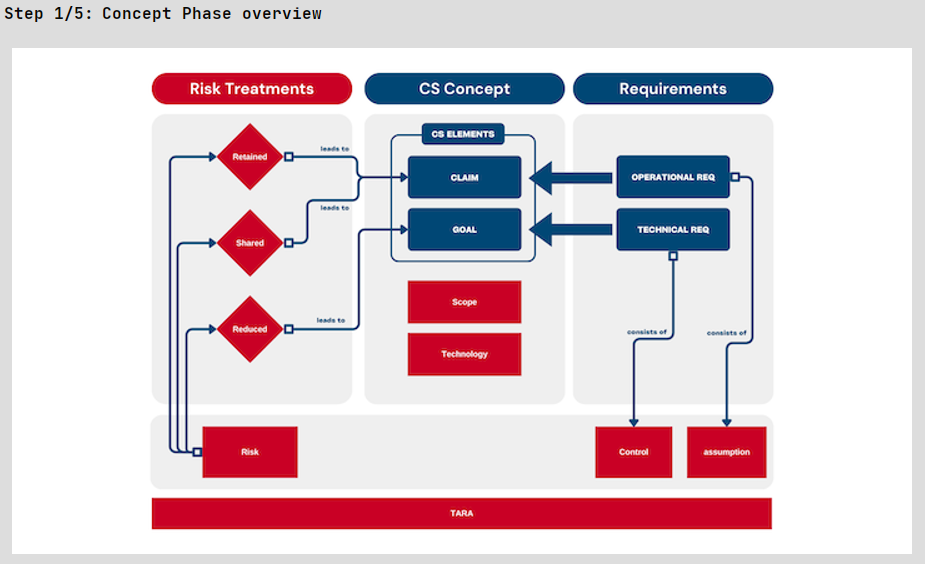
To complement the introduction videos for the Concept Phase with a practical exercise, we have added two new sections to the tutorial. These sections cover both the theoretical concepts and their practical implementation within itemis SECURE, providing a comprehensive learning experience.
Enhanced Report Items for Goals and Claims
To enhance compliance with ISO 21434, we have introduced a feature that allows the export of rationales from the Risk Treatment section directly into the corresponding report items (namely the report tables for Goals and Claims). This improvement ensures that all relevant justifications are systematically documented in the reports, supporting a thorough risk management process.
Enhanced Report Item for Security Concepts
The report item for Security Concepts will now, by default, list the included requirements of each concept. However, users still have the option to configure it to follow the previous format, which lists the linked Goals and Claims. This flexibility enables users to tailor the reports to highlight the most pertinent information, thereby enhancing the usability and customization of reports.
Import Concept Phase from itemis Excel Template
In this new version, we've added the ability to import concept phase information from the itemis SECURE Excel Template. To support this, we've also updated our template to include dedicated spaces for these new element types. This enhancement streamlines your workflow and ensures all essential data is seamlessly integrated.
The itemis Excel template can be found next to the itemis SECURE examples (e.g. C:\Users\{userName}\SECUREExamples\SECURE24.2).
Numerical Attack Feasibility Levels
Enhanced Precision
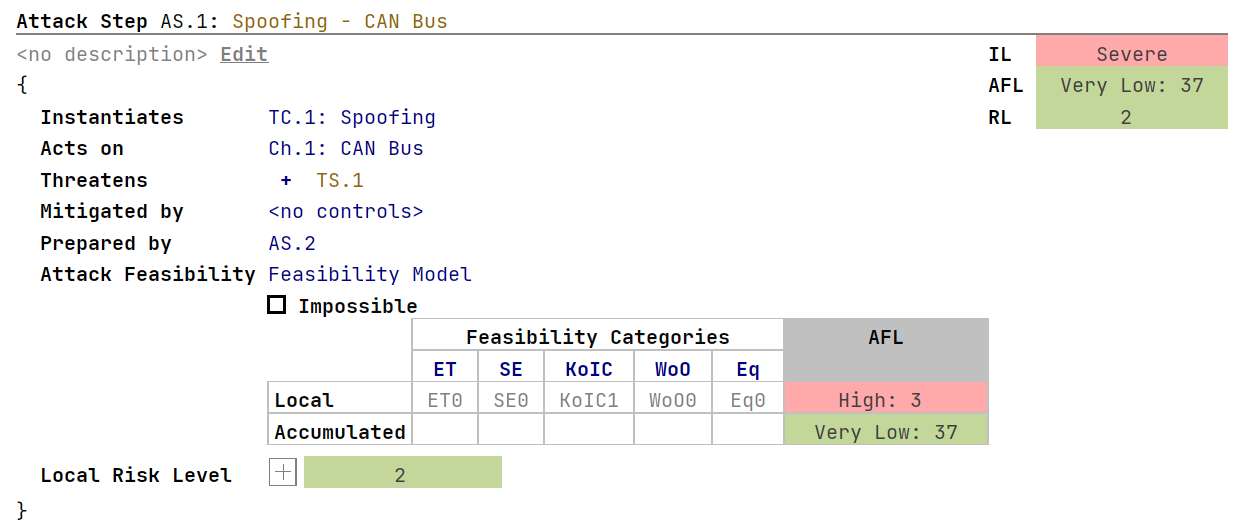
So far, itemis SECURE was only capable of highlighting the Attack Feasibility Level of elements and Attack Paths. That made it harder to compare different Attack Trees or properly evaluate the effects of Controls on the calculated ratings. To enable a more precise analysis of your model, we introduced the option for numerical Attack Feasibility Levels.
You can now enable precise numerical AFL (Attack Feasibility Level) ratings directly in the settings. This feature allows for more accurate comparison of different attack paths and evaluation of control scenarios. By incorporating numerical values into the Attack Feasibility Ratings, you can achieve a more detailed and granular analysis to refine your strategies and countermeasures. This improvement enhances the existing attack feasibility levels, providing a clearer and more precise understanding of attack feasibility, ultimately helping you assess the likelihood of certain attacks more effectively.
Stricter Rules for Consecutive Attacks
Following similar logic to the previous point, we previously examined Attack Steps and Controls using sequential Attack Feasibilities to identify instances of unexpectedly low criticality in consecutive Feasibility Levels. Now, with users able to scrutinize the precise feasibility ratings of individual elements, we have updated our model checker to notify you if a consecutive attack exhibits either a lower criticality Feasibility Level or the same Level but a lower criticality Feasibility Rating. This improvement is designed to facilitate more realistic modeling of consecutive attacks, thereby enhancing the accuracy of risk assessments.
Adapted Feasibility Model
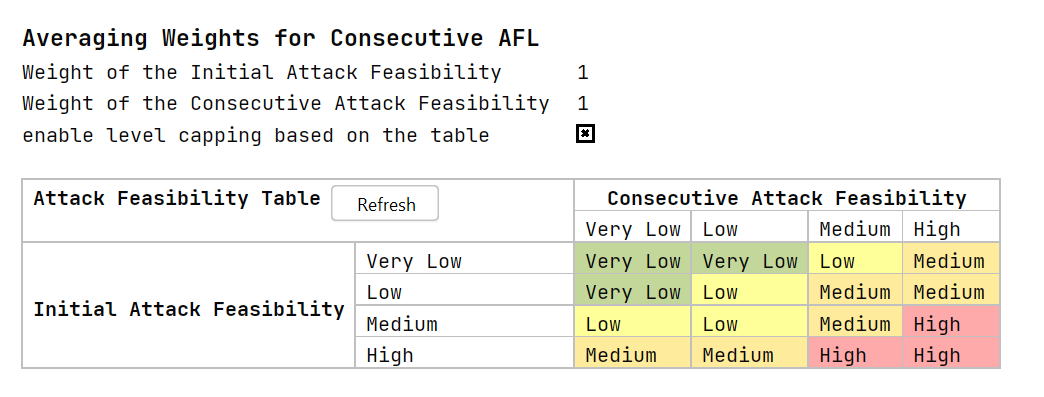
The old Feasibility Model worked fine for initial and follow-up attacks when we didn't have numerical ratings. But now, with these new ratings, we had to change things up. The old lookup table just couldn't handle the new data properly.
So, we switched to a weighted approach. This gives us more flexibility and accurate results. For new projects, the table won't be used by default, but you can turn it on if you want to limit results to certain levels. Existing projects will still use the table to figure out overall criticality.
Showing the Most Critical Attack Path in AFL Tables
Prior to introducing numerical Attack Feasibility Levels, our tool primarily assessed Attack Feasibilities based on generalized levels. When two Attack Paths totaled the same level but differed in their exact Attack Feasibility rating, determining which path had the most significant impact on the overall Risk Level was often unclear. This led to confusion in the "Accumulated" row of the "Feasibility Categories" tables within Attack Steps and Controls. These tables were intended to showcase the most impactful Attack Path but sometimes only reflected a single path with the highest Attack Feasibility Level, not necessarily the highest individual Feasibility Rating.
With the introduction of numerical AFLs, we undertook a reevaluation to address this issue, regardless of whether you opt to use numerical AFLs or not. Now, the displayed Feasibility Options consistently highlight the Attack Path with the highest Feasibility rating, assuming all other factors are equal. For instance, when Risk Levels are identical, we prioritize paths based on their Feasibility ratings. This ensures clarity and precision in identifying the most critical Attack Paths within your risk management framework.
Import/Export
Customized Export to Excel
Customized export options to Excel are now available, offering greater flexibility in data handling and reporting. These custom exports can be seamlessly integrated, significantly improving the workflow for customers using itemis ANALYZE or those needing to report in specific formats. This enhancement ensures efficient data transfer tailored to your needs. Please note that the custom converter itself is not part of itemis SECURE. For more details, feel free to contact us.
Remove Deprecated Actions
We are streamlining our processes by retiring the long-deprecated Excel import and export functionality. In its place, we've introduced a versatile converter service capable of handling a variety of formats, including converting Excel sheets to XSAM and vice versa, as mentioned earlier. This new service offers enhanced flexibility and seamless integration into the RCP, rendering the old export and import options obsolete.
The following deprecated actions have been removed from the Import/Export main menu:
- Import Controls Catalog (Excel) (Deprecated)
- Export Controls Catalog (Excel) (Deprecated)
- Import Threats Catalog (Excel) (Deprecated)
- Export Threats Catalog (Excel) (Deprecated)
- Export Security Elements to Excel (Deprecated)
Bulk XSAM Export
We've added an action performing a bulk XSAM export, making it effortless to handle large datasets efficiently. With this enhancement, you can now export all models simultaneously, saving time and reducing hassle. Designed to streamline your workflow and boost productivity, this feature ensures that managing and organizing your data is easier than ever.
Fixed Long File Names for Multi-Element-Export
When exporting data to XSAM, you have the option to export the entire model or specific nodes. Previously, exporting multiple nodes simultaneously could fail due to excessively long file names. To resolve this issue, we have implemented a default file naming convention of reasonable length. This update ensures a smoother and more reliable export process, empowering you to manage your data exports confidently and seamlessly.
Reports and Assistants
Improved Layout for Attack Step and Control Reports
We have successfully resolved layout issues affecting the Attack Step and Control report items, particularly related to consecutive ratings. The enhancements include:
- Explicit ratings no longer disrupt the layout of Attack Feasibility Level totals and span across the Attack Feasibility columns.
- Rationales are now correctly displayed for non-explicit ratings.
- Consecutive ratings are now presented on separate lines, avoiding grouping under the initial attack's AFL total.
- AFL totals are now provided for consecutive attacks as well.
These improvements result in a cleaner and more readable report layout, significantly enhancing your ability to analyze data and make informed decisions.
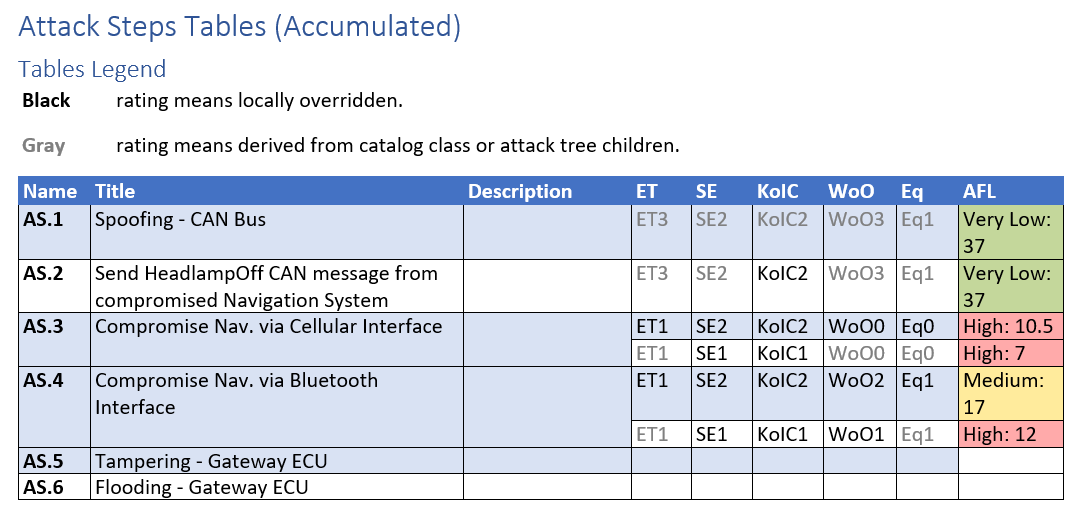
Attack Step Report Table from the modified ISO Example with consecutive attacks and activated numerical AFLs.
Streamlined Configuration and Enhanced Reporting
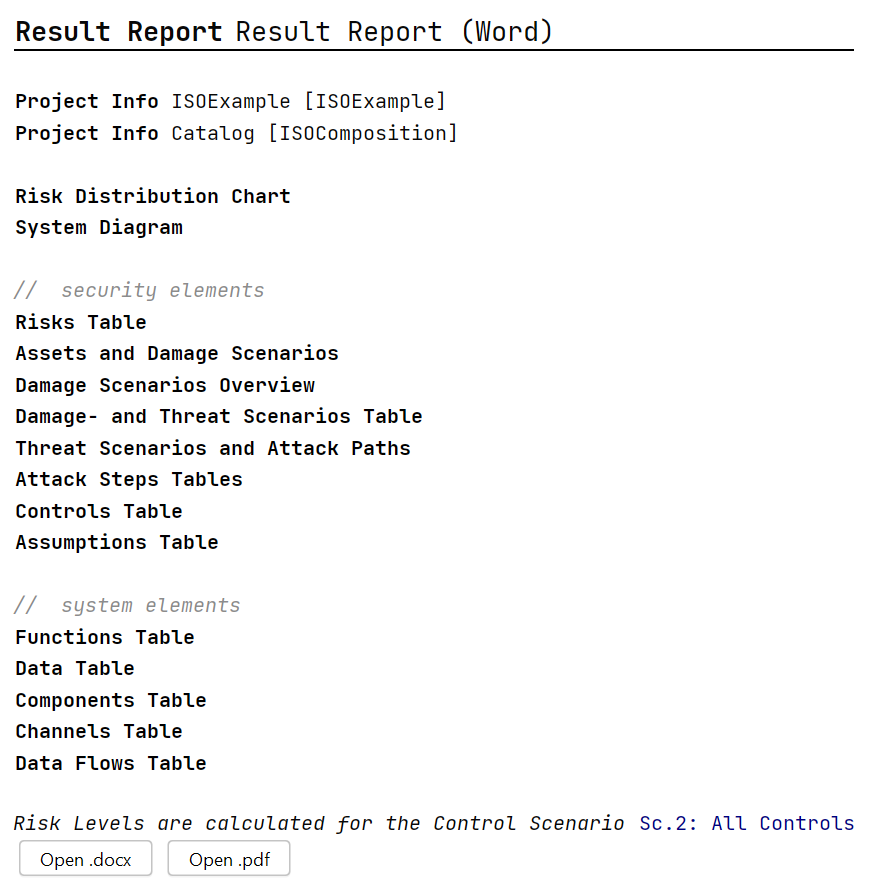
We've implemented several enhancements to improve your experience and the quality of reports:
- Report Item Configuration: The configuration of report items has been moved to the inspector, eliminating the need for the main editor and streamlining workflow.
- Simplified Main Editor: Graphical brackets have been removed from the main editor, simplifying its interface.
- Enhanced DS Table Export: Users can now include Normal Behavior and Operational Situation in the Damage Scenario (DS) table export, enriching the depth of reports.
- Improved Feasibility Rating Export: When exporting rationales in the Damage Scenario table, the title of the feasibility rating is now used for clarity.
- Expanded Terminology Profile: The Terminology Profile has been applied to more areas, ensuring consistent terminology usage across the entire tool.
These updates collectively enhance usability, streamline workflows, and improve the clarity and comprehensiveness of reports generated from the tool.
Enhanced Assistants
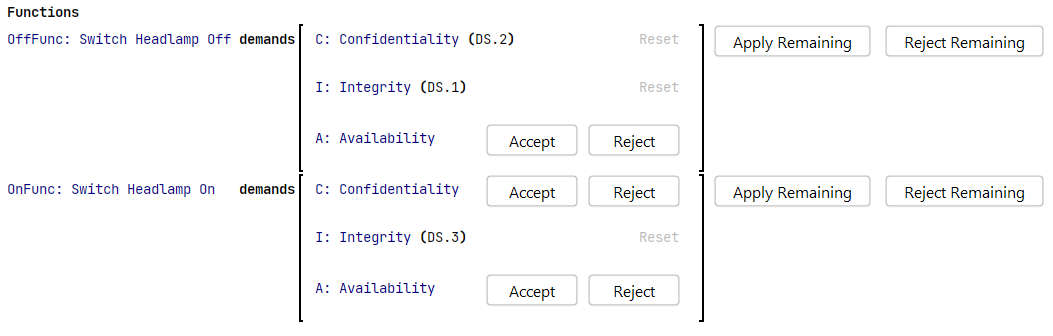
We've implemented several enhancements to streamline the management of suggestions, making the process more intuitive and user-friendly:
- All assistants now feature a reject remaining option, enabling users to handle multiple remaining suggestions simultaneously.
- The Accept Remaining button allows users to accept multiple remaining suggestions at once. Previously labeled as accept all, this button now clearly indicates that only the remaining suggestions will be accepted, excluding those already handled (rejected).
- We've improved tooltips to offer more detailed and helpful information, enhancing clarity and providing effective guidance.
These updates significantly streamline suggestion management, resulting in an improved user experience.
Miscellaneous
Improved Performance for AFL Tables
The performance of the editor significantly degraded when Attack Step and Control chunks contained more than a few dozen elements (e.g. Attack Steps or Controls). This slowdown occurred particularly when adding new elements or modifying existing ones, often causing UI freezes. After investigation, we identified the root cause in the "Feasibility Categories" tables and have since reworked them. This solution resolves the performance issue and slightly enhances the UI/UX of these tables.
However, we recommend organizing your TARA elements into several chunks per type rather than consolidating them into a single chunk (e.g. all Attack Steps in only one Attack Step chunk). This approach not only prevents potential performance issues but also facilitates easier management and overview of all elements.
Fixed CVSS-based Attack Feasibility Comparator
A previous feature addition caused an issue with the "Feasibility Categories" tables for Control Classes, Threat Classes, Controls, and Attack Steps when the CVSS-based comparator was selected in the Feasibility Model. We have resolved this issue.
Fixed CVSS-based New Projects
Due to an oversight, a recent change made it notably challenging to work with new projects using the predefined CVSS-based Composition. This was caused by the fact that the CVSS-based projects typically rely on a predefined, read-only Feasibility Model included in the shipped resources, and this link was inadvertently lost. We have addressed this issue, ensuring that new CVSS-based projects once again include this link, allowing for the use and inspection of the Feasibility Model.
Additionally, we are currently exploring options to facilitate easier customization of the default CVSS Feasibility Model. This initiative aims to accommodate users who may have reservations about certain aspects of the default model but prefer not to start from scratch. Stay tuned for further updates on this front.
Better UX for Terminology Profiles
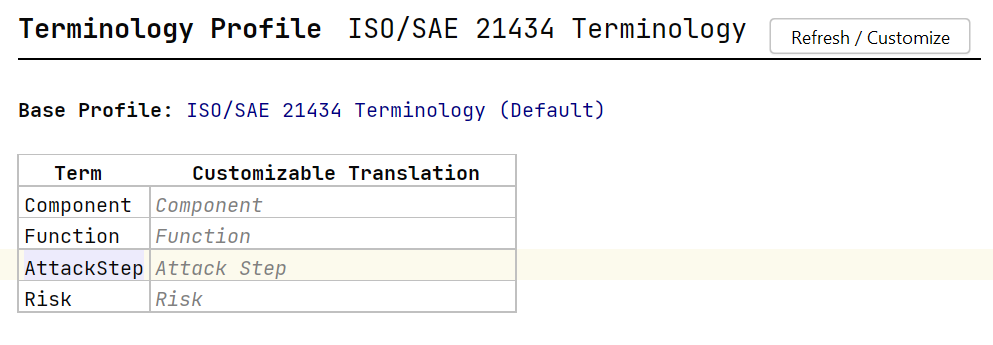
The previous Terminology Profiles lacked clarity in their purpose and usage, making it unclear how they should be utilized. We have enhanced the UI/UX of the Terminology Profiles and addressed rare background issues that could occur when profiles became corrupted or broken.
To improve usability, we added a header line to the table indicating where to edit Terminology Profiles. The terms themselves are now read-only, although you can still replace them if initially selected incorrectly. Editing in the left column is restricted, but you can use Ctrl+Space to autocomplete terms and view available options.
Changed some displayed Risk Levels to Local Risk Levels
All Threat Scenarios, Attack Steps, and Controls feature a "Risk Level" within their main editor. These levels can be expanded to provide deeper insights into the risks associated with various stakeholders and Impact Categories. Previously, the collapsed state displayed a "summary" Risk Level, representing the global risk level aligned with the IL/AFL/RL triplet.
To enhance clarity, we have updated the main editor to display the local rating instead of the "summary" Risk Level. Additionally, we have clarified that these ratings are "Local Risk Levels". This change ensures a clearer understanding of where each Risk Level pertains within the editing interface.
Calculate Threat Scenario Risk per Linked Damage Scenario
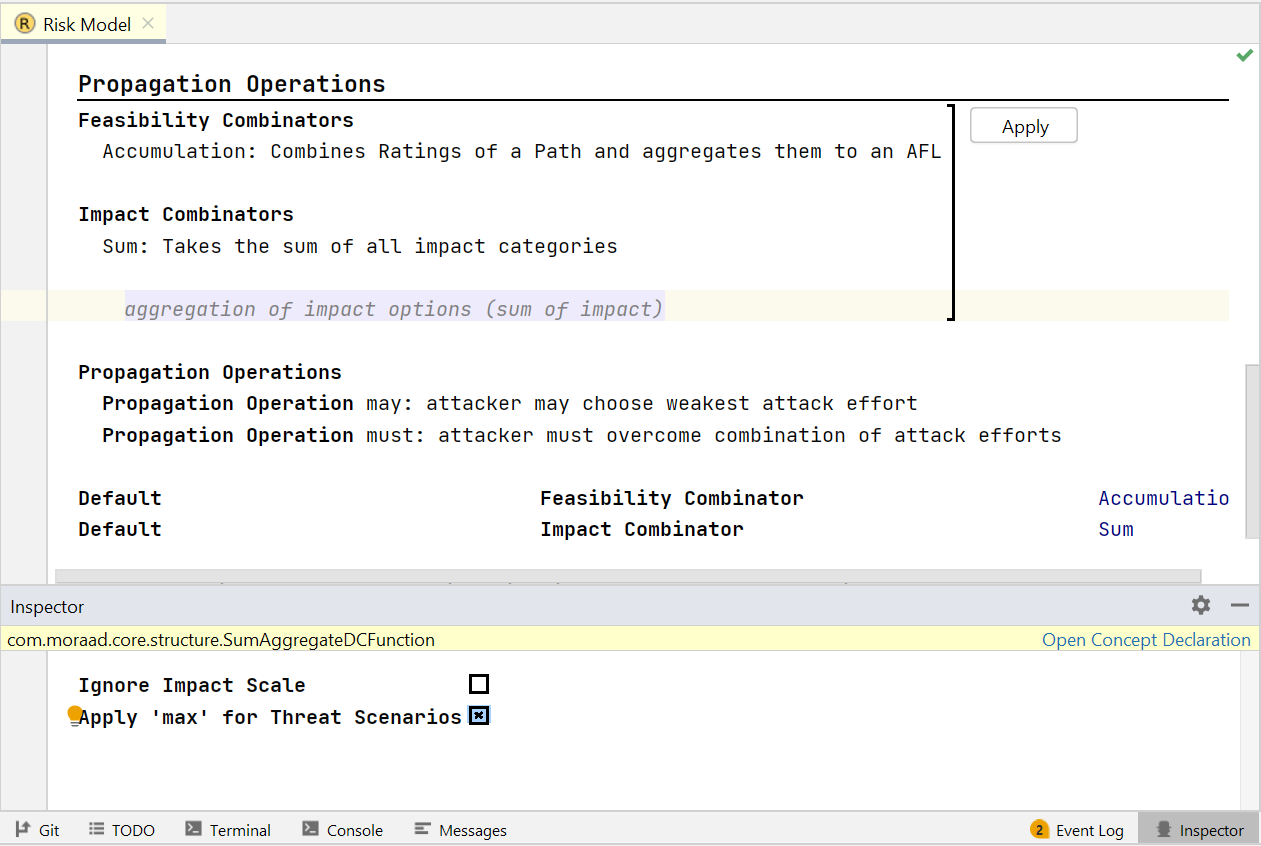
itemis SECURE provides users with the flexibility to choose different methods for calculating Risk Levels in analyzed systems. One crucial aspect of this configuration is the Impact Combinator, which determines how the overall Impact of a Damage Scenario is calculated. The default approaches include summing up all individual Impact ratings within a Damage Scenario or using the highest individual rating as the overall Impact Level.
The latter option has consistently handled scenarios where a Threat Scenario realizes multiple Damage Scenarios effectively. However, the sum-combinator previously aggregated the overall Impact of realized Damage Scenarios to derive the Impact Level of the Threat Scenario. This often did not align with intended semantics and resulted in unexpected calculation outcomes.
In the current Risk Model settings, selecting the sum-combinator provides an option in the Inspector to revert to the previous behavior. Moving forward, the sum-combinator defaults to using a "highest/max" style to derive the Impact of a Threat Scenario from the Damage Scenarios it realizes. For existing projects using the sum-combinator, you must manually adjust this setting if you prefer the "max" combinator across Damage Scenarios. This approach ensures that settings in existing projects are not changed outright or automatically migrated to the new calculation method.
Fixed Analysis Elements in the Project View Not Being Expandable
The introduction of the Concept Phase inadvertently caused some elements in the Project View to become non-expandable, which made it difficult to locate specific elements within chunks. For instance, finding a particular Attack Step in your Attack Step chunks became challenging.
We have resolved this issue, restoring the expandability of elements in the Project View. Now, you can easily navigate and locate specific elements within their respective sections, enhancing usability and workflow efficiency.
Fixed Auto-Borrowing close to License Expiration
When using the Auto-borrowing license type, itemis SECURE occasionally couldn't verify the validity of your license if the borrowing window extended or approached the end date of the current license. We have resolved this issue with the Auto-borrowing license type. The tool now correctly recognizes when the configured borrow window exceeds the end date of the current license. It will automatically adjust by borrowing a license for a shorter duration to ensure compliance with the license's end date.
Version Mapping
The following table can be used to determine the itemis SECURE version based on the internal plugin version com.moraad.core stored in the .msd file of every solution:
<language slang="l:2bca1aa3-c113-4542-8ac2-2a6a30636981:com.moraad.core" version="<com-moraad-core-version>" />
| com.moraad.core version | itemis SECURE version |
|---|---|
| 92 | 24.2 |
| 91 | 24.1 |
| 90 | 23.3 |
| 89 | 23.2, 23.2.1 |
| 88 | 23.1.1 |
| 87 | 23.1 |
| 86 | 22.4 |
| 81 | 22.3 |
| 80 | 22.2 |
| 78 | 22.1 |
| 74 | 21.3 |