itemis SECURE Classic 25.2
Overview
We are excited to announce itemis SECURE Classic 25.2, marking a major milestone: for the first time, itemis SECURE Classic is fully compatible with the new itemis SECURE Cloud solution, now publicly accessible for users. This joint release of itemis SECURE Classic and itemis SECURE Cloud opens the door to seamless collaboration and shared project management across teams.
A central feature of this release is the ability to publish local projects to itemis SECURE Cloud and clone web repositories back into itemis SECURE Classic. These capabilities allow multiple users to work on the same projects in parallel, benefit from structured access control, and streamline workflows for review and editing. While itemis SECURE Classic supports the local setup, itemis SECURE Cloud provides guided processes and templates to help users get started efficiently, making collaboration easier and more transparent than ever before.
Alongside these new capabilities, this release also delivers numerous quality improvements and bug fixes that enhance stability, reliability, and usability across itemis SECURE Classic. These changes ensure that everyday tasks run more smoothly and that the tool continues to meet the evolving needs of our users.
Looking forward, we remain committed to advancing collaborative functionality and continuously improving itemis SECURE Classic. Future releases will expand cloud integration, enhance shared workflows, and provide even more flexibility for teams working together across local and web environments.
itemis SECURE Cloud Release and real-time collaboration
With this release, itemis SECURE Classic can now connect to the new itemis SECURE Cloud, enabling multiple users to collaborate on the same projects simultaneously. This eliminates the need for separate local edits followed by manual merging, providing a smoother and more controlled workflow.
Projects can be published from itemis SECURE Classic to create new web repositories, or cloned from existing web repositories into new local projects. Once linked, changes are synchronized between the local project and the web repository, and projects can later be disconnected if needed, turning the local project into a standalone copy.
itemis SECURE Cloud also offers fine-grained access control, allowing read-only access for colleagues or external parties such as assessors. Projects can be shared directly without requiring recipients to have a full desktop app installation, reducing pre-requirements for reviewing or making minor edits.
While itemis SECURE Classic remains the most capable environment for complex modeling tasks, itemis SECURE Cloud has been optimized for certain workflows, offering a more streamlined and user-friendly experience for collaboration, review, and targeted editing.
Publish local projects to the SECURE web system
You can now publish your local projects directly to your company's instance of itemis SECURE Cloud to make them available for shared access and real-time collaboration with colleagues. Publishing creates a corresponding web repository that mirrors your local project, allowing others to open, review, and edit the same content through the web interface.
Because every customer typically operates their own on-prem itemis SECURE Cloud, itemis SECURE Classic cannot provide a predefined address or direct guidance for the publishing process. To initiate publishing, open your company's itemis SECURE Cloud instance, navigate to the organization or group where the project should be shared, and create a new web repository. In the creation dialog, select the Import from SECURE Desktop tab, then follow the publish wizard that guides you step by step through the process.
When publishing a project, the target web repository must be empty. It is not currently possible to merge or link a local project with an existing web repository. Linking and merging capabilities are planned for a future release.
Clone web repositories into local projects
You can now clone an existing web repository to create a new local project in itemis SECURE Classic. Cloning allows you to work locally on a project while collaborating in real time with colleagues who also have access to the same web repository, keeping your work synchronized across local and web environments.
To start, use the new project template Security Analysis from Web available in the File → New → Project dialog. After selecting the template, follow the guidance provided by the Open in SECURE Desktop wizard in itemis SECURE Cloud to complete the cloning process. While itemis SECURE Classic assists with setting up the local project, the wizard in itemis SECURE Cloud provides the most complete and accurate guidance.
When cloning, the target local project must be empty. It is not currently possible to merge or link a web repository with an existing local project. Linking and merging capabilities are planned for a future release.
Disconnect a local project from a web repository
You can disconnect a local project from its linked web repository, turning it into a standalone project. Once disconnected, the local project will no longer synchronize with the web repository.
Disconnecting a project is permanent in the current release. It is not possible to re-link the local project to its web repository counterpart, nor to merge it with any other web repository. Plan accordingly before performing this action.
Plugins and Plugin Repositories
To enable collaboration between itemis SECURE Classic and itemis SECURE Cloud, this release introduces two new plugins responsible for handling the necessary technical communication in the background.
To keep these plugins aligned with your itemis SECURE Classic version and ensure they stay up to date, itemis SECURE Classic now includes a pre-registered plugin repository. With each application start, itemis SECURE Classic checks this plugin repository for newer plugin versions and offers you an update to the latest available release if one is found. You can view or configure plugin repositories under File → Settings → Plugins → (cog symbol at the center top) → Manage Plugin Repositories.
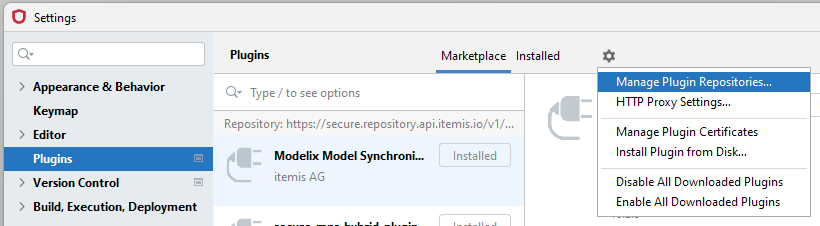
In typical on-premise deployments, plugin updates can be managed through a local plugin repository included with your itemis SECURE Cloud. itemis SECURE Classic is shipped configured to use the official itemis plugin repository; in some environments, you may need or want to replace this endpoint — for example, when network access to the official plugin repository is restricted or to keep the setup fully on premise. Note that the official plugin repository only provides plugin metadata and update information; we do not monitor any access, and no information about your projects is collected or transmitted. For details on locating and configuring the local plugin repository, please consult the accompanying deployment guide.
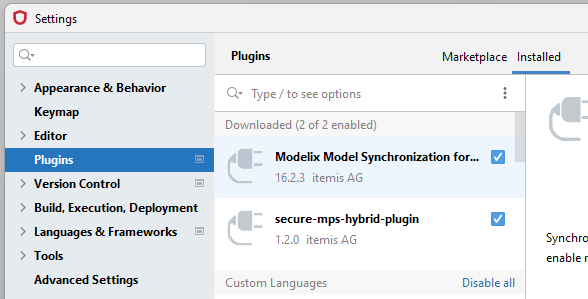
If you prefer not to use web collaboration yet and don't wish to receive plugin update offers, you can disable the two plugins from the Plugins page of the Settings by switching to the Installed tab and disabling all plugins in the Downloaded section (usually the first group at the top). This will deactivate web collaboration and block plugin update notifications. In order to (re-)enable web collaboration later on, reactivate the plugins at any time, and itemis SECURE Classic will again offer you updates to the latest plugin versions.
Bug Fixes and General Improvements
Improved visibility of inherited Technologies from Channels
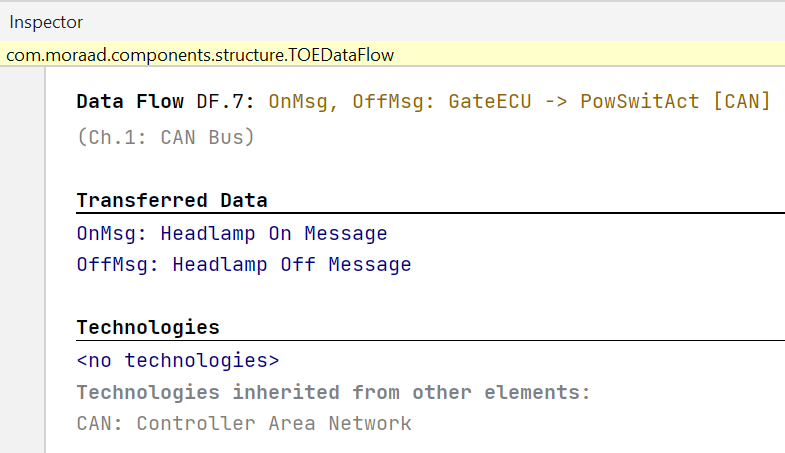
Previously, Technologies defined for a Channel were already correctly inherited by any Data Flows placed within it. However, this inheritance was not clearly visible in most parts of the user interface — the only indication appeared in the derived titles of Data Flows, unless those titles had been customized.
With this release, inherited Technologies are now explicitly shown in the inspector for a Data Flow. Alongside the Technologies configured directly for a Data Flow, you will also see those inherited from the Channel it belongs to. Reports have been updated accordingly, now listing both explicitly configured and inherited Technologies.
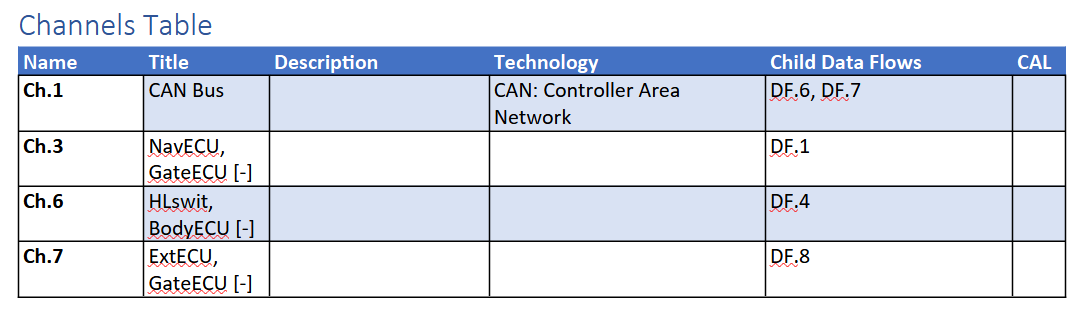
Excerpt from the ISO Example, listing the inherited Technology for a Data Flow.
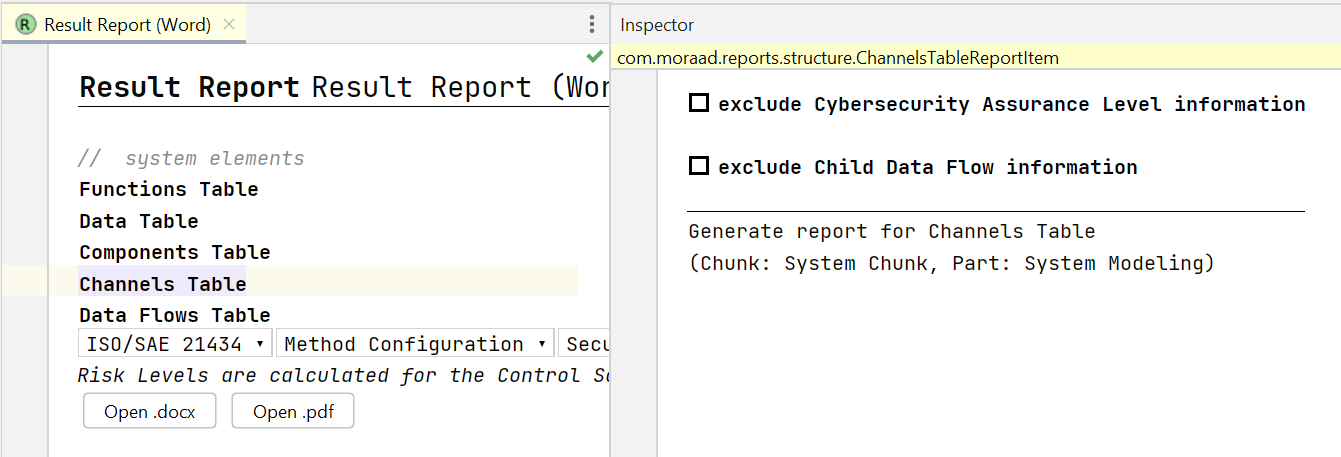
To further improve readability and help assessors understand hierarchical relationships between system elements, the report tables for Channels, Components, and Functions now include a new optional column that lists all direct child elements — for example, all child Components belonging to a given parent Component.
Fixed migrations for projects using scripting
In the previous release, project migrations could fail for a selected few customers using scripting capabilities. Whenever this occurred, our support team promptly ensured that affected projects were migrated successfully. Because scripting is used only in a limited number of projects, manual assistance remained sufficient as a temporary measure.
The underlying issue was caused by an overly cautious platform reacting to an oversight in handling certain dependencies introduced via scripting. These dependencies triggered conflicts during migration, while projects without scripting were unaffected.
With this release, we have addressed all known root causes. All projects, whether last opened in version 24.3 or 25.1, should now migrate seamlessly to 25.2. If you still encounter any issues, please don't hesitate to contact our support team.
Fixed default element types for imported models
Previously, importing models through the itemis Excel template could result in chunks not having their default element types correctly assigned. This caused assistants, such as the asset identification assistant, to sometimes create new elements in additional empty chunks instead of placing them in the intended chunk, for example, a "Damage Scenarios" chunk.
This issue has now been fixed. During import, chunks are properly recognized according to their default element types, ensuring that assistants and automated actions place new elements in the appropriate locations.
Fixed and improved derived titles
Derived titles in itemis SECURE are automatically generated based on element properties, following the Title Pattern configured in your Terminology Profile. Previously, some derived title patterns did not fully adhere to the documented behavior.
With this release, all derived title patterns now correctly follow the documented rules. In addition, configurability has been enhanced: new pattern options allow users to limit the number of referenced elements included in a derived title, helping manage title length when needed. Existing projects using older patterns continue to work as before, so no changes are required.
For detailed guidance on configuring Title Patterns, including placeholders and element limits, please refer to derived titles in the user guide.
Allow Channels as Qualified Assets
Previously, Channels could not be selected as Qualified Assets in the definition of a Damage Scenario. This restriction has been removed with this release, allowing Channels to be used as Qualified Assets where technically possible. Damage Scenarios with Channels as Qualified Assets have limited applicability and are generally useful only for Thread Scenarios targeting the same system component, but this usage is now fully supported.
Version Mapping
The following table can be used to determine the itemis SECURE Classic version based on the internal plugin version com.moraad.core stored in the .msd file of every solution:
<language slang="l:2bca1aa3-c113-4542-8ac2-2a6a30636981:com.moraad.core" version="<com-moraad-core-version>" />
| com.moraad.core version | itemis SECURE Classic version |
|---|---|
| 95 | 25.2 |
| 94 | 25.1 |
| 93 | 24.3 |
| 92 | 24.2, 24.2.1 |
| 91 | 24.1 |
| 90 | 23.3 |
| 89 | 23.2, 23.2.1 |
| 88 | 23.1.1 |
| 87 | 23.1 |
| 86 | 22.4 |
| 81 | 22.3 |
| 80 | 22.2 |
| 78 | 22.1 |
| 74 | 21.3 |