itemis SECURE Classic 26.1
Overview
We are excited to announce itemis SECURE Classic 26.1, a release that continues our focus on improving collaboration, strengthening core platform foundations, and enhancing day-to-day usability and workflow reliability. This version introduces important advances in cross-product collaboration with SECURE Cloud, delivers a major platform upgrade to ensure long-term security and runtime alignment, and includes targeted improvements that make modeling workflows more robust, transparent, and predictable.
In this release, we enhance cross-product collaboration in SECURE Classic by improving the stability and consistency of shared workflows with SECURE Cloud. A key addition is support for centrally managed threat catalogs for TARAs, enabling reusable security content and consistent access to catalog updates across models. Alongside this, synchronization and update processes have been improved for greater reliability and control in collaborative scenarios.
With this release, we have further strengthened the SECURE Classic platform through a major platform upgrade, aligning the system with current runtime expectations, addressing key security requirements, resolving underlying vulnerabilities, and introducing selected usability improvements as part of ongoing modernization efforts.
Finally, we improve the handling of broken references in models by providing clearer control over unresolved links in cases where referenced elements are no longer available. In addition to existing automatic recovery behavior, users can now explicitly remove dangling references when they are no longer needed, improving transparency and control in model maintenance scenarios.
Looking forward, we remain committed to continuously advancing itemis SECURE Classic along three key directions: foundational work towards IEC 62443 support, further expanding cross-product collaboration between desktop and web environments, and continuing the systematic migration of the platform to modern technologies. These efforts reflect our ongoing focus on strengthening interoperability, improving usability, and ensuring the long-term evolution of the platform.
Improving cross-product collaboration
With the previous release, we introduced cross-product collaboration capabilities, enabling you to work with the same projects both in the desktop application and through the web client. With this release, we are strengthening this collaboration further by refining existing workflows for improved stability and consistency, as well as introducing new capabilities that make working across both environments more seamless.
Added support for TARAs with shared threat catalogs
Previously, threat catalogs and TARAs were managed as isolated repository types within SECURE Cloud. Each TARA contained its own threat catalog, with no mechanism for sharing or centrally maintaining catalogs across multiple TARAs.
With this release, both the web client and the desktop application now support TARA repositories that reference a shared threat catalog within the same SECURE Cloud instance. This enables centrally managed catalogs, allows multiple TARAs to reuse the same catalog, and ensures that updates can be rolled out consistently across all linked TARAs.
In this setup, the threat catalog is treated as a shared, read-only component within the TARA context. SECURE Classic reflects this by visually distinguishing these parts of the model. While local modifications may still be technically possible in some cases, they are not part of the intended workflow, are not synchronized back to the shared catalog, and will be overwritten when updates from SECURE Cloud are applied. As a result, changes made locally are not reliably preserved or propagated to other TARAs.
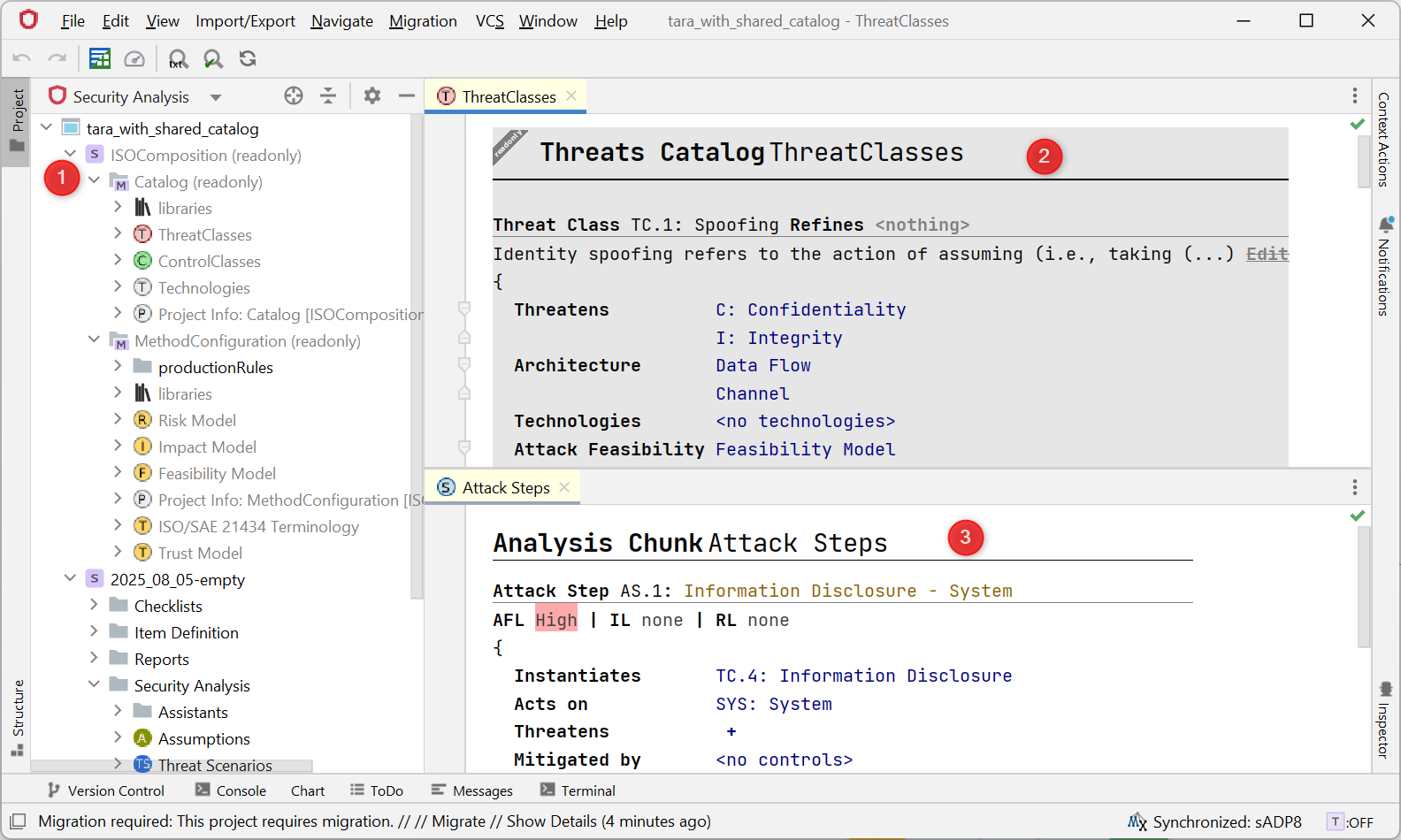
The catalog's grayed-out nodes in the Security Analysis View (1) and main editor (2) indicate read-only status, in contrast to editable TARA content (3).
With this release, and for now, the creation of both shared threat catalogs and TARAs using shared catalogs, the maintenance of shared catalogs, and the rollout of catalog versions to TARA repositories remain the sole responsibility of SECURE Cloud. These workflows are currently not part of SECURE Classic, but may become available in future releases.
Automatic threat catalog updates in SECURE Classic
When a newer version of a shared threat catalog is available, it can be applied in the Catalog tab of a TARA within SECURE Cloud. This updates the catalog version used by that TARA.
Once updated, elements within the TARA can reference and use the updated catalog entries, ensuring that the latest catalog definitions are available for modeling and analysis.
When the same project is opened or synchronized in SECURE Classic, the application automatically retrieves the catalog version currently assigned to the TARA and updates the local project accordingly. Any references to catalog elements are resolved against the updated version, and resulting risk calculations reflect the updated catalog data.
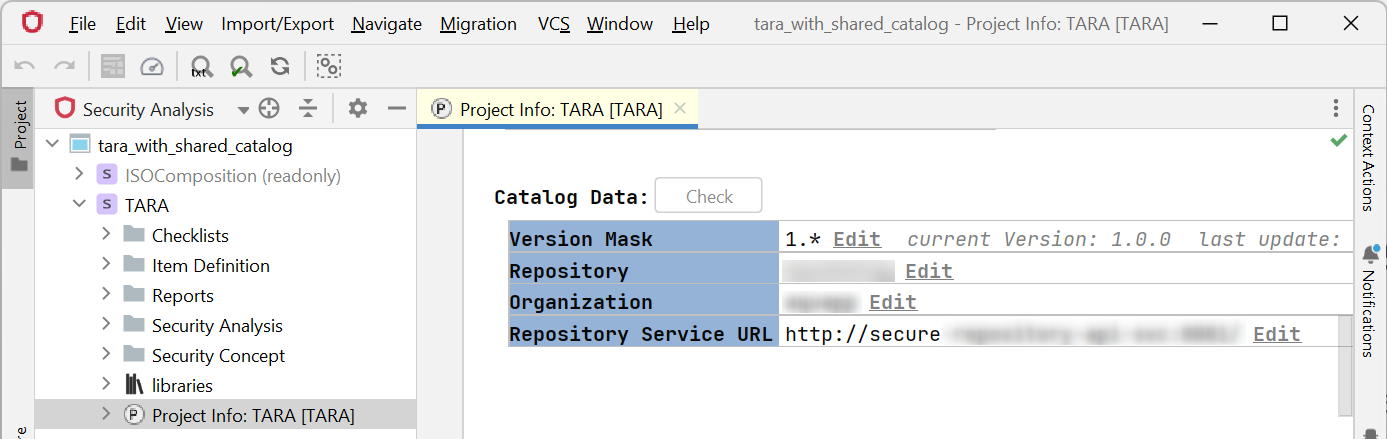
The catalog link is shown with detailed information in the TARA in SECURE Classic.
Reduced synchronization frequency during field editing
To reduce unnecessary synchronization traffic, changes in text and value fields are now sent to the web repository when a field loses focus (for example when clicking elsewhere or pressing Tab).
This removes continuous updates during typing and reduces the number of intermediate model states created while editing.
As a result, updates become visible in other parts of the system — such as the inspector, linked elements, and the web client — only after the field has lost focus and synchronization has been triggered.
Improved reliability of the plugin update process
During internal testing, we identified issues in the plugin update process that could in some cases prevent updates from completing successfully without clearly visible feedback to the user. These issues have been resolved.
As a result, plugin updates now complete reliably when following the guided update dialogs, without requiring additional manual steps such as restarting the application.
Added installer option for plugin update control
SECURE Classic includes updateable plugins, such as the Modelix plugin for interoperability and the SECURE hybrid plugin for cross-product collaboration scenarios. These plugins are checked for updates via an integrated plugin update service.
In the previous release, control over plugin updates was primarily indirect, for example by enabling or disabling the respective plugins. With this release, this control has been made more explicit by introducing an installer option to enable or disable the update service, while also making the repository configuration more transparent.
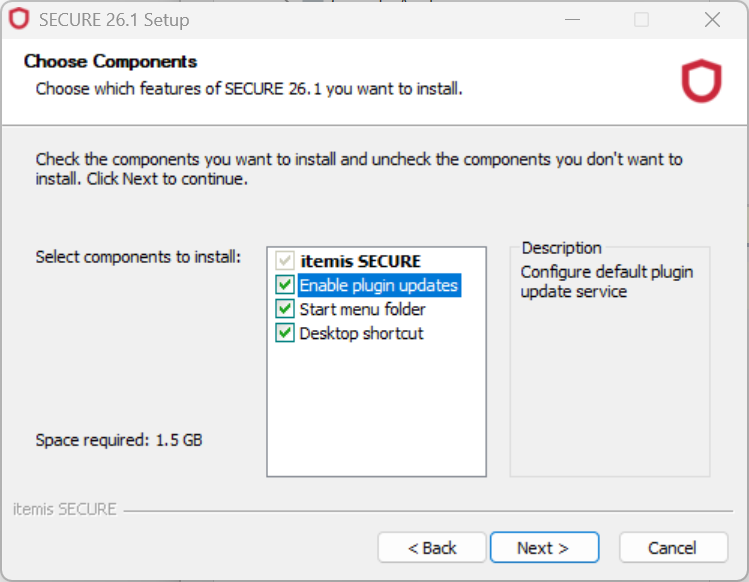
The installer offers an option to disable the plugin update service.
If the update service is disabled during installation, no update checks for the affected plugins will be performed. This decision can be reverted at any time through manual configuration.
After installation, the update behavior can be adjusted via File → Settings → Plugins → (cog symbol) → Manage Plugin Repositories:
- Disabling the relevant plugins prevents update checks
- Removing the configured repository entry disables the update service
- Adding the repository again re-enables the update service
Default plugin repository URL:
https://secure.repository.api.itemis.io/v1/nexus-download/updatePlugins.xml
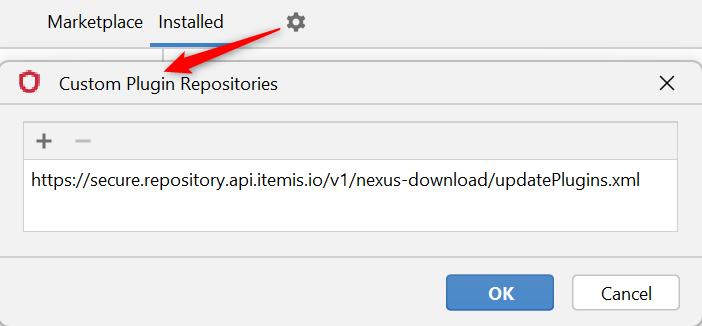
The specified plugin repository is shown in the plugin repository settings.
Strengthened data integrity in synchronized collaboration
This section focuses on improvements to data consistency in synchronized projects across SECURE Classic and SECURE Cloud, and also applies to projects managed solely in SECURE Classic.
In the previous joint SECURE release, certain edge cases in scenarios where collaborative and automated operations interact could lead to unintended inconsistencies, such as duplicated elements or partially applied changes.
With this release, these behaviors have been reviewed and reinforced to ensure that operations are applied consistently and only affect the intended model elements, even in collaborative usage scenarios. As a result, some workflows were adjusted to ensure predictable and reliable behavior.
Stabilizing the Risk Matrix in the Risk Model
The Risk Model defines Risk Levels based on Attack Feasibility Levels (Feasibility Model) and Impact Levels (Impact Model). These models provide the values used to populate the Risk Matrix, which maps combinations of feasibility and impact to a corresponding risk outcome.
As a result, changes to these underlying models can affect its structure and previously defined mappings. With this release, the Risk Matrix has been made more robust against such structural changes, ensuring consistent behavior when levels are adjusted.
From a user perspective, this improvement does not affect how the Risk Matrix is configured or used.
Stabilizing the Attack Feasibility Table in the Feasibility Model
While less relevant for most TARA users, as consecutive attack ratings are rarely used, the mapping table for Attack Feasibility Levels has been updated in line with the improvements made to the Risk Matrix.
The table maps initial and consecutive Attack Feasibility Levels to a combined Attack Feasibility result and depends solely on the available Attack Feasibility Levels. With this release, changes to these levels no longer affect the stability of the mapping table or its configuration.
From a user perspective, this improvement does not change how the table is used.
Improving auto-naming of TARA elements
Auto-naming of TARA elements has been improved to behave more consistently during model synchronization and related workflow operations.
Previously, there were edge cases in which auto-naming was not triggered reliably. With this release, auto-naming now behaves deterministically and is consistently applied when the corresponding conditions are met.
Reworking lists and tables in Project Info chunks
Tables (and to some extent lists) in Project Info chunks previously triggered implicit update behaviors in response to certain user interactions. While intended to assist with consistency, these automated adjustments could in some cases lead to unintended model changes or misaligned table structures.
With this release, these behaviors have been replaced by explicit, user-triggered actions that require a clear intent to modify the structure. This reduces unintended side effects and makes structural changes more predictable.
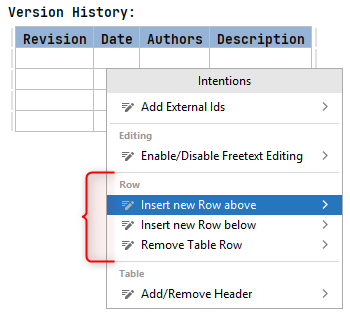
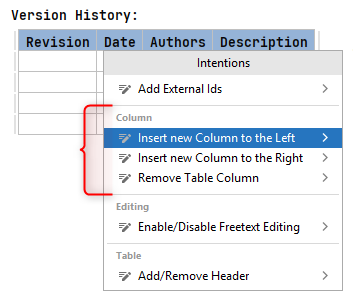
Several of the new intentions to modify a table are shown here.
As a result, there may be cases where tables contain rows with an inconsistent number of cells. In such situations, cells can now be explicitly added or removed to realign the structure, restoring consistency across rows.
Reworking Data Flow handling in Sequence chunks
Sequence chunks in SECURE allow modeling data flows between components and representing them in a structured, UML-like sequence diagram format.
Previously, when users specified the characteristics of a Data Flow — such as source component, target component, and transferred data — the system would attempt to interpret this information and automatically either resolve an existing Data Flow or create a new one if no matching element was found. These actions were triggered implicitly based on detected conditions within the chunk.
With this release, these implicit behaviors have been replaced by explicit intentions. When the system recognizes that a described Data Flow matches an existing element or could be created, it now makes these options available as user-triggered actions instead of executing them automatically. This gives users the opportunity to review and confirm changes before they are applied.
This further ensures that Sequence chunks remain consistent across synchronized project copies while keeping structural modifications under explicit user control.
SECURE Classic platform upgrade
With this release, we have once again performed a platform upgrade for SECURE Classic in order to stay aligned with current security standards, address known vulnerabilities, and follow ongoing advancements in modern software development practices. In the same process, we have continued to evolve the SECURE Classic code base, applying required adjustments as part of the upgrade as well as additional refinements identified during the migration process.
Adopting new Java runtime
Starting with this version, the desktop application has been updated to run on Java 17 (LTS), aligning with the runtime version now required by the underlying platform. While the previous Java version was still within its official support lifecycle, this update brings the application in line with the current platform baseline and incorporates the associated security and runtime improvements introduced at that level.
From a development perspective, this upgrade also reflects an improvement in the overall security baseline provided by the newer runtime, which strengthens the foundation on which the application operates. End users are unlikely to observe direct functional changes as a result of this update.
In terms of performance, the transition to the new runtime and its associated platform changes introduces a shifted baseline for execution characteristics. As with any larger platform transition, performance optimizations are not always immediately reflected in the first aligned version and may temporarily appear neutral or inconsistent depending on usage patterns. However, this step establishes the necessary foundation for upcoming releases, in which further performance-focused improvements are expected as the new runtime environment is fully leveraged.
Introduced early startup indicator
Due to changes in the underlying platform affecting startup behavior and process dependencies, we observed a noticeable delay between application launch and the appearance of the initial user-facing feedback. To address this gap, we have introduced an early startup indicator that appears almost immediately after launch and is visually consistent with the standard splash screen, providing immediate confirmation that the application has started. This indicator is then replaced by the standard splash screen, which continues to display a loading progress bar as part of the normal startup sequence.
This two-stage approach ensures continuous user feedback during startup and improves perceived responsiveness under the current platform conditions. Whether this initial indicator will remain in future versions depends on further improvements in startup performance achieved through ongoing platform modernization.
Added clone progress indicator
When cloning a repository from the desktop application's welcome screen, progress is now shown within the user interface during the cloning process. This provides immediate feedback while the operation is running and improves transparency for longer-running clone operations.
Improved control over tool execution and performance
The model checker can now make use of parallel execution on capable hardware, potentially improving performance during model checking. Depending on the configuration in Settings → Tools → Model Checker, multiple threads can be used when starting this process.
In addition, project startup behavior can now be configured to skip the automatic "make" step when launching the application. When enabled in Settings → Other Settings → Project Settings → Make, this prevents a full build of all modules during startup, which can improve startup time in cases where an initial make would take a long time or require manual configuration beforehand.
Improved text search in project content
The "Find text in project" functionality has been improved, providing better search results and a refined presentation of matches.
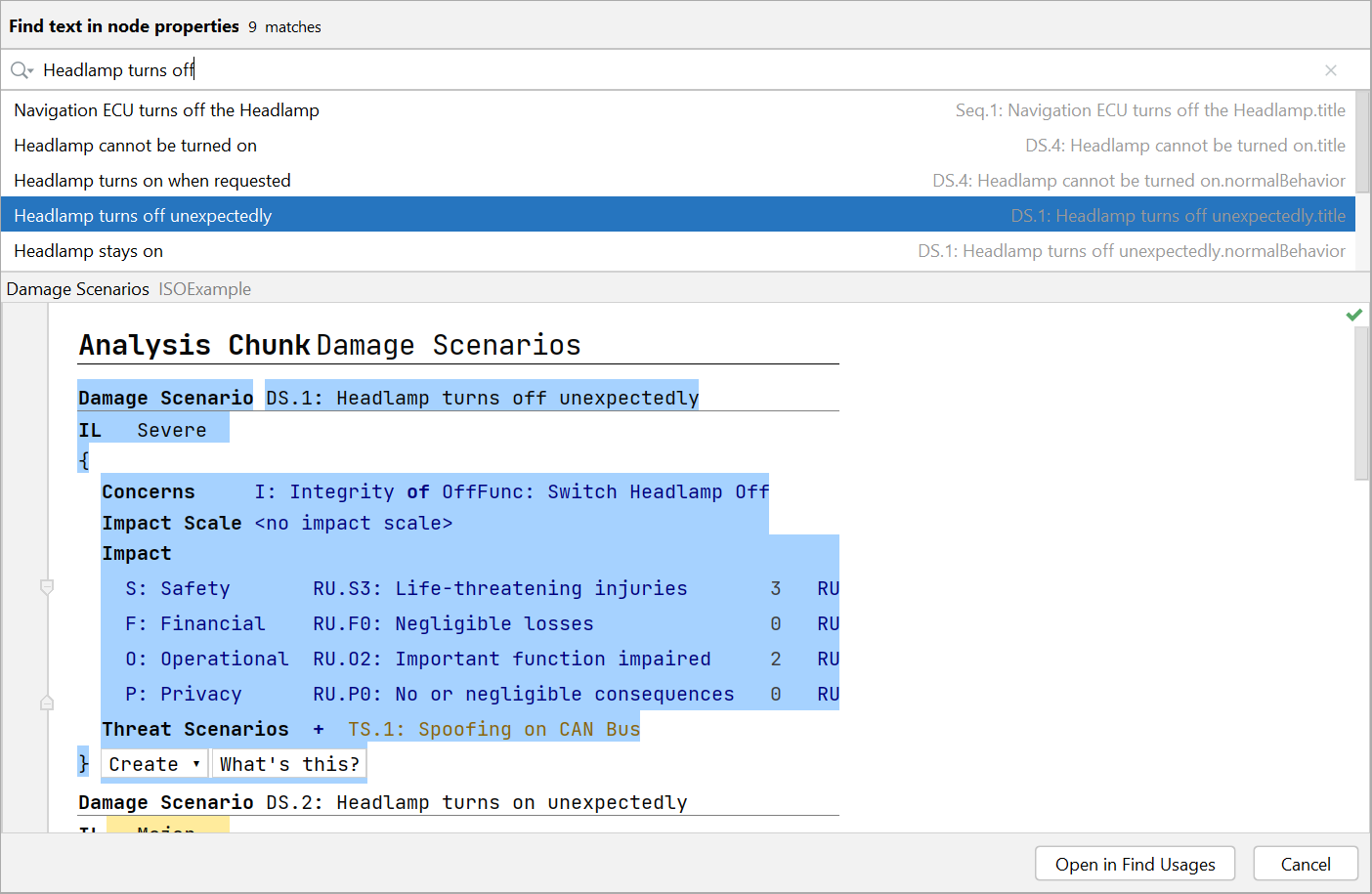
The text search is shown with a list of results and a preview.
Added configurable handling of invalid editor values
When invalid values are entered into a cell, they are marked visually while the last valid value in the model is preserved. The editor can now optionally be configured to automatically restore the original valid value when leaving the cell.
This behavior can be enabled or disabled in Settings → Editor → MPS Editor → Sync with model on selection changes.
Added GPG commit signing support
It is now possible to create GPG-signed commits when using Git. Signed commits are displayed in the Commit Details section of the Git tool window and can be verified as part of the version control workflow.
Improved handling of broken references in models
During various workflows in the desktop app, references to model elements can become invalid. These invalid references (also referred to as dangling references) occur when a link points to an element that no longer exists in the project. In the editor, they are shown as unresolved (e.g. highlighted in red) and no longer connect to valid model elements.
This can happen due to deletions, incomplete imports (e.g. XSAM or other formats), resets performed by assistants, version control operations, or similar changes to the project structure.
In these cases, the system already attempts to automatically re-establish links when the referenced element becomes available again. With this release, we additionally introduce explicit intentions to remove broken references when they are no longer needed or cannot be restored.
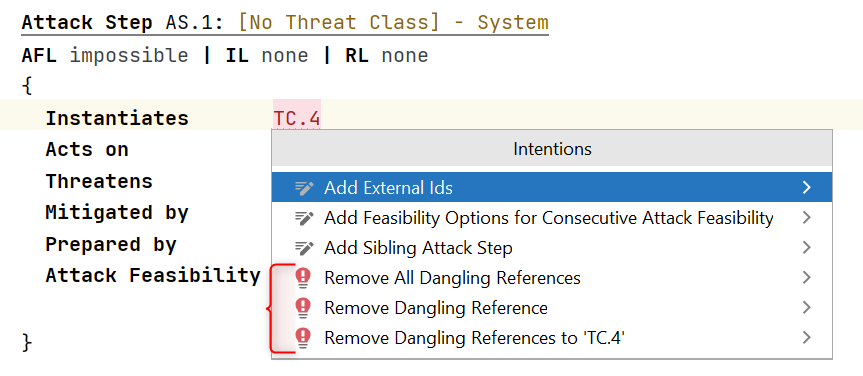
The new intentions to remove dangling references are shown here.
These actions are not executed automatically, ensuring that users can decide whether a dangling reference should be retained for potential recovery or explicitly removed from the model.
Miscellaneous
Extended Attack Feasibility export for Catalog Classes
The XSAM field completeAttackFeasibility has previously been exported for Attack Steps and Controls to enable external tools to access calculated Attack Feasibility ratings without reimplementing the underlying logic.
With this release, the same export has also been extended to Catalog Classes (i.e. Threat Classes and Control Classes). This ensures that Attack Feasibility results are consistently available for all element types where feasibility calculations apply.
Clearer separation of maintenance options in terminology profiles
Previously, terminology profiles (typically located in the Method Configuration model) provided a single button to Refresh / Customize the profile, combining multiple maintenance and configuration actions.
With this release, this functionality has been split into two separate buttons to better reflect their different purposes.

The split maintenance buttons for terminology profiles are shown here.
The Customize button retains the full previous behavior: it cleans up broken or duplicated translations and provides a complete list of all terms for search and manual translation adjustments.
The new Refresh button focuses on structural maintenance only, performing cleanup of translations without changing which terms are included in the profile.
Existing profile intentions for removing individual entries remain unchanged and can still be used independently of the new button separation.
Bug Fixes
Fixed missing error logging for Risk Model configuration issues
A SECURE project must contain exactly one Risk Model, as it defines both the available Risk Levels and the configuration required for risk calculation. Missing or multiple Risk Models result in an invalid configuration state.
Previously, in some cases where this constraint was violated, the corresponding error message was not shown due to an issue in the error handling logic.
This has been fixed so that the error message is now consistently written to the log in such cases.
Version Mapping
The following table can be used to determine the itemis SECURE Classic version based on the internal plugin version com.moraad.core stored in the .msd file of every solution:
<language slang="l:2bca1aa3-c113-4542-8ac2-2a6a30636981:com.moraad.core" version="<com-moraad-core-version>" />
| com.moraad.core version | itemis SECURE Classic version |
|---|---|
| 96 | 26.1 |
| 95 | 25.2 |
| 94 | 25.1 |
| 93 | 24.3 |
| 92 | 24.2, 24.2.1 |
| 91 | 24.1 |
| 90 | 23.3 |
| 89 | 23.2, 23.2.1 |
| 88 | 23.1.1 |
| 87 | 23.1 |
| 86 | 22.4 |
| 81 | 22.3 |
| 80 | 22.2 |
| 78 | 22.1 |
| 74 | 21.3 |