Derived Titles
Some element types are primarily defined by their properties and fields. For these, the tool automatically derives default titles based on their property values, following the Title Pattern configured in your Terminology Profile.
You can override these derived titles manually at any time, which will deactivate the automatic title derivation for that specific element. This gives you full control to customize titles when needed. Automatically updating titles are rendered in an olive color, customized titles are rendered in black.
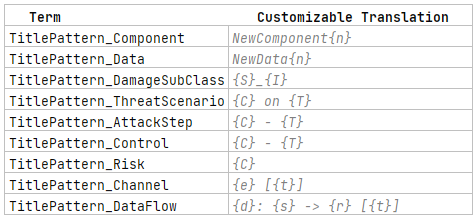
The Title Pattern works similarly to the Name Pattern, but uses placeholders corresponding to element properties. These placeholders—enclosed in curly braces—typically represent abbreviated property names to be included in the generated title.
Most placeholders give you control over whether the titles or the names of referenced elements are used in forming the current element’s title. Uppercase letters indicate that titles should be used, while lowercase letters select the names. This distinction allows you to shorten longer derived titles when needed, with the trade-off that names might be less descriptive than titles.
To further manage the length of derived titles, you can limit the number of elements included for each placeholder. You can specify an exact upper limit by appending a number, such as "{t2}", which limits the placeholder to two elements. Any additional elements beyond this limit will be truncated but indicated in the title with a trailing ", ...".

Some element types use a Title Pattern that incorporates the same incrementing counter placeholder as the name patterns. These patterns combine counter placeholders with property placeholders (as detailed in the upcoming table) to generate an initial title. Unlike fully derived titles, these titles are generated once upon element creation and won’t update automatically when fields change. This provides a stable initial title that can be manually modified without being overridden.
The following table provides a comprehensive overview of the placeholders you can use in title patterns, clearly linking each pattern to the specific element type it applies to, the relevant field or property name, the exact pattern syntax, and a brief explanation of its function. Since patterns are not universal across all element types, this table will help you understand where and how to apply them effectively.
| _ Element type | _ Field/Property | _ Pattern syntax | _ Explanation | _ Notes |
| Component | ordinal number on creation | {n} | forms the Component title with the same counting number as the name | [Creation Only] |
| Data | ordinal number on creation | {n} | forms the Data title with the same counting number as the name | [Creation Only] |
| Impact Option (formerly Damage Sub-Class) | Stakeholder | {S} or {s} | includes the linked Stakeholder | [Unused] |
| Impact Option (formerly Damage Sub-Class) | Impact Category | {I} or {i} | includes the linked Impact Category | [Unused] |
| Threat Scenario | Cause of Compromise (Threat Class) | {C} or {c} | includes the referenced Threat Class to this Threat Scenario | [Singular Element] |
| Threat Scenario | Acts on (targeted element) | {T} or {t} | lists the Item Definition elements this Threat Scenario targets | |
| Attack Step | Instantiates (Threat Class) | {C} or {c} | includes the instantiated Threat Class to this Attack Step | [Singular Element] |
| Attack Step | Acts on (targeted element) | {T} or {t} | lists the Item Definition elements this Attack Step targets | |
| Control | Instantiates (Control Class) | {C} or {c} | includes the instantiated Control Class to this Control | [Singular Element] |
| Control | Acts on (targeted element) | {T} or {t} | lists the Item Definition elements this Control targets | |
| Risk | Caused by | {C} or {c} | lists the "Caused by" elements | |
| Channel | Endpoints | {E} or {e} | lists the "Endpoints" elements | |
| Channel | Technology | {T} or {t} | lists the Channel's technologies | |
| Data Flow | Transferred Data | {D} or {d} | lists the Data elements transferred by this Data Flow | |
| Data Flow | Source | {S} or {s} | includes the sender/Source of the Data Flow | [Singular Element] |
| Data Flow | Target | {R} or {r} | includes the receiver/Target of the Data Flow | [Singular Element] |
| Data Flow | Technology | {T} or {t} | lists the Data Flow's and the enclosing Channel's technologies |