Create a repository from a file
A template file holds the contents of a TARA. You get one with the TEMPLATE tab of the Export dialog. From this file you can create a new repository with the same contents, for example to start a new TARA from an existing one.
Create the repository
- Open the repository list of the organization and click New repository (see Create a repository).
- Select the tab From File.
- Enter the Repository Name. SECURE Web App proposes the short name in the URL field from it; you can change it.
- Under Type, keep TARA.
- Drag the template file onto the File area, or click Browse file and select it.
- Click Create Repository.
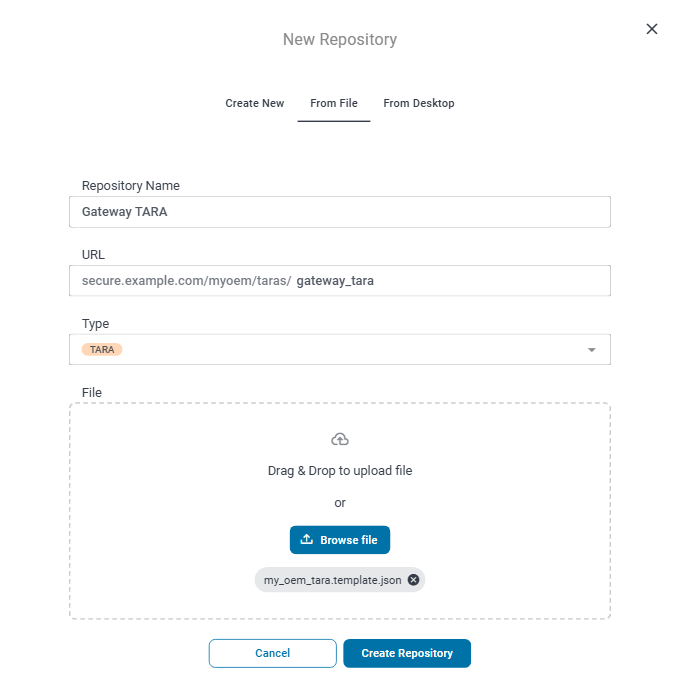
SECURE Web App confirms with "The new repository has been successfully created." and opens the new repository.
What the new repository contains
The new repository has the contents of the TARA as of the version that was exported:
- all elements of the TARA, from the item definition to the risk treatment;
- its catalog and its method configuration. If the TARA was linked to a threat catalog of your organization, the new one is linked to the same catalog version.
Not part of the file, and so not carried over:
- The versions. The new repository starts with a history of its own.
- The members. You are the only member of the new repository, as TARA Author. Who else gets access follows from the organization roles and from sharing the repository, as for any new repository.
When the file is not accepted
The File area takes one JSON file.
Could not upload file with "Uploaded file is of wrong type (…). Expected type application/json". The file is not a JSON file, and Create Repository stays disabled. Select the template file instead.
Creation has failed: followed by "Bad Request" or by a message about the JSON content. The file is a JSON file, but not a template file that SECURE Web App can read. No repository is created. Export a new template file and use that one.