Create a repository
You create a repository with New repository at the top right of the repository list. The repository belongs to the organization you are working in. If you do not see New repository, ask your administrator whether you may create repositories in this organization.
Create a new repository
-
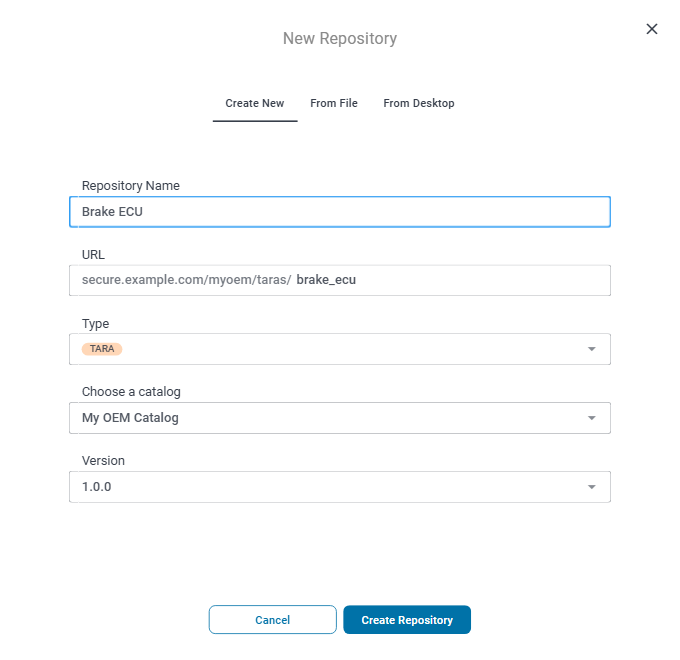
Click New repository. The dialog opens on the Create New tab.
-
Enter the Repository Name. It is shown in the repository list and in the app bar while the repository is open.
-
Check the slug in URL, the last part of the repository's address. SECURE Web App derives it from the name: lowercase letters and digits, with the other characters replaced by underscores, so "Brake ECU" becomes
brake_ecu. You can change it. The slug is part of every link to the repository. -
Select the Type: TARA or THREATS_CATALOG.
-
For a TARA, select the threat catalog it uses in Choose a catalog, and its Version. The list offers the threat catalogs of the organization that you have access to; the most recent version of the catalog is preselected. Select No linked catalog for a TARA without a threat catalog. Later updates to a newer catalog version are described in Catalog.
-
Click Create Repository.
SECURE Web App creates the repository, confirms with "The new repository has been successfully created." and opens it. You are its TARA Author, or for a threat catalog its Catalog Maintainer; to give other people access, see Give people access to a repository.
A new threat catalog is not empty: it starts with a set of general threat classes, such as Spoofing and Tampering. A TARA created with No linked catalog says "No catalog linked to this TARA." on its Catalog page.
When the slug is not accepted
The slug must be unique and between 5 and 256 characters long. It may only
contain lowercase letters, numbers, hyphens and underscores. It must start and
end with a letter or a number, and a hyphen or underscore must not be directly
followed by another hyphen or underscore. For example, tara- and
brake--ecu are not accepted. Below
URL, SECURE Web App says what is wrong:
- "This slug already exists. Please enter another one."
- "The length of the slug has to be between 5 and 256."
- "Slug must only contain lowercase letters, numbers, hyphens or underscores and shall not start or end with a space or underscore."
The last message names only the allowed characters. If your slug uses only those and you still see it, check the start, the end and the places where a hyphen or underscore follows another one.
A slug can also be taken by a repository that you do not see. Then creating the repository fails with "Creation has failed: Could not create resource which exists already." Enter another slug and click Create Repository again.
Other ways to create a repository
The dialog has two more tabs. Both ask for the name, the slug and the type as well.
- From File creates the repository from a file: the template you download with Export from another repository. The new repository starts with the contents of that repository, but without its versions and members. See Create a repository from a file.
- From Desktop is for data you work on in SECURE Desktop. SECURE Web App creates the repository first, and then walks you through uploading your data from SECURE Desktop. See Bring a SECURE Desktop project into SECURE Web App.