Asset identification
On Asset Identification you decide which security properties of your system elements are worth protecting. A property becomes an identified asset as soon as a damage scenario concerns it. What assets and damage scenarios are is explained in Asset Identification and Impact Rating.
Progress
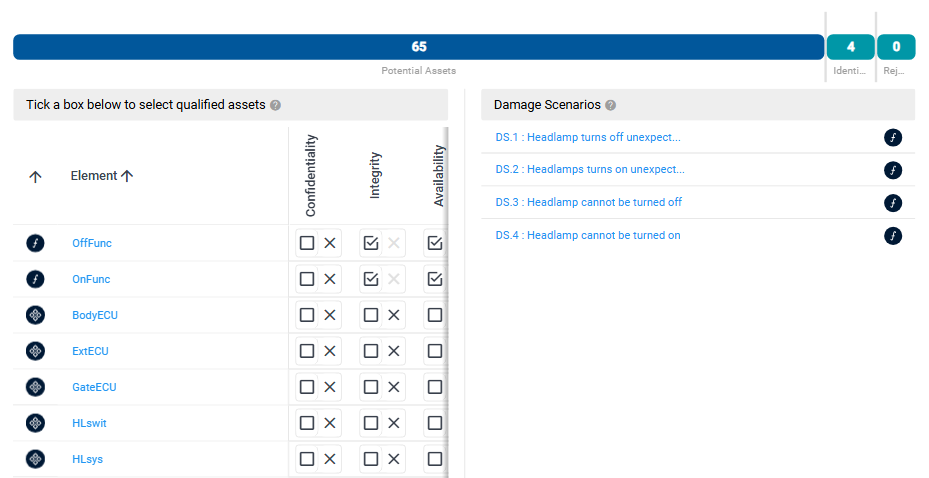
The progress bar at the top counts Potential Assets and Identified Assets. A potential asset is a security property of a system element that no damage scenario concerns yet; each property counts on its own. An identified asset is concerned by at least one damage scenario.
Assets and damage scenarios
Below the progress bar, the page has two parts:
- Tick a box below to select qualified assets: a matrix with one row per system element of the item definition and one column per security property, such as Confidentiality, Integrity and Availability. A ticked box is an identified asset. If more than one damage scenario concerns it, the box shows how many.
- Damage Scenarios: the damage scenarios of the TARA. The icons at the end of each row show which kinds of system elements it concerns; point at an icon to list the assets.
When you point at a damage scenario, its assets are highlighted in the matrix, and when you point at a ticked box, the damage scenarios concerning it are highlighted. Click a system element or a damage scenario to open it in the element column.
Create damage scenarios from assets
If you can edit the repository:
-
In the matrix, tick the boxes of the security properties you want to treat as assets. A button with an arrow and the number of selected assets appears between the matrix and the list of damage scenarios.
-
Click the arrow button and choose:
- Create … Damage Scenarios for one new damage scenario per selected asset, or
- Create one Damage Scenario with … Assets for a single damage scenario that concerns all of them.
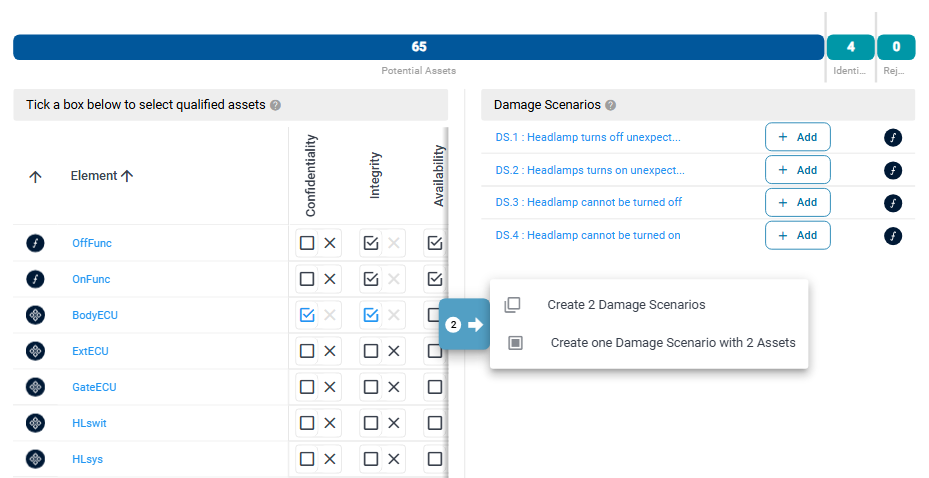
To add the selected assets to a damage scenario that already exists instead, click Add in its row.
A new damage scenario gets the next free name, for example DS.5, and no title. Open it to give it a title, then rate its impact on Impact Rating.