Catalog
The Catalog area shows the threat catalog the TARA uses and its method configuration. Here you also update the TARA to a newer version of its threat catalog.
Threat catalogs and their threat classes are explained in Threat Catalog. How you work on a threat catalog in SECURE Web App is described in Threat Catalogs.
Threat catalog
At the top left, Threat Catalog names the catalog of the TARA, and Method Configuration names its method configuration.
A TARA can be linked to a version of a threat catalog repository. The link is made when the TARA is created, as described in Create a repository. The version of the linked catalog is shown next to its name. The button next to the version opens the catalog in this version in a new browser tab.
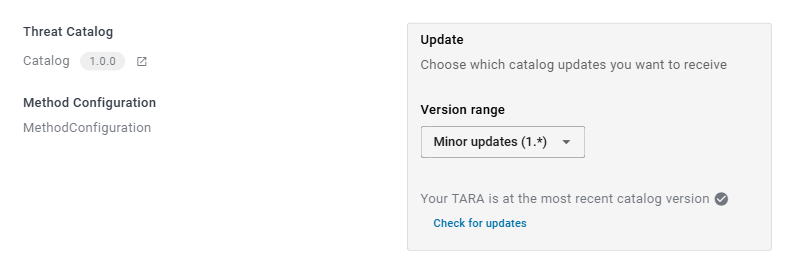
If the TARA is not linked to a catalog repository, the page says No catalog linked to this TARA. The threat classes the TARA uses are then part of the TARA itself.
Update the threat catalog
For a TARA linked to a catalog, the Update card shows whether a newer version of the catalog is available. SECURE Web App checks this when you open the page.
If you can edit the repository, update the catalog as follows:
-
Under Version range, choose which new versions you want to receive. For a TARA at version 1.0.0, for example:
- Major updates (*): every newer version.
- Minor updates (1.*): newer versions starting with 1.
- Patch updates (1.0.*): newer versions starting with 1.0.
The range is saved with the TARA.
-
If no newer version within the range exists, the card says Your TARA is at the most recent catalog version. Check for updates checks again.
-
If there is one, the card says Update available and names the version. Click Update Catalog.
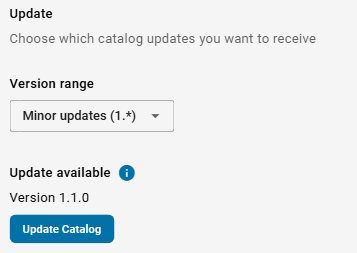
The TARA then uses the new version, which is shown next to the catalog name.
Updating the catalog can change threat classes, and with them the feasibility ratings that threat scenarios and attack steps inherit from their threat classes. Check the Feasibility Rating area after an update.
If SECURE Web App cannot check for updates, for example because you have no access to the catalog repository, the card shows an error message instead.
Method configuration
The lower part of the page shows the method configuration of the TARA: how impact, attack feasibility and risk are rated.
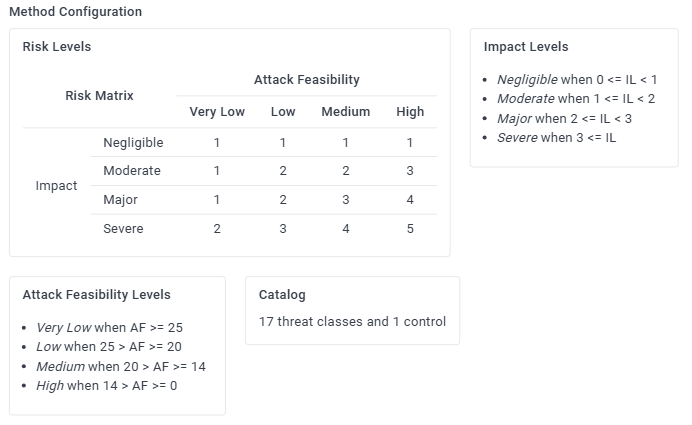
- Risk Levels: the risk matrix, which gives the risk level for each combination of impact level and attack feasibility level.
- Impact Levels: the impact levels, and when each of them applies.
- Attack Feasibility Levels: the attack feasibility levels, and when each of them applies.
- Catalog: how many threat classes the TARA can use, and how many controls it contains.
SECURE Web App shows the method configuration but cannot change it. To change it, use SECURE Desktop. The parts of the method configuration are explained in Configuration Aspects.