Feasibility rating
Feasibility Rating lists the attack steps of the TARA. For each attack step you rate how feasible it is in every feasibility category, such as elapsed time or equipment. The categories, their options and the attack feasibility levels come from the method configuration; see Feasibility Model. Attack steps and their ratings are explained in Attack Path Analysis.
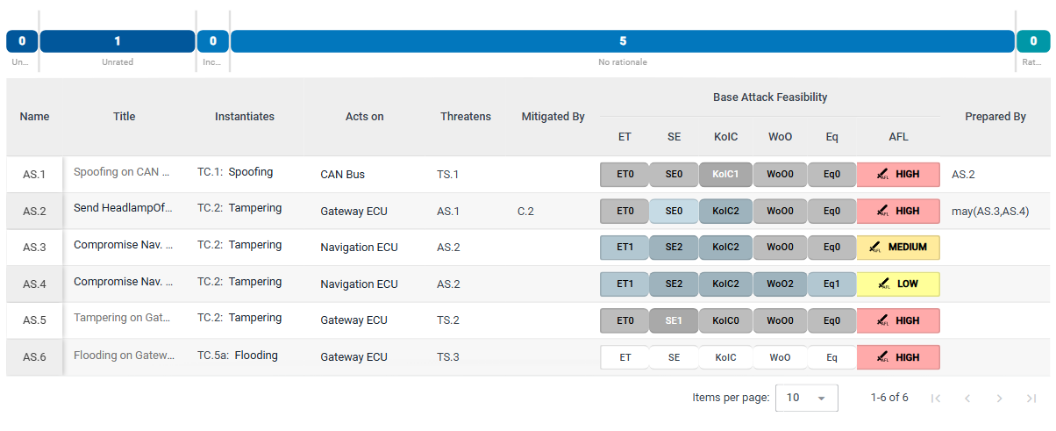
Progress
The progress bar counts:
- Unattacked Threat Scenarios: threat scenarios without any attack step.
- Unrated: attack steps without any feasibility rating, not even an inherited one.
- Incomplete: attack steps with a feasibility rating, but with categories that have none.
- No rationale: attack steps with at least one rating that has no rationale. An attack step can count here and under Incomplete.
- Rated: attack steps rated in every category, each with a rationale.
Attack steps table
The table has one row per attack step: Name, Title, Instantiates, Acts on, Threatens, Mitigated By, Base Attack Feasibility with one column per feasibility category and the resulting AFL (attack feasibility level), and Prepared By.
An attack step that instantiates a threat class inherits the threat class's ratings. Inherited ratings are shown in a different color from the ratings set on the attack step itself.
Click a row to open the attack step in the element column. If you can edit the repository, click + below the table to add an attack step; it gets the next free name, for example AS.7, and opens in the element column.
Describe an attack step
If you can edit the repository, fill in the fields of the element column:
- Instantiates: the threat class of the catalog that the attack step instantiates. Its feasibility ratings become the attack step's inherited ratings.
- Acts on: the components, channels, data or data flows the attack step is carried out on.
- Threatens: the elements the attack step threatens, such as threat scenarios or other attack steps.
- Mitigated By: the controls or assumptions that mitigate the attack step.
- Prepared By: the attack steps an attacker has to carry out before this one. Above the field, SECURE Web App shows the accumulated rating, which takes the preparing attack steps into account.
In Mitigated By and Prepared By, "may" means that the attacker may choose any one of the listed elements. If the field combines them in another way, for example because it was created in SECURE Desktop, it shows the combination as text and you cannot change it here.
Threatens, Prepared By and Mitigated By connect the attack steps with each other and with the rest of the TARA. To see these connections drawn as a tree, open the attack tree.
Rate the feasibility of an attack step
If you can edit the repository:
-
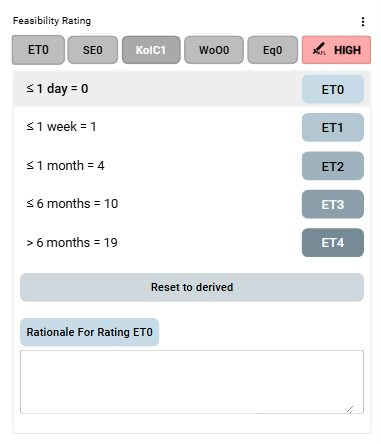
Open the attack step and scroll down to Feasibility Rating. It shows one button per feasibility category and the resulting attack feasibility level.
-
Click a category. The list of its options opens, each with its title and value; point at the button on the right of an option to see its description.
-
Click the option that applies.
-
Enter the reason in Rationale For Rating ….
Reset to derived removes the rating set on the attack step, so that the inherited rating of the threat class applies again.
If an attack step cannot be performed at all, click ⋮ next to Feasibility Rating and choose Mark As Impossible. The rating is then replaced by "This attack step is impossible to perform." and the button Mark as possible, which undoes it.