Function assignment
Functions are implemented by elements of the item: components, data, data flows and channels. Assigning a function to an element records this. See Function Assignment for the concept.
You assign functions in the Function Assignment tab of the Item Definition area, or in the element column of an element or a function.
The matrix
Function Assignment shows a matrix: one row per element, one column per function. A ticked box means the function is assigned to the element.
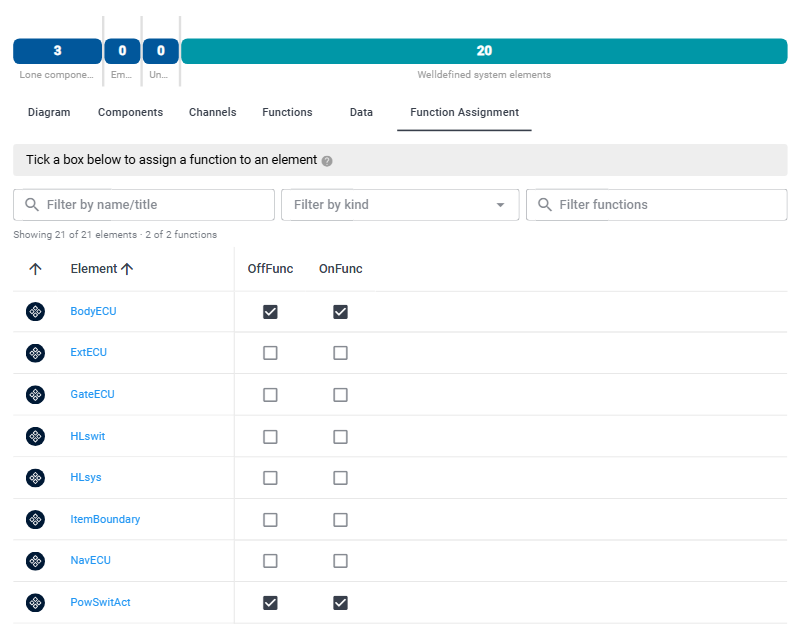
- The icon at the start of a row shows the kind of element. Point at it to see the kind.
- Click an element's name to open it in the element column.
- Point at a function's name to see its title.
Assign a function
- Open Item Definition → Function Assignment.
- Tick the box where the element's row meets the function's column.
To remove the assignment, untick the box. If you can only view the TARA, the boxes cannot be changed.
Narrow the matrix
Three filters narrow the matrix. They only change what you see, not the assignments.
- Filter by name/title: shows the elements whose name or title contains the text.
- Filter by kind: shows only the kinds of elements you choose: Component, Data, Data Flow or Channel.
- Filter functions: shows only the functions whose name contains the text.
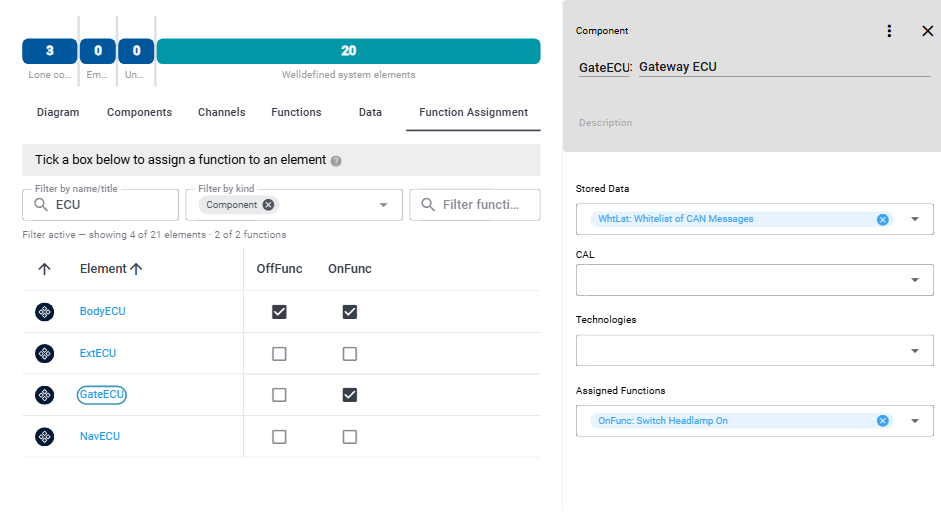
The line below the filters tells how many elements and functions are shown, for example "Showing 21 of 21 elements · 2 of 2 functions". While a filter is active, it starts with "Filter active — showing".
Assign in the element column
The element column shows the same assignments, and you can change them there too:
- For a component, data, data flow or channel, Assigned Functions lists its functions. Add or remove functions there as in any reference box.
- For a function, Assigned to elements lists the elements it is assigned to. Add or remove elements there as in any reference box.
Changes in the element column and in the matrix are the same: a function you assign in one place is shown in the other. How reference boxes work is described in Work with elements.