Impact rating
Impact Rating lists the damage scenarios of the TARA with their impact ratings. For each damage scenario you rate the impact in every impact category and give a rationale. The impact categories, their options and the impact levels come from the method configuration; see Impact Model. What a damage scenario describes is explained in Asset Identification and Impact Rating.
Progress
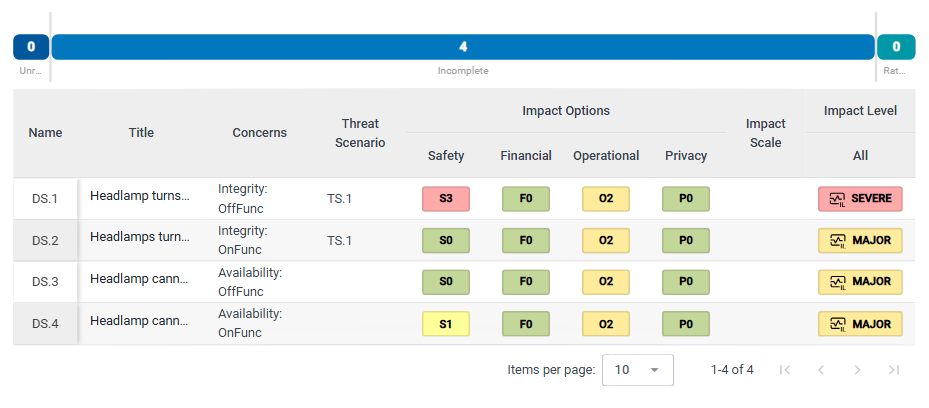
The progress bar counts the damage scenarios that are:
- Unrated: no impact rating at all.
- Incomplete: at least one impact rating has no rationale yet.
- Rated: all impact ratings have a rationale.
Damage scenarios table
The table has one row per damage scenario: Name, Title, Concerns (the assets it concerns), Threat Scenario (the threat scenarios that realize it), Impact Options with one column per impact category, for example Safety, Financial, Operational and Privacy, Impact Scale and Impact Level. SECURE Web App calculates the impact level from the ratings; see Risk Determination and Treatment.
Click a row to open the damage scenario in the element column. If you can edit the repository, click + below the table to add a damage scenario; it gets the next free name, for example DS.5, and opens in the element column.
Rate the impact of a damage scenario
If you can edit the repository:
-
Click the damage scenario in the table.
-
In the element column, describe it in Normal Behavior and Operational Situation if you want to.
-
Check Concerns, the assets the damage scenario concerns. Open the list to see them and to add or remove assets. Damage scenarios created on Asset Identification already concern the assets you selected there.
-
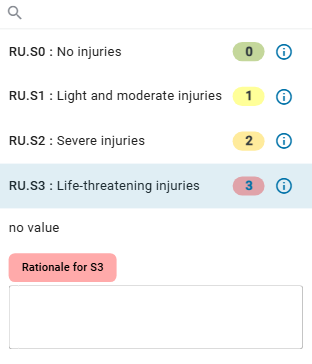
Under Impact Options, each impact category has a slider and a dropdown. Set the option with the slider, or open the dropdown: it lists each option with its full name and value, and ⓘ shows its description. no value removes the rating.
-
In the same dropdown, enter the reason for your rating in the field Rationale for … below the options.
-
Set Impact Scale in the same way, if your method configuration uses an impact scale.
Under Threat Scenario at the bottom of the column, you can also link the threat scenarios that realize the damage scenario. They are described on Attack Identification.