Repository overview
Repository Overview is the first area of the TARA navigation, and the page SECURE Web App shows when you open a TARA. It shows the repository's name, address and type, how far the analysis has come, and your access to the repository.
Progress bars
Five progress bars sum up the state of the analysis, one per activity. Each bar is divided into categories. A segment shows how many elements fall into its category, and its width shows their share.
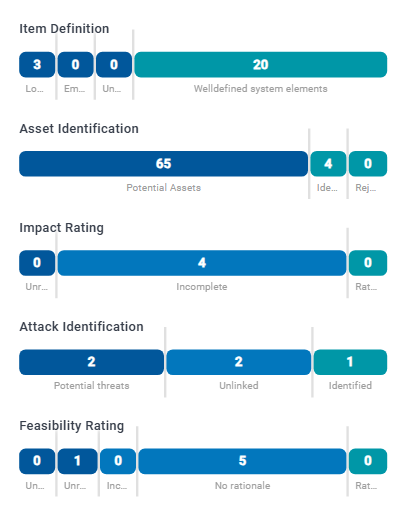
Point at a segment to see the name of its category and what it counts. Click a segment to open the area where these elements are. The same bar is shown at the top of that area.
| Bar | Categories |
|---|---|
| Item Definition | Lone components: components without an incoming or outgoing data flow. Empty channels: channels without a data flow. Unused data: data that is neither stored, transferred nor part of other data. Welldefined system elements: elements of the item definition without any of these issues. |
| Asset Identification | Counted per element and security property. Potential Assets: not yet covered by a damage scenario. Identified Assets: covered by at least one damage scenario. |
| Impact Rating | Counts damage scenarios. Unrated: no impact rating at all. Incomplete: a rating without a rationale. Rated: rated, and every rating has a rationale. |
| Attack Identification | Potential threats: damage scenarios without a threat scenario. Unlinked: threat scenarios that realize no damage scenario yet. Identified: threat scenarios that realize at least one damage scenario. |
| Feasibility Rating | Unattacked Threat Scenarios: threat scenarios without an attack step. The other categories count attack steps, including ratings they inherit: Unrated has no feasibility rating, Incomplete lacks a rating for some categories, No rationale lacks a rationale for some ratings, and Rated is rated in every category, each with a rationale. |
The activities are explained in the TARA process high-level overview.
Your access
The card Who is able to access this? names your role in this repository and your role in the organization. What you may do in the TARA depends on these roles.
Manage Members opens the members of the repository. Sharing a repository with other people is described in Give people access to a repository. What each role allows is listed in Roles and permissions.