Risk treatment
Risk Treatment shows the damage scenarios, the threat scenarios that realize them and the risks these cause, side by side, and lets you decide how each risk is treated. The treatment decisions come from the method configuration; see Risk Model and Risk Treatment Decision.
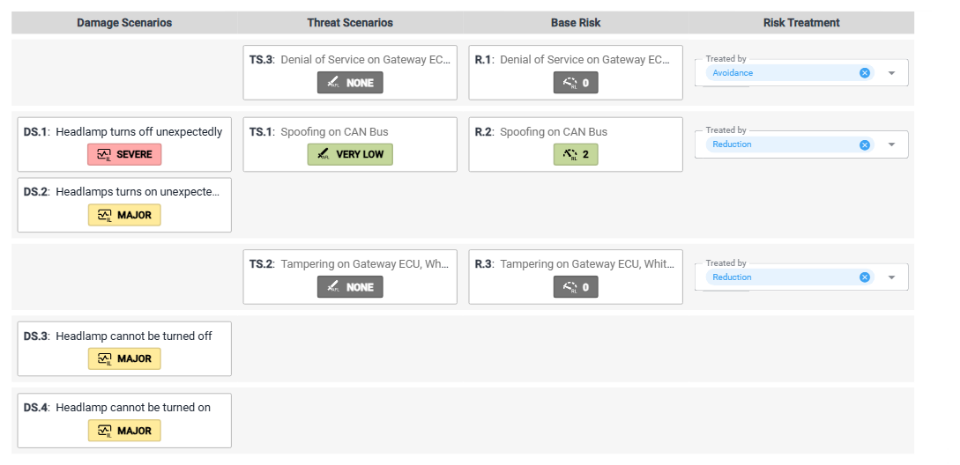
The table
Each row groups elements that belong together:
- Damage Scenarios: the damage scenarios the row's threat scenarios realize, each with its impact level.
- Threat Scenarios: the threat scenarios, each with its attack feasibility level.
- Base Risk: the risk the threat scenarios cause, with a risk level. If there is no risk yet, a dashed box shows the risk level it would have.
- Risk Treatment: the treatment decision, in Treated by.
A threat scenario that no risk refers to gets a row of its own, together with the damage scenarios it realizes, and so does a damage scenario that no threat scenario realizes. How SECURE Web App calculates the levels is explained in Propagation.
Click an element in the table to open it in the element column; its row is highlighted. From the element column of a damage scenario, a threat scenario or a risk elsewhere in the TARA, ⋮ → Show in Risk view opens this page with the element selected.
Decide on a risk treatment
If you can edit the repository:
- In the row of the risk, open Treated by.
- Choose a treatment, for example Avoidance, Reduction, Share or Transfer or Acceptance. Which treatments are offered depends on the method configuration.
To remove the decision, click × in Treated by.
A threat scenario that realizes a damage scenario but has no risk yet also has a Treated by field. Choosing a treatment there creates the risk, for example R.4, caused by this threat scenario, and opens it in the element column. Risks are described on Risks.